Der TRMNL X hängt bei mir an der Wand und zeigt mir auf einen Blick, was ich wissen will. Kein Blaulicht, kein Standby-Geflacker, einfach Daten auf Papier. Ich habe mir jetzt vier eigene Screens gebaut, alle in einer Design-Sprache: eine Serifenschrift, ein gestempeltes Label, feine Linien wie in einer alten Akte. Familienkalender, Wortweiser, historisches Tagesereignis und eine Lost-Place-Ortsakte. Den kompletten Code bekommst du hier zum Kopieren, inklusive allem Styling. Home Assistant brauchst du für diese vier Screens nicht, nur einen TRMNL-Account und ein Gerät. Wer sein TRMNL stattdessen per Home Assistant anbinden will, findet die drei Wege dahin in meinem Guide TRMNL mit Home Assistant verbinden, vom Webhook-Push bis zum cloudfreien BYOS-Server.
Das Gerät: TRMNL X
Der TRMNL X ist die große Version des TRMNL. Ein 10,3-Zoll-E-Ink-Panel mit 1040×780 CSS-Pixeln, physisch gerendert bei 1872×1404 und mit 16 echten Graustufen. Das Display hängt an der Wand oder steht auf dem Schreibtisch und aktualisiert sich in festen Intervallen, ganz ohne Blaulicht und ohne nächtliches Aufleuchten. E-Ink zieht praktisch nur beim Redraw Strom, deshalb hält eine Akkuladung wochenlang. Mit dem Code allautomatic bekommst du im TRMNL-Shop 10 Dollar Rabatt auf dein Gerät. Wenn du erst noch die Ersteinrichtung machst oder unsicher bist, welche Version die richtige ist, die TRMNL-Grundlagen erklären den Unterschied zwischen X und OG und die Bedienung von Anfang an.
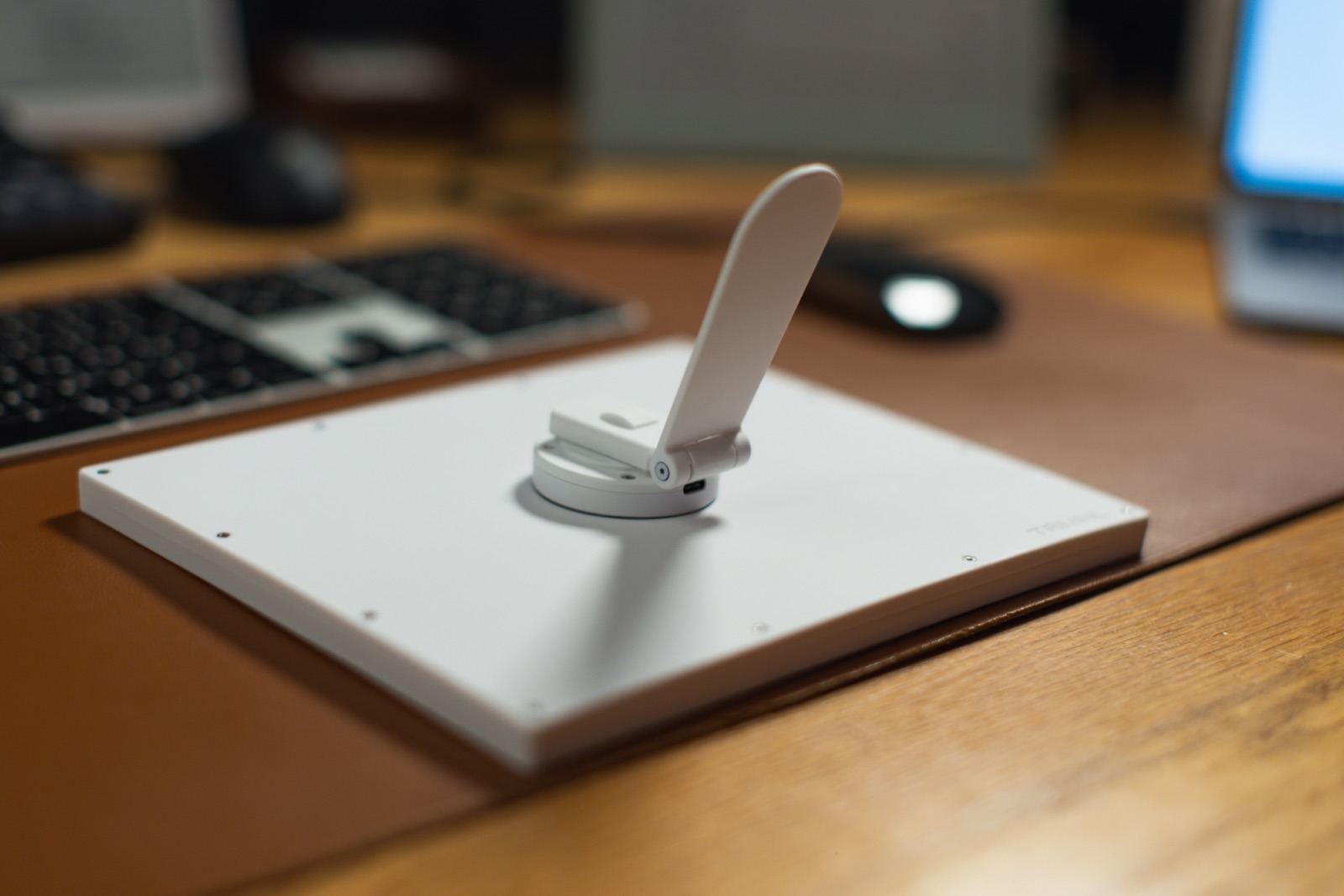
Von hinten ist das Gerät angenehm unspektakulär: ein flaches, weißes Gehäuse, in der Mitte das TRMNL-Logo, verschraubte Ecken. Keine Knöpfe, kein Touch, nichts zum Rumspielen. Weil auch ein Reset-Knopf fehlt, läuft das Zurücksetzen über eine kreisende Bewegung am magnetischen Dock, den genauen Ablauf zeige ich Schritt für Schritt.
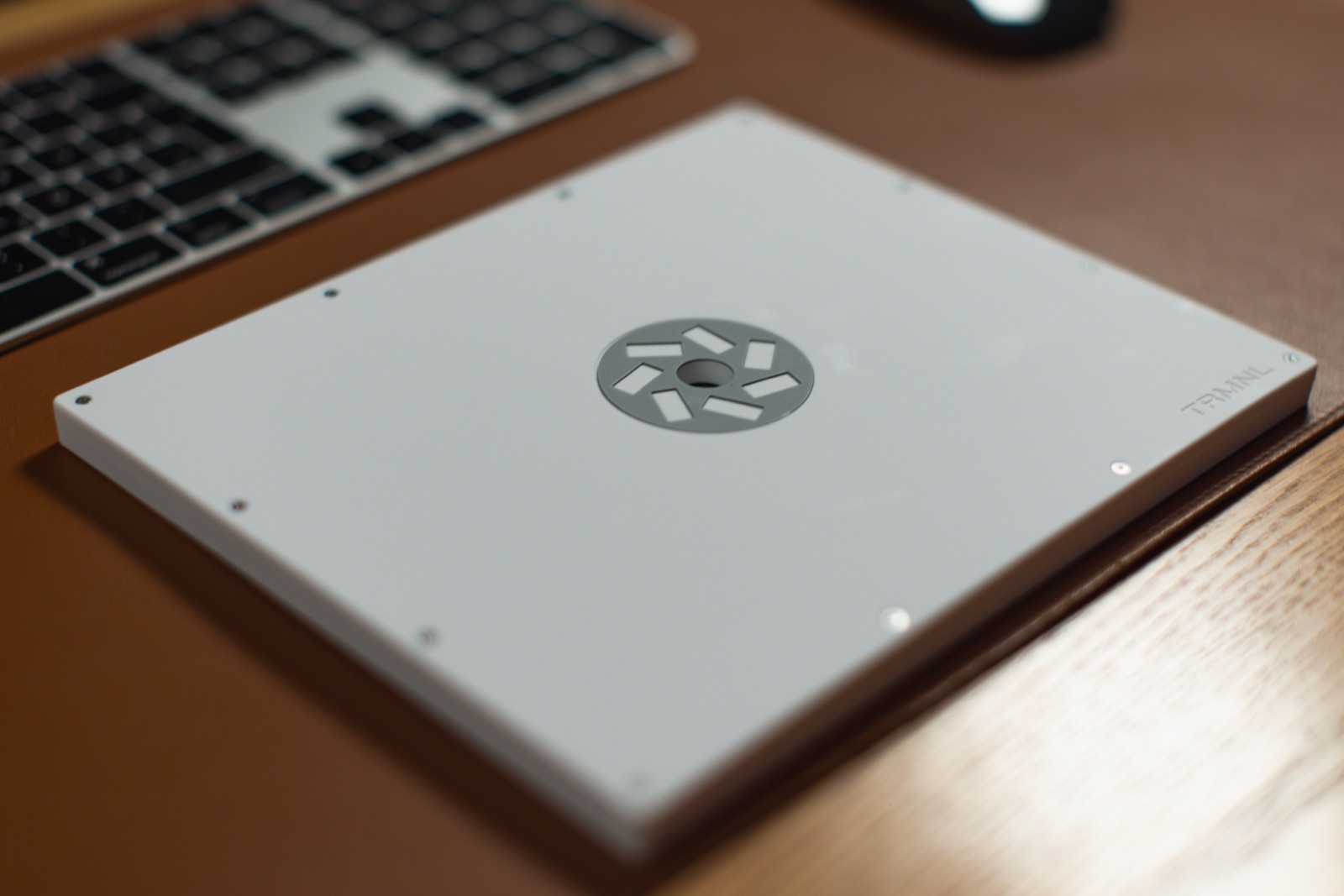
Der ausklappbare Standfuß sitzt mittig auf der Rückseite. Klappst du ihn aus, steht das Display stabil im Hochkant- oder Querformat. Direkt daneben sitzt der USB-C-Anschluss zum Laden.
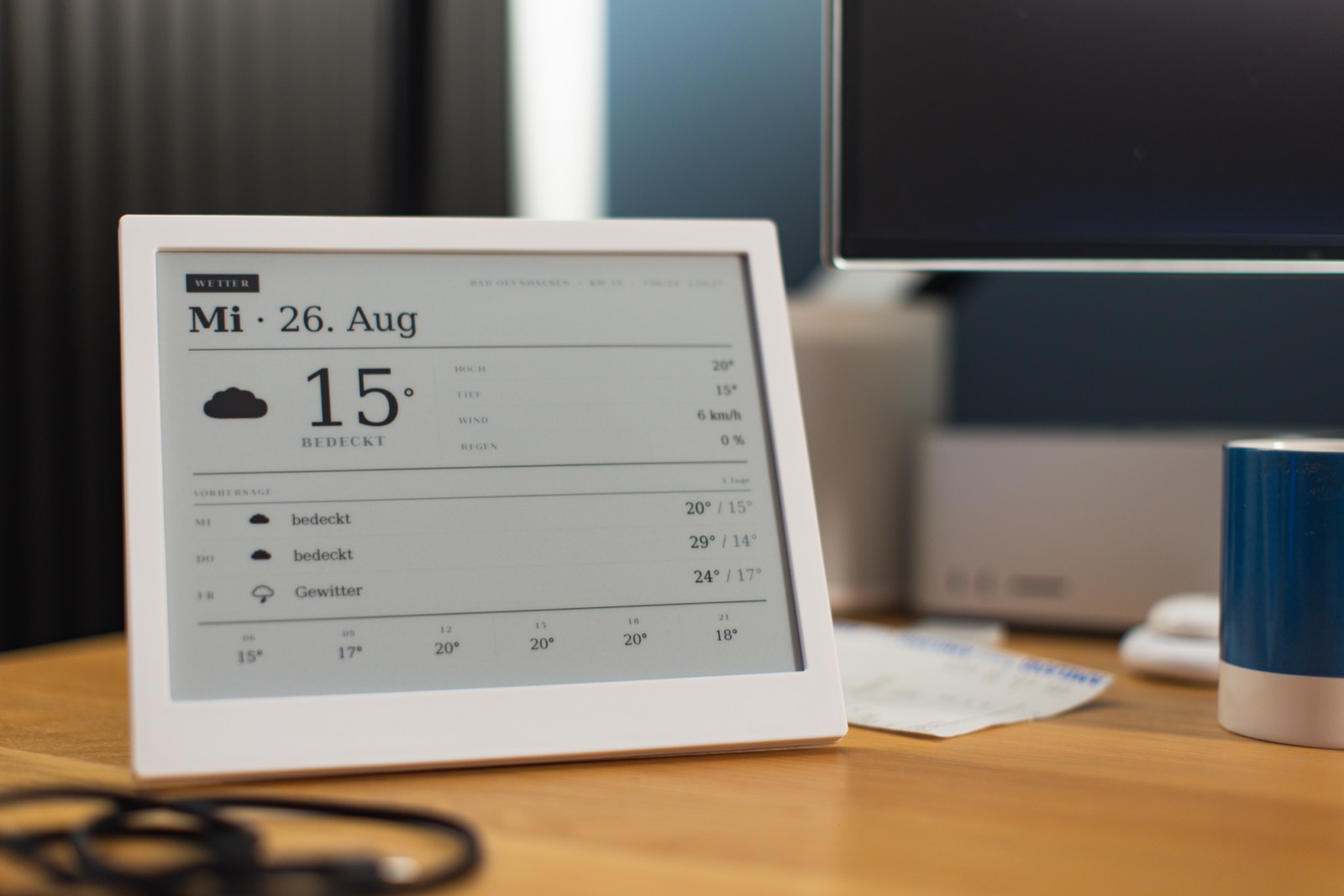
Von vorne zeigt sich, worum es eigentlich geht: der Screen. Hier läuft der Wetter-Screen aus derselben Suite, gesetzt in einer Serifenschrift mit gestempeltem Label, großer Temperatur und einer ruhigen Vorhersage darunter. Genau diese Bildsprache trägt auch die vier Screens, die du gleich nachbaust.
So legst du jeden Screen an
Der Ablauf ist bei allen vier Screens gleich. Die Unterschiede stehen beim jeweiligen Screen.
- Geh auf trmnl.com und logg dich ein.
- Unten in der Leiste auf Plugins, dann Private Plugin, dann Add New (oder das Plus).
- Gib einen Namen ein (z.B.
Wortweiser) und bestätige. - Wähle die Strategy (steht beim jeweiligen Screen: Webhook oder Polling).
- Klick auf Edit Markup.
- Im Feld Full den kompletten Codeblock des Screens einfügen. Alles markieren, reinkopieren, nichts außen herum ergänzen. Der Code ist komplett fertig, er enthält schon Design und Inhalt.
- Save.
- Trag die Daten ein wie beim Screen beschrieben (Polling-URL oder den Webhook-Befehl).
- Leg den Screen in die Playlist: unten auf Playlist, oben rechts Add Plugin, dein Plugin auswählen.
- Am Gerät kurz warten oder in den Geräte-Einstellungen Force Refresh drücken.
Es gibt zwei Sorten Datenfluss. Webhook heißt: du schickst die Daten einmal mit einem fertigen Befehl, danach steht der Screen. Polling heißt: TRMNL holt die Daten selbst von einer öffentlichen Adresse, du trägst nur eine URL ein.
Ein Hinweis zur Zeitzone: stell in deinen TRMNL-Konto-Einstellungen die richtige Zeitzone ein. Dann rechnen die selbstlaufenden Screens automatisch mit deiner lokalen Zeit.
Screen 1: Familienkalender
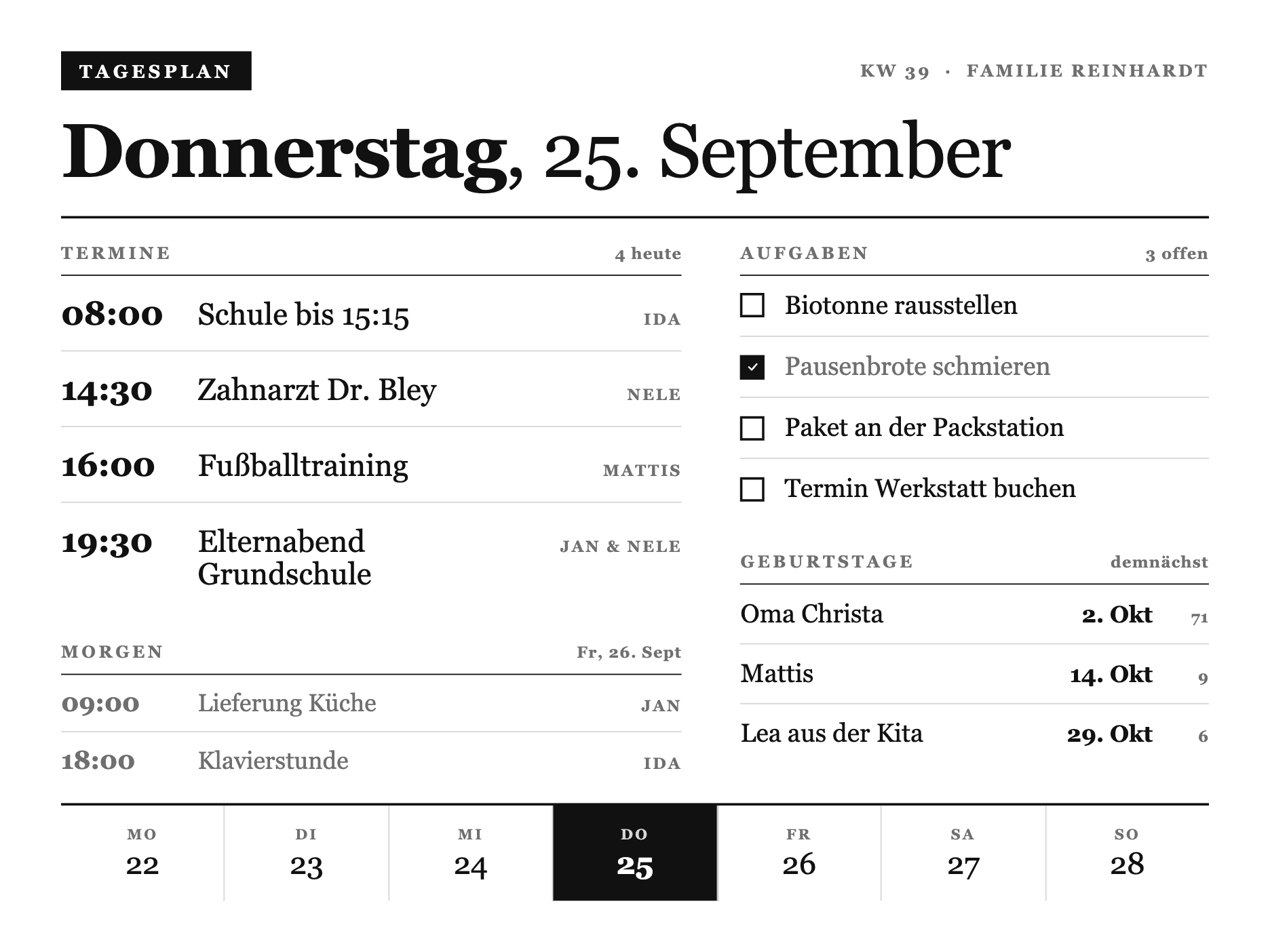
Der Familienkalender als Tagesakte. Links die Termine des Tages als Agenda mit Zeit, Titel und Person, rechts eine Aufgabenliste mit echten Checkboxen und die nächsten Geburtstage, im Fuß eine Wochenleiste mit dem heutigen Tag hervorgehoben. Ein Fall, in dem eine einzelne große Zahl nicht reicht, hier steht die Liste selbst im Mittelpunkt.
Strategy: Webhook
Kompletter Code (ins Full-Feld):
1{%- comment -%} ============================================================
2 TRMNL X - kalender (x-kalender)
3 So einsetzen: dieser komplette Block kommt 1:1 in das Markup-Feld
4 (Full / markup_full) eines TRMNL Private Plugins. shared.liquid (CSS)
5 steht oben, full.liquid (View) darunter. KEIN screen/view-Wrapper.
6============================================================ {%- endcomment -%}
7{%- comment -%}
8 X-Design-Sprache v3 - "Akte / Almanach". Editorial dossier language for the TRMNL X
9 (10.3" e-ink, 1040x780 @ 1.8x = 1872x1404, 16 grays). Pure CSS, AUTO-PREPENDED to the view.
10
11 Derived from the Ortsakte (x-lostplace) look Daniel likes: ONE serifed typeface (the
12 document default, never overridden with Inter), hierarchy from size + case + tracking +
13 hairline rules, an inverted ink stamp as the single accent, dense asymmetric columns.
14 No sans, no minimal-poster emptiness. A printed record, set with care.
15{%- endcomment -%}
16<style>
17 :root {
18 --x-paper: #FFFFFF;
19 --x-ink: #111111;
20 --x-mute: #6F6F6F;
21 --x-line: #D6D6D6;
22 --x-fill: #111111;
23 }
24
25 /* The document face: a serif, deliberately NOT set to Inter - the whole almanac
26 character lives here. Kapitaelchen labels are the same face, uppercased + tracked. */
27 .x-canvas {
28 box-sizing: border-box;
29 width: 100%; height: 100%;
30 display: flex; flex-direction: column;
31 padding: 32px 40px;
32 background: var(--x-paper);
33 color: var(--x-ink);
34 font-family: Georgia, "Times New Roman", "Iowan Old Style", serif;
35 font-feature-settings: "tnum" 1;
36 }
37
38 /* ---- Kapitaelchen label ---- */
39 .k-label {
40 display: block;
41 font-size: 14px; font-weight: 700;
42 letter-spacing: 0.18em; text-transform: uppercase;
43 color: var(--x-mute);
44 }
45
46 /* ---- Masthead: stamp left, meta right, then the date set large ---- */
47 .k-top { display: flex; align-items: center; justify-content: space-between; gap: 20px; }
48 .k-stamp {
49 display: inline-block;
50 background: var(--x-fill); color: var(--x-paper);
51 font-size: 15px; font-weight: 700; letter-spacing: 0.2em; text-transform: uppercase;
52 padding: 8px 15px 7px;
53 }
54 .k-meta { font-size: 14px; font-weight: 700; letter-spacing: 0.14em; text-transform: uppercase; color: var(--x-mute); }
55 .k-date {
56 margin: 20px 0 0;
57 font-size: 62px; font-weight: 400; line-height: 0.98; letter-spacing: -0.015em;
58 color: var(--x-ink);
59 }
60 .k-date b { font-weight: 700; }
61 .k-rule { margin: 22px 0 0; border-top: 2px solid var(--x-ink); }
62
63 /* ---- Body: dense asymmetric two-column dossier ---- */
64 .k-body { flex: 1; display: flex; flex-direction: row; gap: 48px; min-height: 0; padding-top: 20px; }
65 .k-main { flex: 1 1 57%; display: flex; flex-direction: column; min-width: 0; }
66 .k-side { flex: 1 1 43%; display: flex; flex-direction: column; min-width: 0; }
67
68 /* Morgen: the day-ahead preview, quieter than today */
69 .k-ahead { margin-top: 30px; }
70 .k-ahead .k-ev { padding: 11px 0; }
71 .k-ahead .k-ev__t { font-size: 21px; color: var(--x-mute); }
72 .k-ahead .k-ev__b { font-size: 20px; color: var(--x-mute); }
73
74 /* ---- Section header: kapitaelchen + count, underlined by a hairline ---- */
75 .k-sec { display: flex; align-items: baseline; justify-content: space-between; gap: 12px; padding-bottom: 10px; border-bottom: 1px solid var(--x-ink); }
76 .k-sec__n { font-size: 13px; font-weight: 700; letter-spacing: 0.06em; color: var(--x-mute); font-variant-numeric: tabular-nums; }
77 .k-block + .k-block { margin-top: 26px; }
78 .k-block--fill { flex: 1; min-height: 0; }
79
80 /* ---- Agenda: time / entry / person, ruled rows ---- */
81 .k-ev { display: flex; align-items: baseline; gap: 20px; padding: 15px 0; border-bottom: 1px solid var(--x-line); }
82 .k-ev:last-child { border-bottom: 0; }
83 .k-ev__t { flex: 0 0 auto; width: 92px; font-size: 27px; font-weight: 700; letter-spacing: -0.01em; font-variant-numeric: tabular-nums; }
84 .k-ev__b { flex: 1; min-width: 0; font-size: 25px; font-weight: 400; line-height: 1.1; }
85 .k-ev__w { flex: 0 0 auto; font-size: 13px; font-weight: 700; letter-spacing: 0.12em; text-transform: uppercase; color: var(--x-mute); white-space: nowrap; }
86
87 /* ---- Tasks: a checkbox and the line; done = filled box + quiet text ---- */
88 .k-task { display: flex; align-items: center; gap: 16px; padding: 12px 0; border-bottom: 1px solid var(--x-line); }
89 .k-task:last-child { border-bottom: 0; }
90 .k-box { flex: 0 0 auto; width: 20px; height: 20px; border: 2px solid var(--x-ink); box-sizing: border-box; display: inline-flex; align-items: center; justify-content: center; }
91 .k-task--done .k-box { background: var(--x-ink); }
92 .k-check { display: block; width: 11px; height: 11px; }
93 .k-check path { fill: none; stroke: var(--x-paper); stroke-width: 3; stroke-linecap: round; stroke-linejoin: round; }
94 .k-task__t { flex: 1; font-size: 21px; font-weight: 400; line-height: 1.2; }
95 .k-task--done .k-task__t { color: var(--x-mute); }
96
97 /* ---- Birthdays: name, then date + age in fixed right-aligned columns ---- */
98 .k-bd { display: flex; align-items: baseline; gap: 12px; padding: 12px 0; border-bottom: 1px solid var(--x-line); }
99 .k-bd:last-child { border-bottom: 0; }
100 .k-bd__n { flex: 1; min-width: 0; font-size: 21px; font-weight: 400; overflow: hidden; text-overflow: ellipsis; white-space: nowrap; }
101 .k-bd__d { flex: 0 0 auto; width: 92px; text-align: right; font-size: 19px; font-weight: 700; font-variant-numeric: tabular-nums; }
102 .k-bd__a { flex: 0 0 auto; width: 34px; text-align: right; font-size: 13px; font-weight: 700; letter-spacing: 0.04em; color: var(--x-mute); font-variant-numeric: tabular-nums; }
103
104 /* ---- Week footer: seven cells, today stamped, closes the sheet ---- */
105 .k-week { display: flex; gap: 0; margin-top: 22px; border-top: 2px solid var(--x-ink); }
106 .k-week__c { flex: 1; display: flex; flex-direction: column; align-items: center; justify-content: center; gap: 5px; min-height: 78px; border-right: 1px solid var(--x-line); }
107 .k-week__c:last-child { border-right: 0; }
108 .k-week__t { font-size: 12px; font-weight: 700; letter-spacing: 0.14em; text-transform: uppercase; color: var(--x-mute); line-height: 1; }
109 .k-week__n { font-size: 25px; font-weight: 400; font-variant-numeric: tabular-nums; line-height: 1; }
110 .k-week__c--on { background: var(--x-fill); }
111 .k-week__c--on .k-week__t { color: var(--x-line); }
112 .k-week__c--on .k-week__n { color: var(--x-paper); font-weight: 700; }
113
114 /* ---- OG (800x480, 1-bit): reduced sheet - today + tasks only ---- */
115 .screen--og .k-og-hide { display: none; }
116 .screen--og .x-canvas { padding: 20px 26px; }
117 .screen--og .k-date { font-size: 40px; margin-top: 12px; }
118 .screen--og .k-body { gap: 30px; padding-top: 12px; }
119 .screen--og .k-ev { padding: 9px 0; }
120 .screen--og .k-ev__t { width: 66px; font-size: 20px; }
121 .screen--og .k-ev__b { font-size: 18px; }
122 .screen--og .k-task { padding: 7px 0; }
123 .screen--og .k-task__t { font-size: 16px; }
124 .screen--og .k-bd { padding: 7px 0; }
125 .screen--og .k-bd__n { font-size: 16px; }
126</style>
127
128{%- comment -%}
129 Familienkalender als Tagesakte - v3 "Akte / Almanach". A dense editorial day sheet for
130 the household: masthead with stamped date, then an asymmetric split. LEFT the agenda
131 (time / entry / person, ruled like a ledger), RIGHT a task checklist and the upcoming
132 birthdays. One serifed face throughout, one inverted stamp as the accent. shared.liquid
133 (v3 tokens + .k-* dossier classes) is auto-prepended, so this is markup only.
134{%- endcomment -%}
135 <div class="x-canvas">
136
137 <div class="k-top">
138 <span class="k-stamp">Tagesplan</span>
139 <span class="k-meta">KW {{ kw }} · {{ ort }}</span>
140 </div>
141 <h1 class="k-date"><b>{{ wochentag }}</b>, {{ datum }}</h1>
142 <div class="k-rule"></div>
143
144 <div class="k-body">
145
146 <div class="k-main">
147 <div class="k-sec">
148 <span class="k-label">Termine</span>
149 <span class="k-sec__n">{{ termine | size }} heute</span>
150 </div>
151 <div class="k-block">
152 {%- for t in termine -%}
153 <div class="k-ev">
154 <span class="k-ev__t">{{ t.zeit }}</span>
155 <span class="k-ev__b">{{ t.titel }}</span>
156 <span class="k-ev__w">{{ t.wer }}</span>
157 </div>
158 {%- endfor -%}
159 </div>
160
161 {%- if morgen and morgen.size > 0 -%}
162 <div class="k-block k-ahead k-og-hide">
163 <div class="k-sec">
164 <span class="k-label">Morgen</span>
165 <span class="k-sec__n">Fr, 26. Sept</span>
166 </div>
167 {%- for t in morgen -%}
168 <div class="k-ev">
169 <span class="k-ev__t">{{ t.zeit }}</span>
170 <span class="k-ev__b">{{ t.titel }}</span>
171 <span class="k-ev__w">{{ t.wer }}</span>
172 </div>
173 {%- endfor -%}
174 </div>
175 {%- endif -%}
176 </div>
177
178 <div class="k-side">
179 <div class="k-block">
180 <div class="k-sec">
181 <span class="k-label">Aufgaben</span>
182 <span class="k-sec__n">{{ aufgaben | where: "erledigt", false | size }} offen</span>
183 </div>
184 {%- for a in aufgaben -%}
185 <div class="k-task{% if a.erledigt %} k-task--done{% endif %}">
186 <span class="k-box">{% if a.erledigt %}<svg class="k-check" viewBox="0 0 24 24" role="img" aria-label="erledigt"><path d="M5 12.5 L10 17.5 L19 7"/></svg>{% endif %}</span>
187 <span class="k-task__t">{{ a.text }}</span>
188 </div>
189 {%- endfor -%}
190 </div>
191
192 <div class="k-block k-og-hide">
193 <div class="k-sec">
194 <span class="k-label">Geburtstage</span>
195 <span class="k-sec__n">demnächst</span>
196 </div>
197 {%- for g in geburtstage -%}
198 <div class="k-bd">
199 <span class="k-bd__n">{{ g.name }}</span>
200 <span class="k-bd__d">{{ g.datum }}</span>
201 <span class="k-bd__a">{{ g.alter }}</span>
202 </div>
203 {%- endfor -%}
204 </div>
205 </div>
206
207 </div>
208
209 <div class="k-week k-og-hide">
210 {%- for d in woche -%}
211 <div class="k-week__c{% if d.aktiv %} k-week__c--on{% endif %}">
212 <span class="k-week__t">{{ d.tag }}</span>
213 <span class="k-week__n">{{ d.num }}</span>
214 </div>
215 {%- endfor -%}
216 </div>
217
218 </div>Daten setzen (einmal): Nach dem Speichern zeigt dir TRMNL eine Webhook URL. Kopiere sie und führ in deinem Terminal diesen Befehl aus (die URL zwischen den Anführungszeichen ersetzen). Die Werte kannst du frei anpassen, zum Aktualisieren schickst du den Befehl mit neuen Werten einfach nochmal:
curl -X POST "HIER_DEINE_WEBHOOK_URL" \
  -H "Content-Type: application/json" \
  -d '{"merge_variables": {"kw": "39", "wochentag": "Donnerstag", "datum": "25. September", "ort": "Familie Reinhardt", "termine": [{"zeit": "08:00", "titel": "Schule bis 15:15", "wer": "Ida"}, {"zeit": "14:30", "titel": "Zahnarzt Dr. Bley", "wer": "Nele"}, {"zeit": "16:00", "titel": "Fußballtraining", "wer": "Mattis"}, {"zeit": "19:30", "titel": "Elternabend Grundschule", "wer": "Jan & Nele"}], "morgen": [{"zeit": "09:00", "titel": "Lieferung Küche", "wer": "Jan"}, {"zeit": "18:00", "titel": "Klavierstunde", "wer": "Ida"}], "aufgaben": [{"text": "Biotonne rausstellen", "erledigt": false}, {"text": "Pausenbrote schmieren", "erledigt": true}, {"text": "Paket an der Packstation", "erledigt": false}, {"text": "Termin Werkstatt buchen", "erledigt": false}], "geburtstage": [{"name": "Oma Christa", "datum": "2. Okt", "alter": "71"}, {"name": "Mattis", "datum": "14. Okt", "alter": "9"}, {"name": "Lea aus der Kita", "datum": "29. Okt", "alter": "6"}], "woche": [{"tag": "Mo", "num": "22"}, {"tag": "Di", "num": "23"}, {"tag": "Mi", "num": "24"}, {"tag": "Do", "num": "25", "aktiv": true}, {"tag": "Fr", "num": "26"}, {"tag": "Sa", "num": "27"}, {"tag": "So", "num": "28"}]}}'
Die Felder im Überblick: termine ist die heutige Agenda mit Zeit, Titel und Person. morgen ist die Vorschau auf den nächsten Tag. aufgaben ist die Checkliste, wobei erledigt: true die Box füllt. geburtstage sind die nächsten Namen mit Datum und Alter. woche sind die sieben Wochentage im Fuß, aktiv: true markiert heute. Achte auf das Payload-Limit von 2 KB im Standard-Tarif. Auf dem kleinen OG fallen Morgen, Geburtstage und Wochenleiste automatisch weg, dort bleiben Agenda und Aufgaben.
So sieht der fertige Screen auf dem TRMNL X aus:
Screen 2: Wortweiser
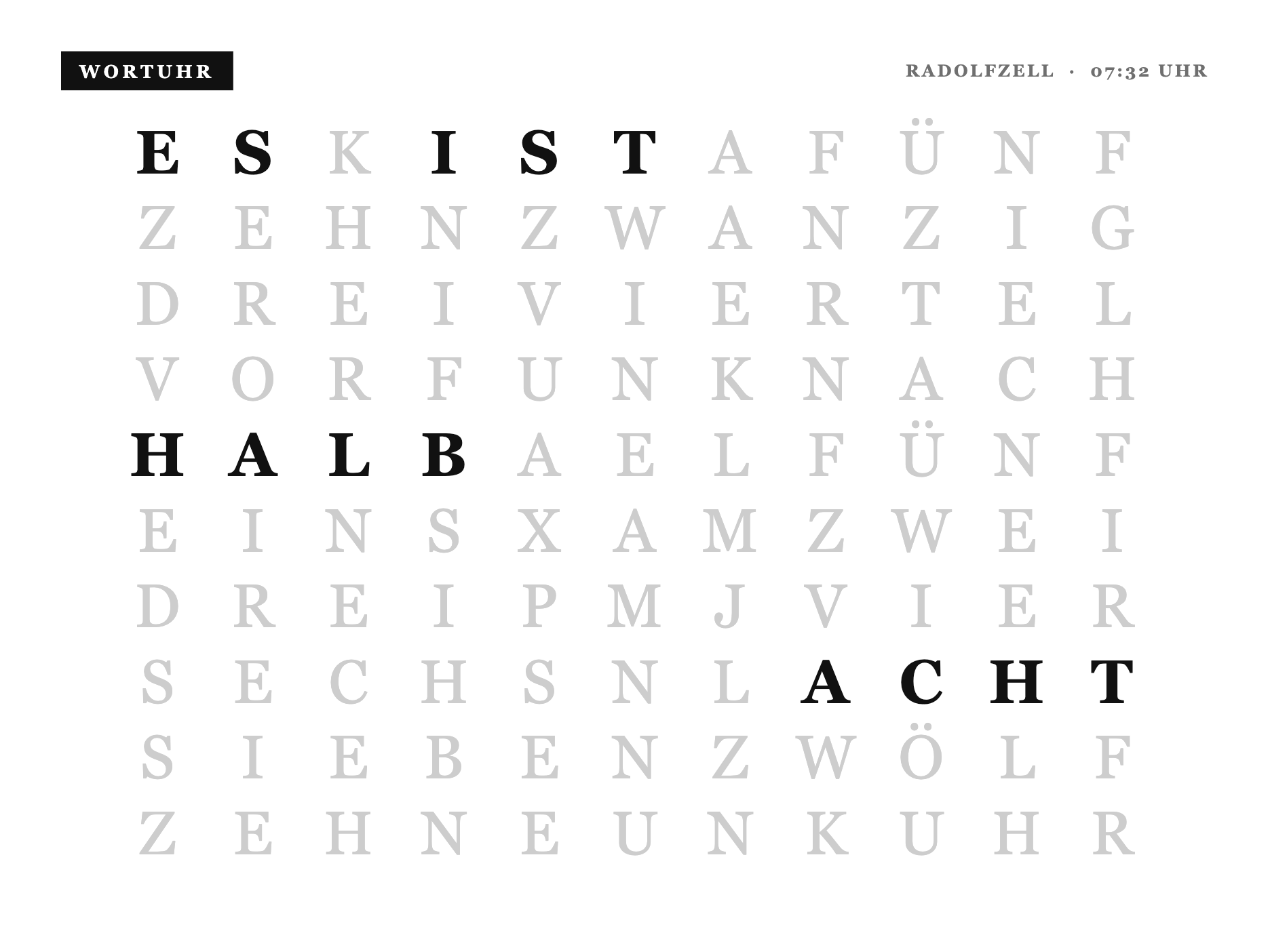
Eine Uhr, die die Zeit in Wörtern zeigt, auf einem 11×10-Buchstabenraster. Die aktiven Wörter stehen in Tinte, der Rest ist hell zurückgenommen. Jedes Wort wird live aus der Uhrzeit berechnet und auf feste Zellen im Raster gelegt, das ist echte Logik statt einer starren Nachschlagetabelle. Die Uhr rechnet ihre Zeit selbst aus deiner Konto-Zeitzone, du musst also keine Zeit schicken. Der eine Befehl unten setzt nur den Ortsnamen in der Kopfzeile.
Strategy: Webhook
Kompletter Code (ins Full-Feld):
1{%- comment -%}
2 Wortweiser - die Uhrzeit in Worten fuer das TRMNL X, auf dem hellen Almanach-Papier wie die
3 uebrige Suite. Ein Stempel-Kopf, darunter ein 11x10-Buchstabenraster: die aktiven Woerter
4 stehen in Ink, der Rest ist hell zurueckgenommen. Die deutschsprachige Wortweiser-Matrix ist
5 funktional (Sprache + Raster), generisch. Kein Markenname, kein Logo. shared.liquid ist
6 auto-prepended.
7{%- endcomment -%}
8<style>
9 :root {
10 --x-paper: #FFFFFF;
11 --x-ink: #111111;
12 --x-mute: #6F6F6F;
13 --x-line: #D6D6D6;
14 --x-fill: #111111;
15 --wu-off: #CDCDCD; /* light gray - unlit letters recede on white paper */
16 }
17
18 .x-canvas {
19 box-sizing: border-box; width: 100%; height: 100%;
20 display: flex; flex-direction: column; padding: 32px 40px 36px;
21 background: var(--x-paper); color: var(--x-ink);
22 font-family: Georgia, "Times New Roman", "Iowan Old Style", serif;
23 font-feature-settings: "tnum" 1;
24 }
25
26 .x-top { display: flex; align-items: center; justify-content: space-between; gap: 20px; }
27 .x-stamp { display: inline-block; background: var(--x-fill); color: var(--x-paper); font-size: 15px; font-weight: 700; letter-spacing: 0.2em; text-transform: uppercase; padding: 8px 15px 7px; }
28 .x-metacap { font-size: 14px; font-weight: 700; letter-spacing: 0.14em; text-transform: uppercase; color: var(--x-mute); }
29 .x-rule { border-top: 2px solid var(--x-ink); margin-top: 20px; }
30
31 /* ---- Letter grid: centered both ways in the space below the masthead ---- */
32 .wu-wrap { flex: 1; display: flex; align-items: center; justify-content: center; min-height: 0; }
33 .wu-grid {
34 display: grid; grid-template-columns: repeat(11, 1fr);
35 width: 100%; max-width: 860px;
36 row-gap: 6px;
37 }
38 .wu-c {
39 text-align: center;
40 font-size: 50px; font-weight: 400; line-height: 1.12;
41 letter-spacing: 0.01em;
42 color: var(--wu-off);
43 }
44 .wu-c--on { color: var(--x-ink); font-weight: 700; }
45
46 /* ---- OG (800x480) ---- */
47 .screen--og .x-canvas { padding: 20px 26px 22px; }
48 .screen--og .wu-grid { max-width: 620px; row-gap: 2px; }
49 .screen--og .wu-c { font-size: 31px; }
50</style>
51
52{%- comment -%}
53 Wortweiser - a REAL word clock. The active letters are computed live from `zeit` (HH:MM): floor
54 to the 5-minute step, pick the minute phrase (VOR/NACH/HALB), roll the hour over past :25, map
55 every word to its cells in the fixed 11x10 German word-clock matrix (a functional, language-
56 dictated layout). The four corner dots show the 1..4 minutes past the step. No brand name or
57 logo is used anywhere. shared.liquid (black panel) is auto-prepended.
58
59 Matrix rows (0..9):
60 0 ESKISTAFÜNF 1 ZEHNZWANZIG 2 DREIVIERTEL 3 VORFUNKNACH 4 HALBAELFÜNF
61 5 EINSXAMZWEI 6 DREIPMJVIER 7 SECHSNLACHT 8 SIEBENZWÖLF 9 ZEHNEUNKUHR
62{%- endcomment -%}
63{%- comment -%} Self-clocking: fehlt `zeit` (kein Push/statische Instanz), berechne die echte
64 lokale Zeit server-seitig aus `now` + der User-Zeitzone. Push-Betrieb bleibt unberührt. {%- endcomment -%}
65{%- if zeit == blank -%}{%- assign zeit = "now" | date: "%s" | plus: trmnl.user.utc_offset | date: "%H:%M" -%}{%- endif -%}
66
67{%- assign raster = "ESKISTAFÜNF,ZEHNZWANZIG,DREIVIERTEL,VORFUNKNACH,HALBAELFÜNF,EINSXAMZWEI,DREIPMJVIER,SECHSNLACHT,SIEBENZWÖLF,ZEHNEUNKUHR" | split: "," -%}
68
69{%- comment -%} word -> cell lists {%- endcomment -%}
70{%- assign ES = "0-0,0-1" -%}
71{%- assign IST = "0-3,0-4,0-5" -%}
72{%- assign M_FUENF = "0-7,0-8,0-9,0-10" -%}
73{%- assign M_ZEHN = "1-0,1-1,1-2,1-3" -%}
74{%- assign ZWANZIG = "1-4,1-5,1-6,1-7,1-8,1-9,1-10" -%}
75{%- assign VIERTEL = "2-4,2-5,2-6,2-7,2-8,2-9,2-10" -%}
76{%- assign VOR = "3-0,3-1,3-2" -%}
77{%- assign NACH = "3-7,3-8,3-9,3-10" -%}
78{%- assign HALB = "4-0,4-1,4-2,4-3" -%}
79{%- assign UHR = "9-8,9-9,9-10" -%}
80
81{%- assign parse_h = zeit | slice: 0, 2 | plus: 0 -%}
82{%- assign m = zeit | slice: 3, 2 | plus: 0 -%}
83{%- assign mi = m | divided_by: 5 | floor -%}
84{%- assign dots = m | modulo: 5 -%}
85
86{%- assign use_next = false -%}
87{%- case mi -%}
88 {%- when 0 -%}{%- assign minute = UHR -%}
89 {%- when 1 -%}{%- assign minute = M_FUENF | append: "," | append: NACH -%}
90 {%- when 2 -%}{%- assign minute = M_ZEHN | append: "," | append: NACH -%}
91 {%- when 3 -%}{%- assign minute = VIERTEL | append: "," | append: NACH -%}
92 {%- when 4 -%}{%- assign minute = ZWANZIG | append: "," | append: NACH -%}
93 {%- when 5 -%}{%- assign minute = M_FUENF | append: "," | append: VOR | append: "," | append: HALB -%}{%- assign use_next = true -%}
94 {%- when 6 -%}{%- assign minute = HALB -%}{%- assign use_next = true -%}
95 {%- when 7 -%}{%- assign minute = M_FUENF | append: "," | append: NACH | append: "," | append: HALB -%}{%- assign use_next = true -%}
96 {%- when 8 -%}{%- assign minute = ZWANZIG | append: "," | append: VOR -%}{%- assign use_next = true -%}
97 {%- when 9 -%}{%- assign minute = VIERTEL | append: "," | append: VOR -%}{%- assign use_next = true -%}
98 {%- when 10 -%}{%- assign minute = M_ZEHN | append: "," | append: VOR -%}{%- assign use_next = true -%}
99 {%- when 11 -%}{%- assign minute = M_FUENF | append: "," | append: VOR -%}{%- assign use_next = true -%}
100{%- endcase -%}
101
102{%- assign hnum = parse_h -%}
103{%- if use_next -%}{%- assign hnum = parse_h | plus: 1 -%}{%- endif -%}
104{%- assign h12 = hnum | modulo: 12 -%}
105{%- if h12 == 0 -%}{%- assign h12 = 12 -%}{%- endif -%}
106{%- case h12 -%}
107 {%- when 1 -%}{%- assign hourcells = "5-0,5-1,5-2,5-3" -%}{%- assign wort = "Eins" -%}
108 {%- when 2 -%}{%- assign hourcells = "5-7,5-8,5-9,5-10" -%}{%- assign wort = "Zwei" -%}
109 {%- when 3 -%}{%- assign hourcells = "6-0,6-1,6-2,6-3" -%}{%- assign wort = "Drei" -%}
110 {%- when 4 -%}{%- assign hourcells = "6-7,6-8,6-9,6-10" -%}{%- assign wort = "Vier" -%}
111 {%- when 5 -%}{%- assign hourcells = "4-7,4-8,4-9,4-10" -%}{%- assign wort = "Fünf" -%}
112 {%- when 6 -%}{%- assign hourcells = "7-0,7-1,7-2,7-3,7-4" -%}{%- assign wort = "Sechs" -%}
113 {%- when 7 -%}{%- assign hourcells = "8-0,8-1,8-2,8-3,8-4,8-5" -%}{%- assign wort = "Sieben" -%}
114 {%- when 8 -%}{%- assign hourcells = "7-7,7-8,7-9,7-10" -%}{%- assign wort = "Acht" -%}
115 {%- when 9 -%}{%- assign hourcells = "9-3,9-4,9-5,9-6" -%}{%- assign wort = "Neun" -%}
116 {%- when 10 -%}{%- assign hourcells = "9-0,9-1,9-2,9-3" -%}{%- assign wort = "Zehn" -%}
117 {%- when 11 -%}{%- assign hourcells = "4-5,4-6,4-7" -%}{%- assign wort = "Elf" -%}
118 {%- when 12 -%}{%- assign hourcells = "8-6,8-7,8-8,8-9,8-10" -%}{%- assign wort = "Zwölf" -%}
119{%- endcase -%}
120
121{%- comment -%} for :00 the hour word is shown before UHR; otherwise the phrase carries it {%- endcomment -%}
122{%- assign active = ES | append: "," | append: IST | append: "," | append: minute | append: "," | append: hourcells -%}
123{%- assign akt = "," | append: active | append: "," -%}
124 <div class="x-canvas">
125
126 <div class="x-top">
127 <span class="x-stamp">Wortweiser</span>
128 <span class="x-metacap">{{ ort }} · {{ zeit }} Uhr</span>
129 </div>
130
131 <div class="wu-wrap">
132 <div class="wu-grid">
133 {%- for row in raster -%}
134 {%- assign r = forloop.index0 -%}
135 {%- for i in (0..10) -%}
136 {%- assign ch = row | slice: i, 1 -%}
137 {%- assign key = "," | append: r | append: "-" | append: i | append: "," -%}
138 <span class="wu-c{% if akt contains key %} wu-c--on{% endif %}">{{ ch }}</span>
139 {%- endfor -%}
140 {%- endfor -%}
141 </div>
142 </div>
143
144 </div>Daten setzen (einmal): Nach dem Anlegen zeigt dir TRMNL eine Webhook URL. Kopiere sie und führ diesen Befehl aus (die URL ersetzen, Radolfzell durch deine Stadt):
curl -X POST "HIER_DEINE_WEBHOOK_URL" \
  -H "Content-Type: application/json" \
  -d '{"merge_variables": {"ort": "Radolfzell"}}'
Danach läuft die Uhr dauerhaft mit echter Zeit, du musst nichts mehr schicken. Wichtig ist nur die richtige Zeitzone in deinen TRMNL-Konto-Einstellungen, dann stimmt die Uhrzeit automatisch.
So sieht der fertige Screen auf dem TRMNL X aus:
Screen 3: Chronik
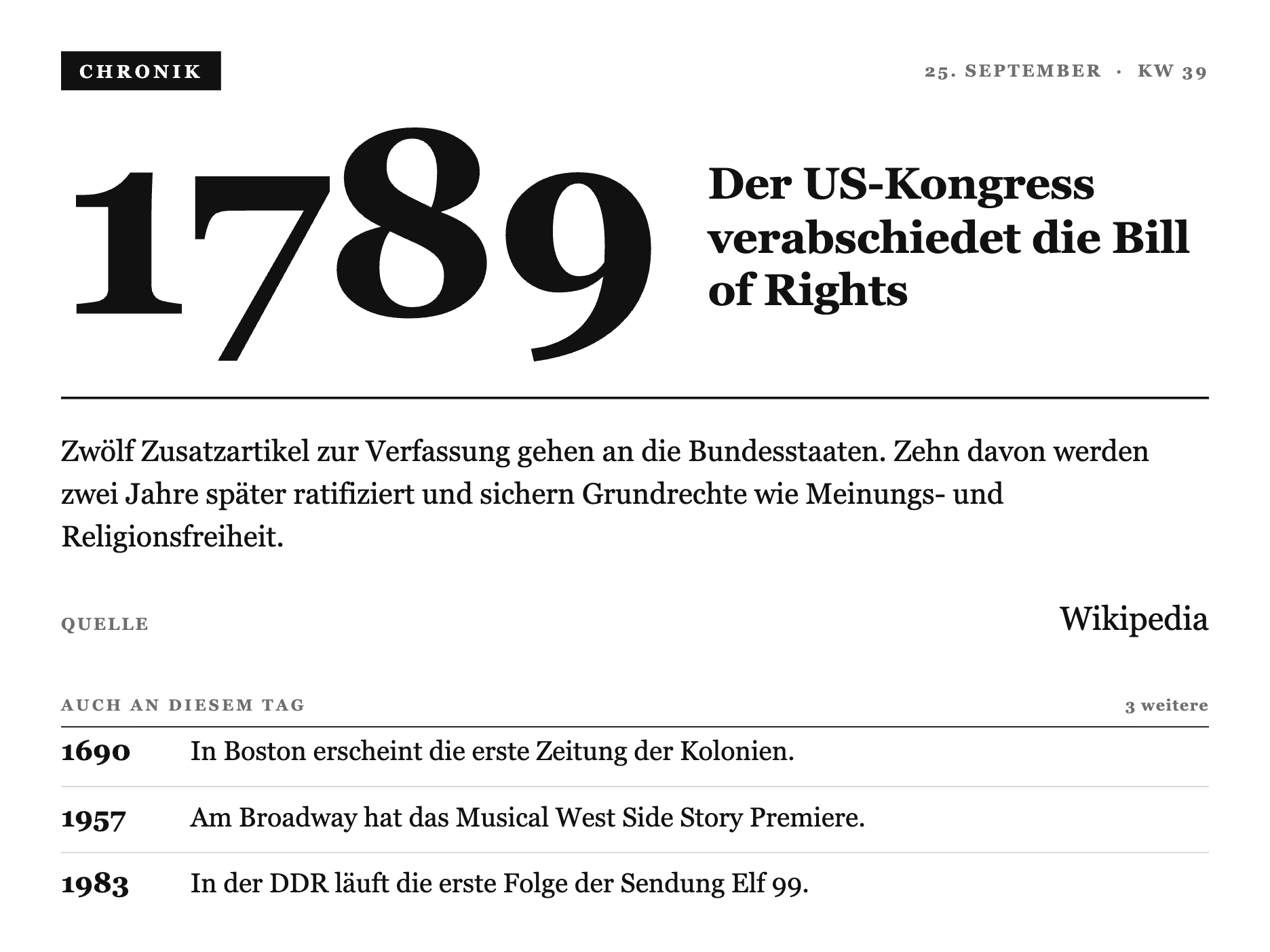
Ein historisches Ereignis von heute, jeden Tag neu. Die Jahreszahl steht monumental als Blickfang, daneben die Schlagzeile, darunter eine Aktennotiz mit Quelle und eine Liste weiterer Jahre. Für diesen Screen brauchst du gar keine eigenen Daten, TRMNL holt sie selbst von einer fertigen öffentlichen Adresse. Das ist eigentlich der schönste Beweis, dass du für so einen Screen kein eigenes Smart Home brauchst.
Strategy: Polling
Polling URL: https://alles-automatisch.de/trmnl/on-this-day.json
Verb: GET
Refresh: z.B. alle 60 Minuten
Code einfügen, URL eintragen, in die Playlist, fertig. Der Endpoint ist eine statische Datei und bleibt dauerhaft kostenlos und offen, egal wie viele ihn nutzen.
Kompletter Code (ins Full-Feld):
1{%- comment -%}
2 X-Design-Sprache v3 "Akte / Almanach" - MASTER core primitives for the TRMNL X demo suite
3 (10.3" e-ink, 1040x780 @ 1.8x = 1872x1404, 16 grays). Pure CSS, AUTO-PREPENDED per view.
4
5 Derived from Daniel's Ortsakte (x-lostplace): ONE serifed face throughout (deliberately NOT
6 Inter), hierarchy from size + case + tracking + hairline rules, an inverted ink STAMP as the
7 single accent per screen, dense asymmetric composition that fills the sheet. A printed record.
8
9 Each view copies THESE primitives into its own src/shared.liquid and adds its view-specific
10 classes below them. Reference implementations: x-uhr (hero), x-kalender (dense list).
11
12 x-history ("Chronik / Kalenderblatt"): the .h-* classes below build a dense almanach page -
13 masthead stamp, the year as a monumental serif numeral next to the headline, the day's main
14 entry filed like an Aktennotiz with a QUELLE citation row (reuses .x-row), then a ruled
15 "Auch an diesem Tag" ledger of further years. No 7-segment digits here (that's x-uhr's
16 bespoke clock face) - the hero is a plain serif numeral, per the Chronik's editorial register.
17{%- endcomment -%}
18<style>
19 :root {
20 --x-paper: #FFFFFF;
21 --x-ink: #111111;
22 --x-mute: #6F6F6F;
23 --x-line: #D6D6D6;
24 --x-fill: #111111;
25 }
26
27 .x-canvas {
28 box-sizing: border-box;
29 width: 100%; height: 100%;
30 display: flex; flex-direction: column;
31 padding: 32px 40px;
32 background: var(--x-paper);
33 color: var(--x-ink);
34 font-family: Georgia, "Times New Roman", "Iowan Old Style", serif;
35 font-feature-settings: "tnum" 1, "lnum" 1;
36 }
37
38 /* ---- Masthead: inverted stamp left, kapitaelchen meta right ---- */
39 .x-top { display: flex; align-items: center; justify-content: space-between; gap: 20px; }
40 .x-stamp {
41 display: inline-block; background: var(--x-fill); color: var(--x-paper);
42 font-size: 15px; font-weight: 700; letter-spacing: 0.2em; text-transform: uppercase;
43 padding: 8px 15px 7px;
44 }
45 .x-metacap { font-size: 14px; font-weight: 700; letter-spacing: 0.14em; text-transform: uppercase; color: var(--x-mute); }
46
47 /* ---- Kapitaelchen section/field label ---- */
48 .x-cap { display: block; font-size: 13px; font-weight: 700; letter-spacing: 0.18em; text-transform: uppercase; color: var(--x-mute); }
49
50 /* ---- A large serifed display line (date, name, headline) ---- */
51 .x-display { margin: 20px 0 0; font-size: 62px; font-weight: 400; line-height: 0.98; letter-spacing: -0.015em; color: var(--x-ink); }
52 .x-display b { font-weight: 700; }
53
54 /* ---- Rules ---- */
55 .x-rule { border-top: 2px solid var(--x-ink); }
56 .x-hairline { border-top: 1px solid var(--x-ink); }
57
58 /* ---- Section header: kapitaelchen label + a small count, underlined by an ink hairline ---- */
59 .x-sec { display: flex; align-items: baseline; justify-content: space-between; gap: 12px; padding-bottom: 10px; border-bottom: 1px solid var(--x-ink); }
60 .x-sec__n { font-size: 13px; font-weight: 700; letter-spacing: 0.06em; color: var(--x-mute); font-variant-numeric: tabular-nums; }
61
62 /* ---- Ledger row: label left, value right, ruled with a faint hairline ---- */
63 .x-row { display: flex; align-items: baseline; justify-content: space-between; gap: 18px; padding: 14px 0; border-bottom: 1px solid var(--x-line); }
64 .x-row:last-child { border-bottom: 0; }
65 .x-row__k { flex: 0 0 auto; font-size: 14px; font-weight: 700; letter-spacing: 0.12em; text-transform: uppercase; color: var(--x-mute); }
66 .x-row__v { flex: 0 0 auto; text-align: right; font-size: 27px; font-weight: 400; color: var(--x-ink); font-variant-numeric: tabular-nums; }
67
68 /* Views add their own .<v>-* classes below this block. */
69
70 /* ==========================================================================================
71 x-history ".h-*" - Chronik / Kalenderblatt
72 ========================================================================================== */
73
74 /* ---- Hero: the year as a monumental serif numeral, headline filed flush beside it ---- */
75 .h-hero { display: flex; align-items: flex-end; gap: 40px; margin-top: 26px; margin-bottom: 58px; }
76 .h-year {
77 flex: 0 0 auto;
78 font-size: 214px; font-weight: 700; line-height: 0.78; letter-spacing: -0.02em;
79 color: var(--x-ink);
80 }
81 .h-headline {
82 flex: 1 1 auto; min-width: 0; margin: 0 0 8px;
83 font-size: 36px; font-weight: 700; line-height: 1.2; letter-spacing: -0.005em;
84 color: var(--x-ink);
85 }
86
87 /* ---- Main entry: the Aktennotiz body, then a QUELLE citation (reuses .x-row) ---- */
88 .h-main { margin-top: 26px; }
89 .h-fakt { margin: 0; max-width: 74ch; font-size: 24px; font-weight: 400; line-height: 1.45; color: var(--x-ink); }
90 .h-main .x-row { margin-top: 18px; padding: 16px 0; }
91
92 /* ---- "Auch an diesem Tag": a ruled ledger of further years, spaced to close the sheet.
93 The list is a flex column that distributes the remaining canvas height BETWEEN rows
94 (space-between), so the ledger reads as generously set almanach entries running all the
95 way to the foot of the page, not a cramped list stranded above blank paper. ---- */
96 .h-sec-wrap { margin-top: 32px; flex: 1 1 auto; display: flex; flex-direction: column; min-height: 0; }
97 .h-list { flex: 1 1 auto; display: flex; flex-direction: column; justify-content: space-between; min-height: 0; padding-top: 6px; }
98 .h-item { display: flex; align-items: baseline; gap: 22px; padding-bottom: 14px; border-bottom: 1px solid var(--x-line); }
99 .h-item:last-child { border-bottom: 0; padding-bottom: 0; }
100 .h-item__y { flex: 0 0 auto; width: 84px; font-size: 23px; font-weight: 700; color: var(--x-ink); font-variant-numeric: tabular-nums; }
101 .h-item__t { flex: 1 1 auto; min-width: 0; font-size: 22px; font-weight: 400; line-height: 1.28; color: var(--x-ink); }
102
103 /* ---- OG (800x480, 1-bit): reduced sheet - year + headline + main entry only ---- */
104 .screen--og .h-og-hide { display: none; }
105 .screen--og .x-canvas { padding: 20px 26px; }
106 .screen--og .h-hero { margin-top: 10px; margin-bottom: 20px; gap: 18px; }
107 .screen--og .h-year { font-size: 96px; line-height: 0.82; }
108 .screen--og .h-headline { font-size: 21px; line-height: 1.22; margin-bottom: 3px; }
109 .screen--og .h-main { margin-top: 12px; }
110 .screen--og .h-fakt { font-size: 15px; line-height: 1.35; }
111 .screen--og .h-main .x-row { margin-top: 8px; padding: 8px 0; }
112 .screen--og .h-main .x-row__v { font-size: 18px; }
113</style>
114
115{%- comment -%}
116 Heute in der Geschichte - "Chronik / Kalenderblatt", v3 "Akte / Almanach". A dense
117 almanach page for the household's demo day. Masthead: stamp "CHRONIK" left, date + KW
118 right. Hero: the year set as a monumental serif numeral, the headline filed flush beside
119 it at the baseline. Below the rule: the main entry's body text like an Aktennotiz, with
120 a QUELLE citation row (reuses the shared .x-row ledger pattern). The lower sheet is a
121 ruled "Auch an diesem Tag" ledger of further years, each in the same aligned year column
122 as the item text - fills the sheet densely, one serif face throughout, one stamp accent.
123
124 Merge variables: datum, kw, jahr, titel, text, quelle, weitere[] (each { jahr, was }).
125 shared.liquid (v3 tokens + .h-* Chronik classes) is AUTO-PREPENDED, so this file is
126 markup only, no {% include %} / {% render %}.
127{%- endcomment -%}
128 <div class="x-canvas">
129
130 <div class="x-top">
131 <span class="x-stamp">Chronik</span>
132 <span class="x-metacap">{{ datum }} · KW {{ kw }}</span>
133 </div>
134
135 <div class="h-hero">
136 <span class="h-year">{{ jahr }}</span>
137 <h1 class="h-headline">{{ titel }}</h1>
138 </div>
139
140 <div class="x-rule"></div>
141
142 <div class="h-main">
143 <p class="h-fakt">{{ text }}</p>
144 <div class="x-row">
145 <span class="x-row__k">Quelle</span>
146 <span class="x-row__v">{{ quelle }}</span>
147 </div>
148 </div>
149
150 {%- if weitere and weitere.size > 0 -%}
151 <div class="h-sec-wrap h-og-hide">
152 <div class="x-sec">
153 <span class="x-cap">Auch an diesem Tag</span>
154 <span class="x-sec__n">{{ weitere | size }} weitere</span>
155 </div>
156 <div class="h-list">
157 {%- for w in weitere -%}
158 <div class="h-item">
159 <span class="h-item__y">{{ w.jahr }}</span>
160 <span class="h-item__t">{{ w.was }}</span>
161 </div>
162 {%- endfor -%}
163 </div>
164 </div>
165 {%- endif -%}
166
167 </div>So sieht der fertige Screen auf dem TRMNL X aus:
Screen 4: Lost Place
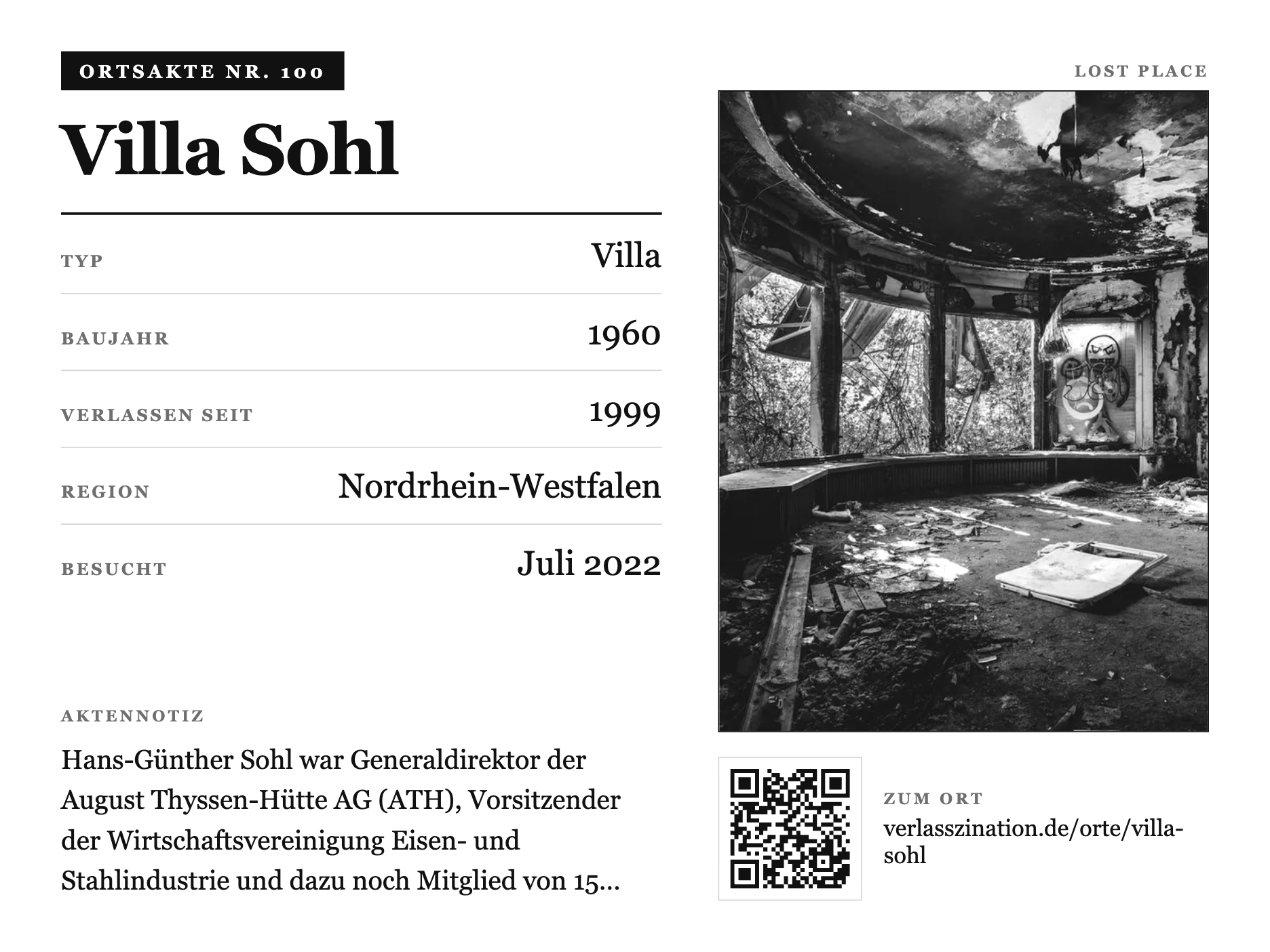
Der Lost Place des Tages als Akte. Links die gestempelte Akten-Nummer, der Ortsname groß, eine linierte Faktentabelle mit Typ, Baujahr, Region und Besuchsdatum, dazu eine Aktennotiz. Rechts das gerahmte, fürs E-Ink gerasterte Foto und darunter ein QR-Code zur öffentlichen Ortsseite. Auch hier brauchst du keine eigenen Daten, der Screen läuft über eine öffentliche Adresse und rotiert täglich. Der QR-Code zeigt bewusst nur die Region, keinen exakten Standort.
Strategy: Polling
Polling URL: https://verlasszination.de/api/trmnl/lost-place
Verb: GET
Refresh: z.B. alle 60 Minuten
Code einfügen, URL eintragen, in die Playlist, fertig.
Kompletter Code (ins Full-Feld):
1{%- comment -%}
2 Lost-Place "Ortsakte" - v3 "Akte / Almanach" (die Ur-Referenz der Suite, jetzt auf die
3 gemeinsamen Primitive gehoben). Editorialer Split: links die Akte (invertierter Stempel mit
4 Akten-Nr, Ortsname gross, gerulte Fakten, Aktennotiz), rechts das gerahmte, geditherte Foto,
5 darunter ein QR-Code zur oeffentlichen Ortsseite (nur Region, kein exakter Standort). Eine
6 Serif, ein Stempel-Akzent. shared.liquid ist auto-prepended.
7{%- endcomment -%}
8<style>
9 :root {
10 --x-paper: #FFFFFF; --x-ink: #111111; --x-mute: #6F6F6F; --x-line: #D6D6D6; --x-fill: #111111;
11 }
12 .x-canvas {
13 box-sizing: border-box; width: 100%; height: 100%;
14 display: flex; flex-direction: column; padding: 32px 40px;
15 background: var(--x-paper); color: var(--x-ink);
16 font-family: Georgia, "Times New Roman", "Iowan Old Style", serif;
17 font-feature-settings: "tnum" 1;
18 }
19 .x-stamp { display: inline-block; background: var(--x-fill); color: var(--x-paper); font-size: 15px; font-weight: 700; letter-spacing: 0.2em; text-transform: uppercase; padding: 8px 15px 7px; }
20 .x-cap { display: block; font-size: 13px; font-weight: 700; letter-spacing: 0.18em; text-transform: uppercase; color: var(--x-mute); }
21 .x-row { display: flex; align-items: baseline; justify-content: space-between; gap: 20px; padding: 17px 0; border-bottom: 1px solid var(--x-line); }
22 .x-row:last-child { border-bottom: 0; }
23 .x-row__k { font-size: 14px; font-weight: 700; letter-spacing: 0.14em; text-transform: uppercase; color: var(--x-mute); }
24 .x-row__v { text-align: right; font-size: 28px; font-weight: 400; color: var(--x-ink); line-height: 1; }
25
26 /* ---- Split: dossier | framed photo + QR ---- */
27 .lp-split { flex: 1; display: flex; flex-direction: row; gap: 46px; min-height: 0; }
28
29 .lp-dossier { flex: 1 1 55%; display: flex; flex-direction: column; min-width: 0; }
30 /* Ortsname: laengenadaptiv (Stufe wird im Markup aus name|size gewaehlt) + Umbruch-Sicherung,
31 damit lange Namen nie in die Foto-Spalte laufen. Kurze Namen bleiben gross und wirkungsvoll. */
32 .lp-name { margin: 20px 0 0; font-weight: 700; line-height: 1.04; letter-spacing: -0.02em; color: var(--x-ink); overflow-wrap: break-word; word-break: break-word; hyphens: auto; }
33 .lp-name--xl { font-size: 58px; }
34 .lp-name--l { font-size: 46px; }
35 .lp-name--m { font-size: 38px; }
36 .lp-name--s { font-size: 31px; }
37 .lp-rule { margin: 22px 0 2px; border-top: 2px solid var(--x-ink); }
38 .lp-note { margin-top: auto; padding-top: 22px; }
39 .lp-note .x-cap { margin-bottom: 12px; }
40 .lp-fakt { margin: 0; font-size: 22px; line-height: 1.5; color: var(--x-ink); max-width: 46ch; }
41
42 /* ---- Figure column: photo grows, QR pinned to the foot ---- */
43 .lp-figure { flex: 1 1 45%; display: flex; flex-direction: column; min-width: 0; min-height: 0; }
44 .lp-photo { flex: 1; min-height: 0; border: 1px solid var(--x-ink); overflow: hidden; }
45 .lp-photo img { width: 100%; height: 100%; display: block; object-fit: cover; }
46 .lp-qr { margin-top: 20px; display: flex; align-items: center; gap: 18px; }
47 .lp-qr__code { flex: 0 0 auto; width: 118px; height: 118px; padding: 9px; background: var(--x-paper); border: 1px solid var(--x-line); box-sizing: border-box; }
48 .lp-qr__code svg { display: block; width: 100%; height: 100%; }
49 .lp-qr__t { min-width: 0; }
50 .lp-qr__t .x-cap { margin-bottom: 6px; }
51 .lp-qr__url { font-size: 19px; color: var(--x-ink); word-break: break-word; line-height: 1.15; }
52
53 /* ---- OG (800x480): tighter split, smaller photo + QR ---- */
54 .screen--og .x-canvas { padding: 20px 26px; }
55 .screen--og .lp-split { gap: 26px; }
56 .screen--og .lp-name { margin-top: 10px; }
57 .screen--og .lp-name--xl { font-size: 34px; }
58 .screen--og .lp-name--l { font-size: 28px; }
59 .screen--og .lp-name--m { font-size: 24px; }
60 .screen--og .lp-name--s { font-size: 20px; }
61 .screen--og .lp-rule { margin: 12px 0 0; }
62 .screen--og .x-row { padding: 8px 0; }
63 .screen--og .x-row__v { font-size: 17px; }
64 .screen--og .x-row__k { font-size: 11px; }
65 .screen--og .lp-fakt { font-size: 14px; }
66 .screen--og .lp-qr__code { width: 80px; height: 80px; padding: 6px; }
67 .screen--og .lp-qr__url { font-size: 13px; }
68</style>
69
70{%- comment -%}
71 Lost-Place "Ortsakte" v3. Links die Akte (gestempelte Akten-Nr, Ortsname gross, gerulte
72 Fakten, Aktennotiz), rechts das gerahmte, geditherte Foto und darunter der QR-Code zur
73 oeffentlichen Ortsseite. Nur Anzeige-Daten, keine Koordinaten. shared.liquid ist auto-prepended.
74{%- endcomment -%}
75 <div class="x-canvas">
76
77 <div class="x-top" style="display:flex;align-items:center;justify-content:space-between;gap:20px;">
78 <span class="x-stamp">Ortsakte Nr. {{ akte_nr }}</span>
79 <span class="x-cap">Lost Place</span>
80 </div>
81
82 <div class="lp-split">
83
84 {%- comment -%} ---- LEFT: die Akte ---- {%- endcomment -%}
85 <div class="lp-dossier">
86 {%- assign namelen = name | size -%}
87 {%- assign name_cls = "lp-name--xl" -%}
88 {%- if namelen > 26 -%}{%- assign name_cls = "lp-name--s" -%}
89 {%- elsif namelen > 20 -%}{%- assign name_cls = "lp-name--m" -%}
90 {%- elsif namelen > 14 -%}{%- assign name_cls = "lp-name--l" -%}
91 {%- endif -%}
92 <h1 class="lp-name {{ name_cls }}" lang="de">{{ name }}</h1>
93 <div class="lp-rule"></div>
94
95 <div class="lp-rows">
96 {%- if typ and typ != "" -%}<div class="x-row"><span class="x-row__k">Typ</span><span class="x-row__v">{{ typ }}</span></div>{%- endif -%}
97 {%- if baujahr and baujahr != "" -%}<div class="x-row"><span class="x-row__k">Baujahr</span><span class="x-row__v value--tnums">{{ baujahr }}</span></div>{%- endif -%}
98 {%- if verlassen_seit and verlassen_seit != "" -%}<div class="x-row"><span class="x-row__k">Verlassen seit</span><span class="x-row__v value--tnums">{{ verlassen_seit }}</span></div>{%- endif -%}
99 {%- if region and region != "" -%}<div class="x-row"><span class="x-row__k">Region</span><span class="x-row__v">{{ region }}</span></div>{%- endif -%}
100 {%- if besucht_am and besucht_am != "" -%}<div class="x-row"><span class="x-row__k">Besucht</span><span class="x-row__v">{{ besucht_am }}</span></div>{%- endif -%}
101 </div>
102
103 {%- if fakt and fakt != "" -%}
104 <div class="lp-note">
105 <span class="x-cap">Aktennotiz</span>
106 <p class="lp-fakt">{{ fakt }}</p>
107 </div>
108 {%- endif -%}
109 </div>
110
111 {%- comment -%} ---- RIGHT: Foto + QR ---- {%- endcomment -%}
112 <div class="lp-figure">
113 {%- if image_url and image_url != "" -%}
114 <div class="lp-photo">
115 <img class="image image--dither image--cover" src="{{ image_url }}" alt="{{ name }}">
116 </div>
117 {%- endif -%}
118
119 {%- if qr and qr != "" -%}
120 <div class="lp-qr">
121 <div class="lp-qr__code">
122 <svg viewBox="0 0 {{ qr_n }} {{ qr_n }}" role="img" aria-label="QR-Code zum Ort"><path d="{{ qr }}" fill="var(--x-ink)"/></svg>
123 </div>
124 <div class="lp-qr__t">
125 <span class="x-cap">Zum Ort</span>
126 <div class="lp-qr__url">{{ ort_url }}</div>
127 </div>
128 </div>
129 {%- endif -%}
130 </div>
131
132 </div>
133
134 </div>So sieht der fertige Screen auf dem TRMNL X aus:
Eine Design-Sprache, zwei Geräte
Alle vier Screens laufen genauso auf dem kleineren TRMNL OG, also der 7,5-Zoll-Variante mit 800×480 und 1-Bit. Jeder Screen hat seine OG-Anpassungen schon eingebaut, du brauchst keine zweite Vorlage. Auf dem OG fällt bewusst weg, was auf dem kleinen Panel zu eng würde: beim Kalender etwa Morgen, Geburtstage und Wochenleiste, bei der Chronik die Liste der weiteren Jahre. Der Rest bleibt scharf und lesbar. Das finde ich tatsächlich wahnsinnig praktisch, eine Vorlage, zwei Geräte, alles passt.
Für noch mehr Screens gehe ich im Guide TRMNL Screens selbst bauen Schritt für Schritt durch zehn weitere, von einem Countdown über die Müllabfuhr bis zu Wetter und Solar mit Home Assistant als Datenquelle. Den kompletten Code gibt es dort genauso zum Kopieren.
Nutzt du schon ein TRMNL oder ein anderes E-Ink-Display? Was zeigst du dir darauf an?
Weiterführende Inhalte
- TRMNL E-Ink Display mit Home Assistant einrichten – Die Einrichtung von Grund auf
- TRMNL Screens selbst bauen – Der Guide zu eigenen Layouts
- TRMNL: Grundlagen und Bedienung – Grundlagen zum Gerät
- TRMNL zurücksetzen – Wenn der Screen nicht mehr will