TRMNL Screens selbst bauen
Zehn fertige TRMNL-Screens zum Nachbauen, mit komplettem Code zum Kopieren und Schritt für Schritt erklärt. Vom Wortweiser ohne Home Assistant bis zum Solar- und Kalender-Screen mit HA.
Was du hier baust
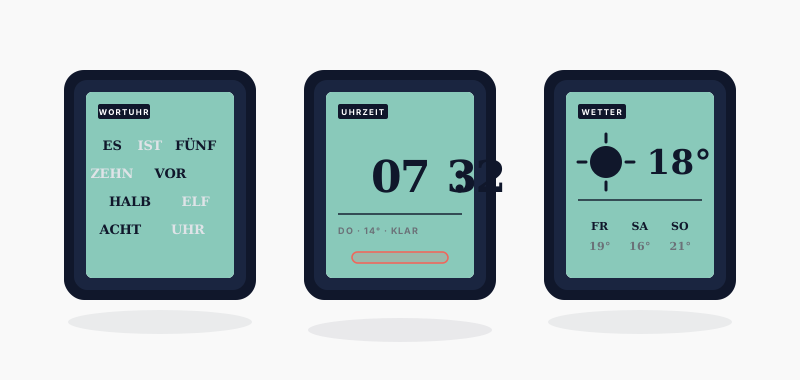
Ich habe mir eine ganze Reihe eigener Screens für den TRMNL gebaut, alle in einer Design-Sprache: Serifenschrift, ein gestempeltes Label, gerulte Zeilen wie aus einer Akte. Die schönsten und universellsten davon gebe ich dir hier komplett mit, mit Code zum Kopieren und Schritt für Schritt erklärt.
Vier Screens brauchen kein Home Assistant, nur einen TRMNL-Account und ein Gerät: der Wortweiser, ein Countdown, die Chronik und die Müllabfuhr. Der Rest holt sich die Daten aus Home Assistant, das ist was für Fortgeschrittene. Bei jedem Screen steht dabei, was du brauchst.
Hinweis: Wenn du das Gerät noch gar nicht kennst, lies zuerst TRMNL: Grundlagen und Bedienung. Für die Home-Assistant-Screens hilft dir TRMNL mit Home Assistant verbinden.
Das Grundrezept
Jeder Screen wird gleich angelegt. Merk dir diesen Ablauf einmal, dann geht der Rest schnell.
- Auf usetrmnl.com auf Plugins, dann Private Plugin, dann ein neues anlegen.
- Einen Namen vergeben und die Strategy wählen (steht bei jedem Screen dabei: Webhook oder Polling).
- Auf Edit Markup klicken und den kompletten Code des Screens ins Feld Full einfügen. Nichts drum herum ergänzen, der Code ist fertig.
- Speichern, dann die Daten einrichten (bei jedem Screen beschrieben).
- Den Screen in die Playlist ziehen. Fertig.
Der Code enthält schon alles, das Design und den Inhalt. Du fütterst ihn nur mit Daten. Bei den Webhook-Screens ersetzt du im Befehl DEINE_WEBHOOK_URL durch die URL, die TRMNL dir nach dem Speichern zeigt.
Wortweiser
Einsteiger, kein HA nötig · Strategy Webhook
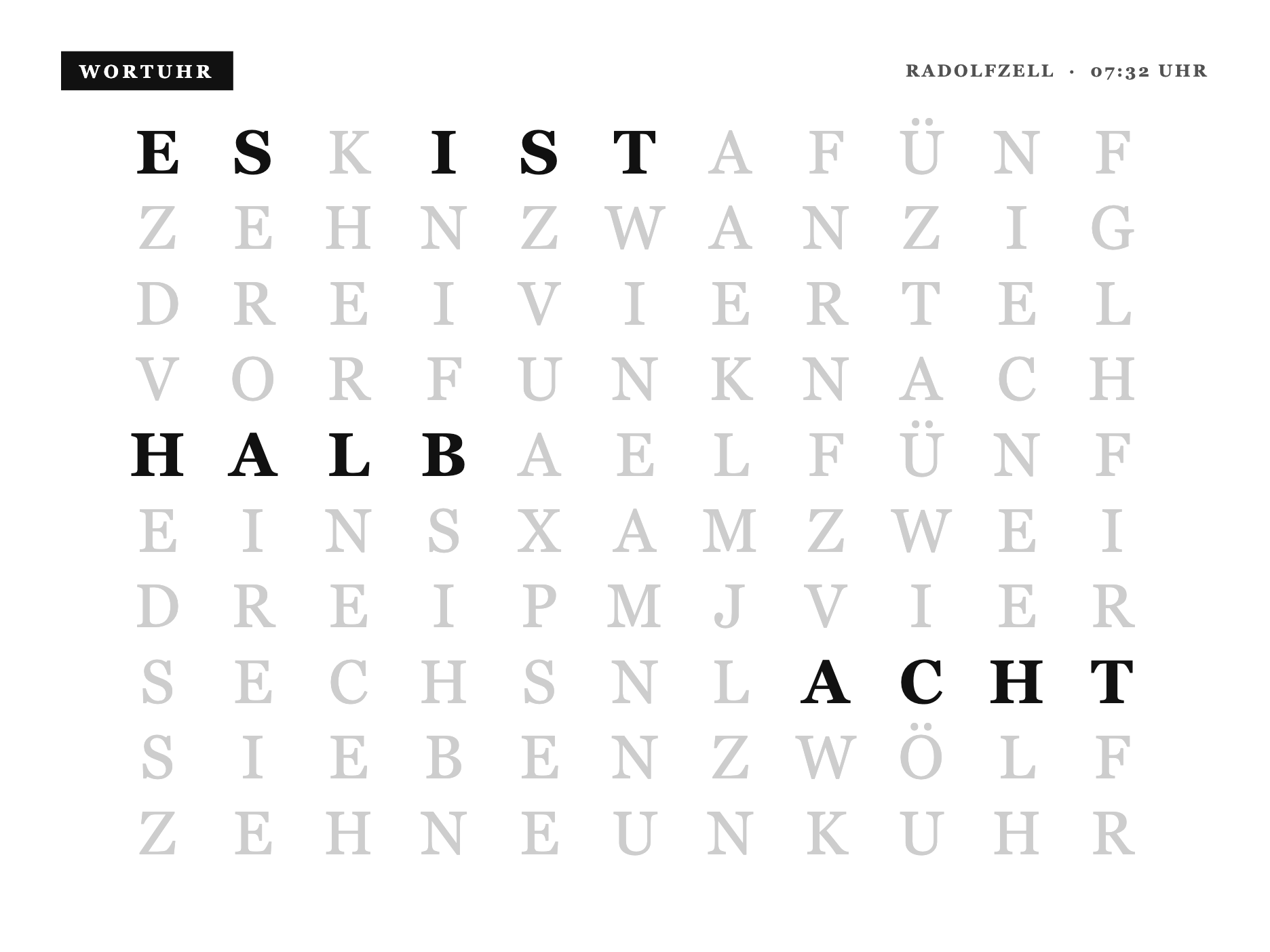
Die Uhr zeigt die Zeit in Wörtern statt in Ziffern. Das Beste: sie rechnet die aktuelle Uhrzeit selbst aus deiner Konto-Zeitzone. Du musst also keine Zeit schicken, nur einmal den Ortsnamen für die Kopfzeile.
So baust du sie:
- Private Plugin anlegen, Strategy Webhook, speichern.
- Den kompletten Code unten ins Feld Full einfügen.
- In deinen TRMNL-Konto-Einstellungen die richtige Zeitzone setzen, dann stimmt die Uhrzeit automatisch.
- Die Webhook-URL kopieren und den Ort einmal setzen (Befehl unten).
- In die Playlist ziehen.
Daten setzen (einmal): Nach dem Anlegen zeigt dir TRMNL eine Webhook-URL. Kopiere sie und führ diesen Befehl aus, Bad Oeynhausen durch deine Stadt ersetzen:
curl -X POST "DEINE_WEBHOOK_URL" -H "Content-Type: application/json" -d '{"merge_variables": {"ort": "Bad Oeynhausen"}}'Danach tickt die Uhr von selbst weiter, du musst nichts mehr schicken.
Kompletter Code (ins Feld Full kopieren)
1{%- comment -%}
2 Wortweiser - die Uhrzeit in Worten fuer das TRMNL X, auf dem hellen Almanach-Papier wie die
3 uebrige Suite. Ein Stempel-Kopf, darunter ein 11x10-Buchstabenraster: die aktiven Woerter
4 stehen in Ink, der Rest ist hell zurueckgenommen. Die deutschsprachige Wortweiser-Matrix ist
5 funktional (Sprache + Raster), generisch. Kein Markenname, kein Logo. shared.liquid ist
6 auto-prepended.
7{%- endcomment -%}
8<style>
9 :root {
10 --x-paper: #FFFFFF;
11 --x-ink: #111111;
12 --x-mute: #525252;
13 --x-line: #D6D6D6;
14 --x-fill: #111111;
15 --wu-off: #CDCDCD; /* light gray - unlit letters recede on white paper */
16 }
17
18 .x-canvas {
19 box-sizing: border-box; width: 100%; height: 100%;
20 display: flex; flex-direction: column; padding: 32px 40px 36px;
21 background: var(--x-paper); color: var(--x-ink);
22 font-family: Georgia, "Times New Roman", "Iowan Old Style", serif;
23 font-feature-settings: "tnum" 1;
24 }
25
26 .x-top { display: flex; align-items: center; justify-content: space-between; gap: 20px; }
27 .x-stamp { display: inline-block; background: var(--x-fill); color: var(--x-paper); font-size: 15px; font-weight: 700; letter-spacing: 0.2em; text-transform: uppercase; padding: 8px 15px 7px; }
28 .x-metacap { font-size: 14px; font-weight: 700; letter-spacing: 0.14em; text-transform: uppercase; color: var(--x-mute); }
29 .x-rule { border-top: 2px solid var(--x-ink); margin-top: 20px; }
30
31 /* ---- Letter grid: centered both ways in the space below the masthead ---- */
32 .wu-wrap { flex: 1; display: flex; align-items: center; justify-content: center; min-height: 0; }
33 .wu-grid {
34 display: grid; grid-template-columns: repeat(11, 1fr);
35 width: 100%; max-width: 860px;
36 row-gap: 6px;
37 }
38 .wu-c {
39 text-align: center;
40 font-size: 50px; font-weight: 400; line-height: 1.12;
41 letter-spacing: 0.01em;
42 color: var(--wu-off);
43 }
44 .wu-c--on { color: var(--x-ink); font-weight: 700; }
45
46 /* ---- OG (800x480) ---- */
47 .screen--og .x-canvas { padding: 20px 26px 22px; }
48 .screen--og .wu-grid { max-width: 620px; row-gap: 2px; }
49 .screen--og .wu-c { font-size: 31px; }
50</style>
51
52{%- comment -%}
53 Wortweiser - a REAL word clock. The active letters are computed live from `zeit` (HH:MM): floor
54 to the 5-minute step, pick the minute phrase (VOR/NACH/HALB), roll the hour over past :25, map
55 every word to its cells in the fixed 11x10 German word-clock matrix (a functional, language-
56 dictated layout). The four corner dots show the 1..4 minutes past the step. No brand name or
57 logo is used anywhere. shared.liquid (black panel) is auto-prepended.
58
59 Matrix rows (0..9):
60 0 ESKISTAFÜNF 1 ZEHNZWANZIG 2 DREIVIERTEL 3 VORFUNKNACH 4 HALBAELFÜNF
61 5 EINSXAMZWEI 6 DREIPMJVIER 7 SECHSNLACHT 8 SIEBENZWÖLF 9 ZEHNEUNKUHR
62{%- endcomment -%}
63{%- comment -%} Self-clocking: fehlt `zeit` (kein Push/statische Instanz), berechne die echte
64 lokale Zeit server-seitig aus `now` + der User-Zeitzone. Push-Betrieb bleibt unberührt. {%- endcomment -%}
65{%- if zeit == blank -%}{%- assign zeit = "now" | date: "%s" | plus: trmnl.user.utc_offset | date: "%H:%M" -%}{%- endif -%}
66
67{%- assign raster = "ESKISTAFÜNF,ZEHNZWANZIG,DREIVIERTEL,VORFUNKNACH,HALBAELFÜNF,EINSXAMZWEI,DREIPMJVIER,SECHSNLACHT,SIEBENZWÖLF,ZEHNEUNKUHR" | split: "," -%}
68
69{%- comment -%} word -> cell lists {%- endcomment -%}
70{%- assign ES = "0-0,0-1" -%}
71{%- assign IST = "0-3,0-4,0-5" -%}
72{%- assign M_FUENF = "0-7,0-8,0-9,0-10" -%}
73{%- assign M_ZEHN = "1-0,1-1,1-2,1-3" -%}
74{%- assign ZWANZIG = "1-4,1-5,1-6,1-7,1-8,1-9,1-10" -%}
75{%- assign VIERTEL = "2-4,2-5,2-6,2-7,2-8,2-9,2-10" -%}
76{%- assign VOR = "3-0,3-1,3-2" -%}
77{%- assign NACH = "3-7,3-8,3-9,3-10" -%}
78{%- assign HALB = "4-0,4-1,4-2,4-3" -%}
79{%- assign UHR = "9-8,9-9,9-10" -%}
80
81{%- assign parse_h = zeit | slice: 0, 2 | plus: 0 -%}
82{%- assign m = zeit | slice: 3, 2 | plus: 0 -%}
83{%- assign mi = m | divided_by: 5 | floor -%}
84{%- assign dots = m | modulo: 5 -%}
85
86{%- assign use_next = false -%}
87{%- case mi -%}
88 {%- when 0 -%}{%- assign minute = UHR -%}
89 {%- when 1 -%}{%- assign minute = M_FUENF | append: "," | append: NACH -%}
90 {%- when 2 -%}{%- assign minute = M_ZEHN | append: "," | append: NACH -%}
91 {%- when 3 -%}{%- assign minute = VIERTEL | append: "," | append: NACH -%}
92 {%- when 4 -%}{%- assign minute = ZWANZIG | append: "," | append: NACH -%}
93 {%- when 5 -%}{%- assign minute = M_FUENF | append: "," | append: VOR | append: "," | append: HALB -%}{%- assign use_next = true -%}
94 {%- when 6 -%}{%- assign minute = HALB -%}{%- assign use_next = true -%}
95 {%- when 7 -%}{%- assign minute = M_FUENF | append: "," | append: NACH | append: "," | append: HALB -%}{%- assign use_next = true -%}
96 {%- when 8 -%}{%- assign minute = ZWANZIG | append: "," | append: VOR -%}{%- assign use_next = true -%}
97 {%- when 9 -%}{%- assign minute = VIERTEL | append: "," | append: VOR -%}{%- assign use_next = true -%}
98 {%- when 10 -%}{%- assign minute = M_ZEHN | append: "," | append: VOR -%}{%- assign use_next = true -%}
99 {%- when 11 -%}{%- assign minute = M_FUENF | append: "," | append: VOR -%}{%- assign use_next = true -%}
100{%- endcase -%}
101
102{%- assign hnum = parse_h -%}
103{%- if use_next -%}{%- assign hnum = parse_h | plus: 1 -%}{%- endif -%}
104{%- assign h12 = hnum | modulo: 12 -%}
105{%- if h12 == 0 -%}{%- assign h12 = 12 -%}{%- endif -%}
106{%- case h12 -%}
107 {%- when 1 -%}{%- assign hourcells = "5-0,5-1,5-2,5-3" -%}{%- assign wort = "Eins" -%}
108 {%- when 2 -%}{%- assign hourcells = "5-7,5-8,5-9,5-10" -%}{%- assign wort = "Zwei" -%}
109 {%- when 3 -%}{%- assign hourcells = "6-0,6-1,6-2,6-3" -%}{%- assign wort = "Drei" -%}
110 {%- when 4 -%}{%- assign hourcells = "6-7,6-8,6-9,6-10" -%}{%- assign wort = "Vier" -%}
111 {%- when 5 -%}{%- assign hourcells = "4-7,4-8,4-9,4-10" -%}{%- assign wort = "Fünf" -%}
112 {%- when 6 -%}{%- assign hourcells = "7-0,7-1,7-2,7-3,7-4" -%}{%- assign wort = "Sechs" -%}
113 {%- when 7 -%}{%- assign hourcells = "8-0,8-1,8-2,8-3,8-4,8-5" -%}{%- assign wort = "Sieben" -%}
114 {%- when 8 -%}{%- assign hourcells = "7-7,7-8,7-9,7-10" -%}{%- assign wort = "Acht" -%}
115 {%- when 9 -%}{%- assign hourcells = "9-3,9-4,9-5,9-6" -%}{%- assign wort = "Neun" -%}
116 {%- when 10 -%}{%- assign hourcells = "9-0,9-1,9-2,9-3" -%}{%- assign wort = "Zehn" -%}
117 {%- when 11 -%}{%- assign hourcells = "4-5,4-6,4-7" -%}{%- assign wort = "Elf" -%}
118 {%- when 12 -%}{%- assign hourcells = "8-6,8-7,8-8,8-9,8-10" -%}{%- assign wort = "Zwölf" -%}
119{%- endcase -%}
120
121{%- comment -%} for :00 the hour word is shown before UHR; otherwise the phrase carries it {%- endcomment -%}
122{%- assign active = ES | append: "," | append: IST | append: "," | append: minute | append: "," | append: hourcells -%}
123{%- assign akt = "," | append: active | append: "," -%}
124 <div class="x-canvas">
125
126 <div class="x-top">
127 <span class="x-stamp">Wortweiser</span>
128 <span class="x-metacap">{{ ort }} · {{ zeit }} Uhr</span>
129 </div>
130
131 <div class="wu-wrap">
132 <div class="wu-grid">
133 {%- for row in raster -%}
134 {%- assign r = forloop.index0 -%}
135 {%- for i in (0..10) -%}
136 {%- assign ch = row | slice: i, 1 -%}
137 {%- assign key = "," | append: r | append: "-" | append: i | append: "," -%}
138 <span class="wu-c{% if akt contains key %} wu-c--on{% endif %}">{{ ch }}</span>
139 {%- endfor -%}
140 {%- endfor -%}
141 </div>
142 </div>
143
144 </div>Countdown
Einsteiger, kein HA nötig · Strategy Webhook
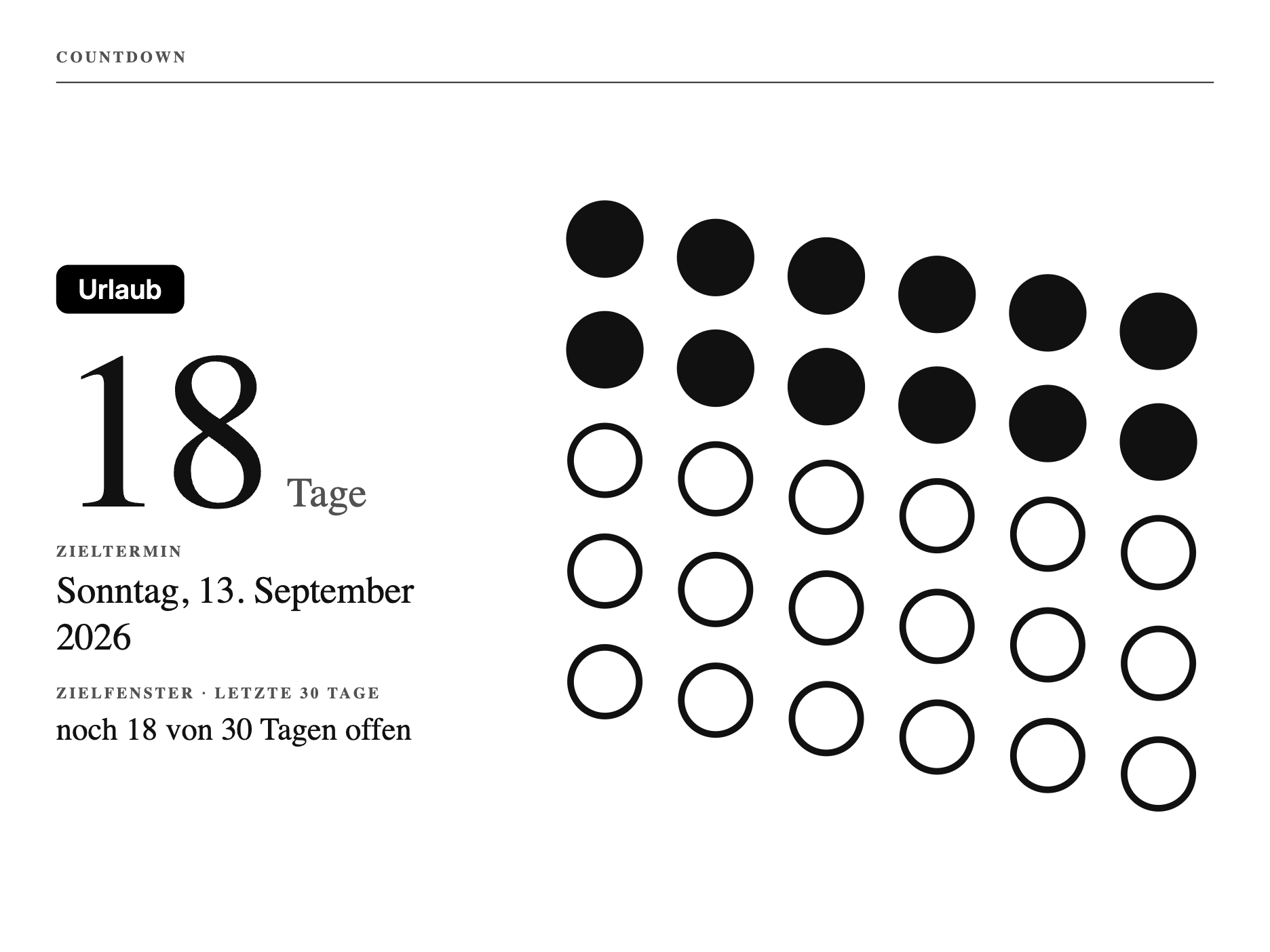
Zählt die Tage bis zu einem Termin herunter, mit einem Punkteraster für die letzten 30 Tage. Je weiter das Ziel weg ist, desto grober wird die Anzeige, von Tagen auf Wochen und Monate. Perfekt fürs nächste Video, den Urlaub oder einen Geburtstag.
So baust du sie:
- Private Plugin anlegen, Strategy Webhook, speichern.
- Den kompletten Code unten ins Feld Full einfügen.
- Zieldatum und Label einmal setzen (Befehl unten).
- In die Playlist ziehen.
Daten setzen: Am einfachsten per Webhook, du schickst Zieldatum und Label einmal:
curl -X POST "DEINE_WEBHOOK_URL" -H "Content-Type: application/json" -d '{"merge_variables": {"countdown_date": "2026-12-24", "countdown_label": "Urlaub"}}'Das Datum im Format JJJJ-MM-TT. Der Screen rechnet die Tage selbst und stellt automatisch von Tagen auf Wochen und Monate um, je weiter das Ziel weg ist. Wer das Datum lieber direkt in der TRMNL-Oberfläche ändert, legt stattdessen zwei Formularfelder countdown_date und countdown_label an.
Kompletter Code (ins Feld Full kopieren)
1{%- comment -%}
2 X-Design-Sprache - shared design language for the TRMNL X (10.3" e-ink, 1040x780 @ 1.8x =
3 1872x1404 physical, 16 grays). Pure CSS, mirroring the real TRMNL model: this file is
4 AUTO-PREPENDED to every view (no {% include %} / {% render %} needed in screen templates).
5 Screens style with framework classes (value--*, title--*, label--*, bg--gray-*, layout--*)
6 plus the thin .x-* components below.
7
8 Near-black ink on white paper. Hierarchy from type + hairlines, not decoration. Only
9 widely-separated grays (paper #FFF / mute #777 / ink #111); none of the motion, depth, or
10 transparency effects e-ink breaks on.
11{%- endcomment -%}
12<style>
13 /* ---- X design tokens: only widely-separated e-ink grays ---- */
14 :root {
15 --x-paper: #FFFFFF; /* page + card surface (white paper) */
16 --x-ink: #111111; /* gray-10 - near-black text, rules */
17 --x-mute: #525252; /* gray-40 - secondary labels, quiet separators */
18 --x-fill: #111111; /* gray-10 - solid ink fill for the one inverted accent block */
19 --x-line: #DDDDDD; /* gray-70 - light separator / secondary text on the ink block */
20 --x-seg-off: #F0F0F0; /* gray-75 - faint OFF-segment ghost on the 7-segment clock (variant B) */
21 }
22
23 /* ---- Canvas: the editorial frame inside view--full ---- */
24 .x-canvas {
25 box-sizing: border-box;
26 width: 100%;
27 height: 100%;
28 display: flex;
29 flex-direction: column;
30 padding: 30px 36px;
31 background: var(--x-paper);
32 color: var(--x-ink);
33 font-feature-settings: "tnum" 1, "cv01" 1;
34 }
35
36 /* ---- Card: white paper on white, defined by a crisp ink hairline, not a fill ---- */
37 .x-card {
38 box-sizing: border-box;
39 background: var(--x-paper);
40 color: var(--x-ink);
41 border: 1px solid var(--x-ink);
42 border-radius: 12px;
43 padding: 24px 28px;
44 }
45
46 /* ---- Card, inverted: the single confident accent per screen ---- */
47 .x-card--ink {
48 background: var(--x-fill);
49 color: var(--x-paper);
50 border-color: var(--x-fill);
51 }
52 .x-card--ink .x-eyebrow { color: var(--x-paper); }
53 .x-card--ink .value { color: var(--x-paper); } /* bright figures on ink */
54 .x-card--ink .label { color: var(--x-line); } /* dim secondary on ink */
55 .x-card--ink .x-row__k { color: var(--x-line); }
56 .x-card--ink .x-row { border-bottom-color: var(--x-line); }
57 .x-card--ink .x-hairline { border-top-color: var(--x-paper); }
58
59 /* ---- Eyebrow: small, quiet, tracked label cap that sits above an oversized value ---- */
60 .x-eyebrow {
61 display: block;
62 font-size: 13px;
63 font-weight: 600;
64 line-height: 1;
65 letter-spacing: 0.16em;
66 text-transform: uppercase;
67 color: var(--x-mute);
68 }
69
70 /* ---- Row: label left, value right, aligned to a baseline like a well-set table ---- */
71 .x-row {
72 display: flex;
73 align-items: baseline;
74 justify-content: space-between;
75 gap: 20px;
76 padding: 12px 0;
77 border-bottom: 1px solid var(--x-mute);
78 }
79 .x-row:last-child { border-bottom: 0; }
80 .x-row > .x-row__k { color: var(--x-mute); font-weight: 500; }
81 .x-row > .x-row__v { text-align: right; font-variant-numeric: tabular-nums; }
82
83 /* ---- Hairline: a single crisp structural rule (masthead / section break) ---- */
84 .x-hairline {
85 display: block;
86 width: 100%;
87 height: 0;
88 margin: 0;
89 border: 0;
90 border-top: 1px solid var(--x-ink);
91 }
92</style>
93
94{%- comment -%}
95 Countdown - Variante A "Tage-Raster". Die Restzeit wird taktil: ein Inline-SVG-Raster aus
96 Zellen. Bereits vergangene Einheiten sind mit Tinte gefuellt, verbleibende bleiben hohle Ringe.
97 Man SIEHT die Zeit ablaufen. Die hohlen Zellen entsprechen exakt der Restzahl in der gewaehlten
98 Einheit. Das Raster ist der Held, die Zahl im linken Rail traegt sie mit. shared.liquid (Tokens
99 + .x-*) wird auto-prepended.
100
101 Adaptive Einheit, damit das Raster fuer JEDE Spanne lesbar bleibt (Ziel ~10 bis 60 Zellen):
102 Rest <= 42 Tage -> eine Zelle pro Tag (Fenster 30 bzw. 42)
103 Rest <= 364 Tage -> eine Zelle pro Woche (Fenster 13 / 26 / 52)
104 Rest >= 365 Tage -> eine Zelle pro Monat (Fenster 12 / 18 / 24 / 36 / 48 / 60)
105 Die HERO-Zahl bleibt immer die echte Rest-Zahl in TAGEN ("212 Tage"), egal welche Rastereinheit.
106 Das Fenster (cellsTotal) ist die aufgerundete Gesamtspanne, die Fuellung zeigt vergangen vs offen.
107
108 Tag-Mathe wie im Original: beide Daten -> Epoch (%s), Differenz / 86400, ceil. Positiv -> Zukunft,
109 0 -> heute, negativ -> Vergangenheit (Count-up). Deutscher Monat + Wochentag ueber Lookups (nicht
110 %B/%A, die im TRMNL-Liquid Englisch liefern), Wochentag via %w als Index. Div-durch-0 ist
111 unmoeglich: cellsTotal und cols sind immer >= 1, rows via Aufrund-Trick.
112{%- endcomment -%}
113{%- assign label = countdown_label | default: "Countdown" -%}
114{%- assign epoch = countdown_date | date: "%s" -%}
115{%- assign valid = false -%}
116{%- if countdown_date != blank and epoch != countdown_date -%}{%- assign valid = true -%}{%- endif -%}
117
118{%- assign months = "Januar,Februar,März,April,Mai,Juni,Juli,August,September,Oktober,November,Dezember" | split: "," -%}
119{%- assign mnum = countdown_date | date: "%m" | plus: 0 -%}
120{%- assign midx = mnum | minus: 1 -%}
121{%- assign mname = months[midx] -%}
122{%- assign dnum = countdown_date | date: "%d" | plus: 0 -%}
123{%- assign yr = countdown_date | date: "%Y" -%}
124{%- assign de_date = dnum | append: ". " | append: mname | append: " " | append: yr -%}
125{%- assign wdays = "So,Mo,Di,Mi,Do,Fr,Sa" | split: "," -%}
126{%- assign wnum = countdown_date | date: "%w" | plus: 0 -%}
127{%- assign wname = wdays[wnum] -%}
128{%- assign wdays_full = "Sonntag,Montag,Dienstag,Mittwoch,Donnerstag,Freitag,Samstag" | split: "," -%}
129{%- assign wname_full = wdays_full[wnum] -%}
130
131{%- assign now = "now" | date: "%s" -%}
132{%- assign secs = epoch | minus: now -%}
133{%- assign days = secs | divided_by: 86400.0 | ceil -%}
134
135{%- comment -%} state + display number/unit {%- endcomment -%}
136{%- assign state = "future" -%}
137{%- assign num = days -%}
138{%- assign unit = "Tage" -%}
139{%- if days == 0 -%}
140 {%- assign state = "today" -%}
141{%- elsif days < 0 -%}
142 {%- assign state = "past" -%}
143 {%- assign num = 0 | minus: days -%}
144 {%- if num == 1 -%}{%- assign unit = "Tag her" -%}{%- else -%}{%- assign unit = "Tage her" -%}{%- endif -%}
145{%- else -%}
146 {%- if days == 1 -%}{%- assign unit = "Tag" -%}{%- endif -%}
147{%- endif -%}
148
149{%- comment -%} ---- adaptive Rastereinheit: Tag / Woche / Monat je nach Restspanne ---- {%- endcomment -%}
150{%- assign cols = 6 -%}
151{%- assign cellsTotal = 30 -%}
152{%- assign cellsRemaining = 0 -%}
153{%- assign unitAcc = "Tage" -%}
154{%- assign unitDat = "Tagen" -%}
155
156{%- if state == "past" -%}
157 {%- comment -%} Fenster komplett vorbei: voller 30er-Block, alles gefuellt {%- endcomment -%}
158 {%- assign cols = 6 -%}
159 {%- assign cellsTotal = 30 -%}
160 {%- assign cellsRemaining = 0 -%}
161{%- elsif days <= 42 -%}
162 {%- comment -%} kleine Spanne: eine Zelle pro Tag {%- endcomment -%}
163 {%- assign cellsRemaining = days -%}
164 {%- assign unitAcc = "Tage" -%}{%- assign unitDat = "Tagen" -%}
165 {%- if cellsRemaining <= 30 -%}{%- assign cellsTotal = 30 -%}{%- assign cols = 6 -%}
166 {%- else -%}{%- assign cellsTotal = 42 -%}{%- assign cols = 7 -%}{%- endif -%}
167{%- elsif days <= 364 -%}
168 {%- comment -%} mittlere Spanne: eine Zelle pro Woche {%- endcomment -%}
169 {%- assign cellsRemaining = days | divided_by: 7.0 | ceil -%}
170 {%- assign unitAcc = "Wochen" -%}{%- assign unitDat = "Wochen" -%}
171 {%- if cellsRemaining <= 13 -%}{%- assign cellsTotal = 13 -%}{%- assign cols = 7 -%}
172 {%- elsif cellsRemaining <= 26 -%}{%- assign cellsTotal = 26 -%}{%- assign cols = 9 -%}
173 {%- else -%}{%- assign cellsTotal = 52 -%}{%- assign cols = 9 -%}{%- endif -%}
174{%- else -%}
175 {%- comment -%} grosse Spanne: eine Zelle pro Monat (30-Tage-Naeherung) {%- endcomment -%}
176 {%- assign cellsRemaining = days | divided_by: 30.0 | ceil -%}
177 {%- assign unitAcc = "Monate" -%}{%- assign unitDat = "Monaten" -%}
178 {%- if cellsRemaining <= 12 -%}{%- assign cellsTotal = 12 -%}{%- assign cols = 6 -%}
179 {%- elsif cellsRemaining <= 18 -%}{%- assign cellsTotal = 18 -%}{%- assign cols = 6 -%}
180 {%- elsif cellsRemaining <= 24 -%}{%- assign cellsTotal = 24 -%}{%- assign cols = 8 -%}
181 {%- elsif cellsRemaining <= 36 -%}{%- assign cellsTotal = 36 -%}{%- assign cols = 9 -%}
182 {%- elsif cellsRemaining <= 48 -%}{%- assign cellsTotal = 48 -%}{%- assign cols = 8 -%}
183 {%- elsif cellsRemaining <= 60 -%}{%- assign cellsTotal = 60 -%}{%- assign cols = 10 -%}
184 {%- else -%}
185 {%- comment -%} > 5 Jahre: auf naechste 12 Monate aufrunden {%- endcomment -%}
186 {%- assign blocks = cellsRemaining | divided_by: 12.0 | ceil -%}
187 {%- assign cellsTotal = blocks | times: 12 -%}{%- assign cols = 12 -%}
188 {%- endif -%}
189{%- endif -%}
190
191{%- comment -%} Guards: cols/cellsTotal immer >= 1, elapsed geklemmt, rows via Aufrund-Trick {%- endcomment -%}
192{%- if cols < 1 -%}{%- assign cols = 6 -%}{%- endif -%}
193{%- if cellsTotal < 1 -%}{%- assign cellsTotal = 1 -%}{%- endif -%}
194{%- if cellsRemaining < 0 -%}{%- assign cellsRemaining = 0 -%}{%- endif -%}
195{%- if cellsRemaining > cellsTotal -%}{%- assign cellsRemaining = cellsTotal -%}{%- endif -%}
196{%- assign elapsed = cellsTotal | minus: cellsRemaining -%}
197{%- if elapsed < 0 -%}{%- assign elapsed = 0 -%}{%- endif -%}
198{%- if elapsed > cellsTotal -%}{%- assign elapsed = cellsTotal -%}{%- endif -%}
199{%- assign left_in_frame = cellsRemaining -%}
200{%- assign last = cellsTotal | minus: 1 -%}
201{%- assign rows = cellsTotal | plus: cols | minus: 1 | divided_by: cols -%}
202{%- if rows < 1 -%}{%- assign rows = 1 -%}{%- endif -%}
203{%- assign vbw = cols | times: 100 -%}
204{%- assign vbh = rows | times: 100 -%}
205
206 <div class="x-canvas">
207
208 {%- if valid -%}
209 <div style="display:flex;align-items:baseline;justify-content:space-between;gap:24px;">
210 <span class="x-eyebrow">Countdown</span>
211 </div>
212 <div class="x-hairline" style="margin-top:14px;"></div>
213
214 <div style="flex:1;display:flex;align-items:stretch;gap:52px;padding-top:28px;padding-bottom:6px;">
215
216 {%- comment -%} ---- LEFT rail: the supporting number ---- {%- endcomment -%}
217 <div style="width:352px;flex:none;display:flex;flex-direction:column;justify-content:center;">
218 <span class="label label--inverted" style="align-self:flex-start;font-size:22px;font-weight:600;line-height:1;padding:9px 18px;border-radius:10px;margin-bottom:30px;">{{ label }}</span>
219 {%- if state == "today" -%}
220 <span class="value--tnums" style="font-size:132px;line-height:0.8;font-weight:350;letter-spacing:-0.02em;">heute</span>
221 <div style="margin-top:22px;">
222 <span class="x-eyebrow" style="margin-bottom:8px;">Zieltermin</span>
223 <span style="display:block;font-size:31px;font-weight:500;letter-spacing:-0.005em;color:var(--x-ink);line-height:1.2;">{{ wname_full }}, {{ de_date }}</span>
224 </div>
225 <span style="font-size:22px;color:var(--x-mute);margin-top:18px;line-height:1.3;">Das Fenster ist voll. Der Tag ist da.</span>
226 {%- else -%}
227 <div style="display:flex;align-items:baseline;gap:16px;">
228 <span class="value--tnums" style="font-size:184px;line-height:0.74;font-weight:325;letter-spacing:-0.03em;">{{ num }}</span>
229 <span style="font-size:34px;font-weight:500;color:var(--x-mute);line-height:1;">{{ unit }}</span>
230 </div>
231 <div style="margin-top:22px;">
232 <span class="x-eyebrow" style="margin-bottom:8px;">Zieltermin</span>
233 <span style="display:block;font-size:31px;font-weight:500;letter-spacing:-0.005em;color:var(--x-ink);line-height:1.2;">{{ wname_full }}, {{ de_date }}</span>
234 </div>
235 {%- if state == "past" -%}
236 <span style="font-size:22px;color:var(--x-mute);margin-top:18px;line-height:1.35;">Alle {{ cellsTotal }} {{ unitAcc }} des Fensters sind vorbei.</span>
237 {%- else -%}
238 <div style="margin-top:20px;">
239 <span class="x-eyebrow" style="margin-bottom:9px;">Zielfenster · letzte {{ cellsTotal }} {{ unitAcc }}</span>
240 <span style="display:block;font-size:26px;font-weight:500;color:var(--x-ink);line-height:1.15;">noch <span class="value--tnums">{{ left_in_frame }}</span> von {{ cellsTotal }} {{ unitDat }} offen</span>
241 </div>
242 {%- endif -%}
243 {%- endif -%}
244 </div>
245
246 {%- comment -%} ---- RIGHT: the day grid, the hero ---- {%- endcomment -%}
247 <div style="flex:1;display:flex;align-items:center;justify-content:center;min-width:0;">
248 <svg viewBox="0 0 {{ vbw }} {{ vbh }}" preserveAspectRatio="xMidYMid meet" role="img" aria-label="{{ elapsed }} von {{ cellsTotal }} {{ unitDat }} des Zielfensters vergangen" style="width:100%;height:100%;display:block;">
249 {%- for i in (0..last) -%}
250 {%- assign row = i | divided_by: cols -%}
251 {%- assign col = i | modulo: cols -%}
252 {%- assign cx = col | times: 100 | plus: 50 -%}
253 {%- assign cy = row | times: 100 | plus: 50 -%}
254 {%- if i < elapsed -%}
255 <circle cx="{{ cx }}" cy="{{ cy }}" r="35" style="fill:var(--x-ink);stroke:none;"/>
256 {%- else -%}
257 <circle cx="{{ cx }}" cy="{{ cy }}" r="31" style="fill:var(--x-paper);stroke:var(--x-ink);stroke-width:6;"/>
258 {%- endif -%}
259 {%- endfor -%}
260 </svg>
261 </div>
262
263 </div>
264
265 {%- else -%}
266 {%- comment -%} Empty state: no date set yet {%- endcomment -%}
267 <div style="display:flex;align-items:baseline;justify-content:space-between;gap:24px;">
268 <span class="x-eyebrow">Countdown</span>
269 </div>
270 <div class="x-hairline" style="margin-top:14px;"></div>
271 <div style="flex:1;display:flex;flex-direction:column;justify-content:center;gap:22px;">
272 <span class="value--giga" style="line-height:0.82;color:var(--x-mute);">Kein Ziel</span>
273 <span class="title--large" style="color:var(--x-mute);max-width:720px;line-height:1.25;">Trag dein Zieldatum und ein Label in den Plugin-Einstellungen ein. Format YYYY-MM-DD.</span>
274 </div>
275 {%- endif -%}
276
277 </div>Chronik (Heute in der Geschichte)
Einsteiger, kein HA nötig · Strategy Polling
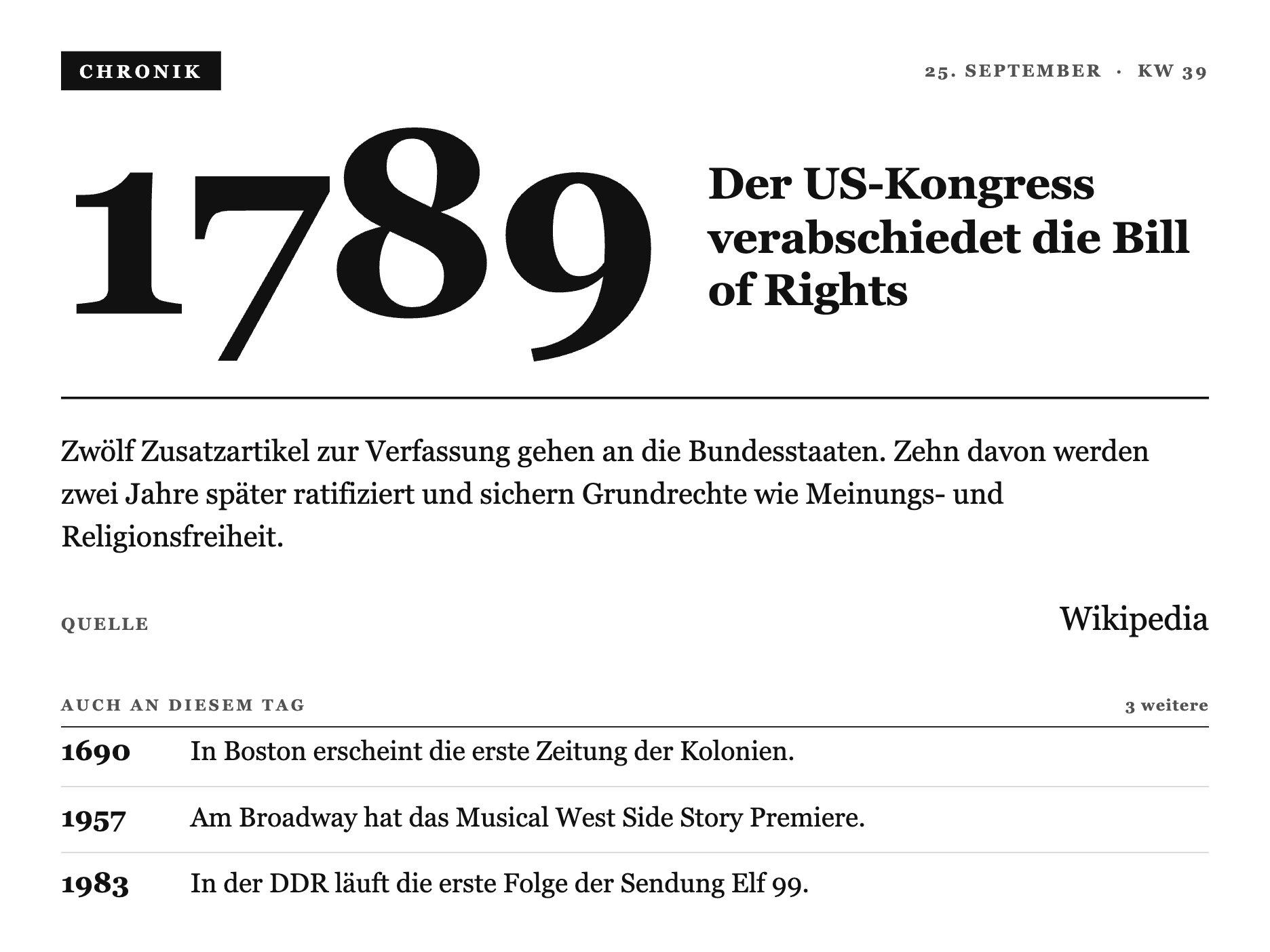
Ein historisches Ereignis von heute, täglich frisch aus dem deutschen Wikipedia-Feed. Der Screen holt sich alles selbst von einer öffentlichen Adresse, du brauchst keinen eigenen Server und kein Smart Home.
So baust du sie:
- Private Plugin anlegen, Strategy Polling.
- Als Polling URL
https://alles-automatisch.de/trmnl/on-this-day.jsoneintragen, Verb GET. - Refresh-Intervall auf 60 Minuten, öfter bringt nichts.
- Den kompletten Code unten ins Feld Full einfügen.
- In die Playlist ziehen.
Daten: Es gibt nichts einzurichten und keinen Befehl abzusetzen. Weil dieser Screen Polling nutzt (nicht Webhook), holt sich das Display die Daten selbst von der angegebenen Adresse. Die URL ist öffentlich und wird viermal am Tag neu gebaut.
Kompletter Code (ins Feld Full kopieren)
1{%- comment -%}
2 X-Design-Sprache v3 "Akte / Almanach" - MASTER core primitives for the TRMNL X demo suite
3 (10.3" e-ink, 1040x780 @ 1.8x = 1872x1404, 16 grays). Pure CSS, AUTO-PREPENDED per view.
4
5 Derived from Daniel's Ortsakte (x-lostplace): ONE serifed face throughout (deliberately NOT
6 Inter), hierarchy from size + case + tracking + hairline rules, an inverted ink STAMP as the
7 single accent per screen, dense asymmetric composition that fills the sheet. A printed record.
8
9 Each view copies THESE primitives into its own src/shared.liquid and adds its view-specific
10 classes below them. Reference implementations: x-uhr (hero), x-kalender (dense list).
11
12 x-history ("Chronik / Kalenderblatt"): the .h-* classes below build a dense almanach page -
13 masthead stamp, the year as a monumental serif numeral next to the headline, the day's main
14 entry filed like an Aktennotiz with a QUELLE citation row (reuses .x-row), then a ruled
15 "Auch an diesem Tag" ledger of further years. No 7-segment digits here (that's x-uhr's
16 bespoke clock face) - the hero is a plain serif numeral, per the Chronik's editorial register.
17{%- endcomment -%}
18<style>
19 :root {
20 --x-paper: #FFFFFF;
21 --x-ink: #111111;
22 --x-mute: #525252;
23 --x-line: #D6D6D6;
24 --x-fill: #111111;
25 }
26
27 .x-canvas {
28 box-sizing: border-box;
29 width: 100%; height: 100%;
30 display: flex; flex-direction: column;
31 padding: 32px 40px;
32 background: var(--x-paper);
33 color: var(--x-ink);
34 font-family: Georgia, "Times New Roman", "Iowan Old Style", serif;
35 font-feature-settings: "tnum" 1, "lnum" 1;
36 }
37
38 /* ---- Masthead: inverted stamp left, kapitaelchen meta right ---- */
39 .x-top { display: flex; align-items: center; justify-content: space-between; gap: 20px; }
40 .x-stamp {
41 display: inline-block; background: var(--x-fill); color: var(--x-paper);
42 font-size: 15px; font-weight: 700; letter-spacing: 0.2em; text-transform: uppercase;
43 padding: 8px 15px 7px;
44 }
45 .x-metacap { font-size: 14px; font-weight: 700; letter-spacing: 0.14em; text-transform: uppercase; color: var(--x-mute); }
46
47 /* ---- Kapitaelchen section/field label ---- */
48 .x-cap { display: block; font-size: 13px; font-weight: 700; letter-spacing: 0.18em; text-transform: uppercase; color: var(--x-mute); }
49
50 /* ---- A large serifed display line (date, name, headline) ---- */
51 .x-display { margin: 20px 0 0; font-size: 62px; font-weight: 400; line-height: 0.98; letter-spacing: -0.015em; color: var(--x-ink); }
52 .x-display b { font-weight: 700; }
53
54 /* ---- Rules ---- */
55 .x-rule { border-top: 2px solid var(--x-ink); }
56 .x-hairline { border-top: 1px solid var(--x-ink); }
57
58 /* ---- Section header: kapitaelchen label + a small count, underlined by an ink hairline ---- */
59 .x-sec { display: flex; align-items: baseline; justify-content: space-between; gap: 12px; padding-bottom: 10px; border-bottom: 1px solid var(--x-ink); }
60 .x-sec__n { font-size: 13px; font-weight: 700; letter-spacing: 0.06em; color: var(--x-mute); font-variant-numeric: tabular-nums; }
61
62 /* ---- Ledger row: label left, value right, ruled with a faint hairline ---- */
63 .x-row { display: flex; align-items: baseline; justify-content: space-between; gap: 18px; padding: 14px 0; border-bottom: 1px solid var(--x-line); }
64 .x-row:last-child { border-bottom: 0; }
65 .x-row__k { flex: 0 0 auto; font-size: 14px; font-weight: 700; letter-spacing: 0.12em; text-transform: uppercase; color: var(--x-mute); }
66 .x-row__v { flex: 0 0 auto; text-align: right; font-size: 27px; font-weight: 400; color: var(--x-ink); font-variant-numeric: tabular-nums; }
67
68 /* Views add their own .<v>-* classes below this block. */
69
70 /* ==========================================================================================
71 x-history ".h-*" - Chronik / Kalenderblatt
72 ========================================================================================== */
73
74 /* ---- Hero: the year as a monumental serif numeral, headline filed flush beside it ---- */
75 .h-hero { display: flex; align-items: flex-end; gap: 40px; margin-top: 26px; margin-bottom: 58px; }
76 .h-year {
77 flex: 0 0 auto;
78 font-size: 214px; font-weight: 700; line-height: 0.78; letter-spacing: -0.02em;
79 color: var(--x-ink);
80 }
81 .h-headline {
82 flex: 1 1 auto; min-width: 0; margin: 0 0 8px;
83 font-size: 36px; font-weight: 700; line-height: 1.2; letter-spacing: -0.005em;
84 color: var(--x-ink);
85 }
86
87 /* ---- Main entry: the Aktennotiz body, then a QUELLE citation (reuses .x-row) ---- */
88 .h-main { margin-top: 26px; }
89 .h-fakt { margin: 0; max-width: 74ch; font-size: 24px; font-weight: 400; line-height: 1.45; color: var(--x-ink); }
90 .h-main .x-row { margin-top: 18px; padding: 16px 0; }
91
92 /* ---- "Auch an diesem Tag": a ruled ledger of further years, spaced to close the sheet.
93 The list is a flex column that distributes the remaining canvas height BETWEEN rows
94 (space-between), so the ledger reads as generously set almanach entries running all the
95 way to the foot of the page, not a cramped list stranded above blank paper. ---- */
96 .h-sec-wrap { margin-top: 32px; flex: 1 1 auto; display: flex; flex-direction: column; min-height: 0; }
97 .h-list { flex: 1 1 auto; display: flex; flex-direction: column; justify-content: space-between; min-height: 0; padding-top: 6px; }
98 .h-item { display: flex; align-items: baseline; gap: 22px; padding-bottom: 14px; border-bottom: 1px solid var(--x-line); }
99 .h-item:last-child { border-bottom: 0; padding-bottom: 0; }
100 .h-item__y { flex: 0 0 auto; width: 84px; font-size: 23px; font-weight: 700; color: var(--x-ink); font-variant-numeric: tabular-nums; }
101 .h-item__t { flex: 1 1 auto; min-width: 0; font-size: 22px; font-weight: 400; line-height: 1.28; color: var(--x-ink); }
102
103 /* ---- OG (800x480, 1-bit): reduced sheet - year + headline + main entry only ---- */
104 .screen--og .h-og-hide { display: none; }
105 .screen--og .x-canvas { padding: 20px 26px; }
106 .screen--og .h-hero { margin-top: 10px; margin-bottom: 20px; gap: 18px; }
107 .screen--og .h-year { font-size: 96px; line-height: 0.82; }
108 .screen--og .h-headline { font-size: 21px; line-height: 1.22; margin-bottom: 3px; }
109 .screen--og .h-main { margin-top: 12px; }
110 .screen--og .h-fakt { font-size: 15px; line-height: 1.35; }
111 .screen--og .h-main .x-row { margin-top: 8px; padding: 8px 0; }
112 .screen--og .h-main .x-row__v { font-size: 18px; }
113</style>
114
115{%- comment -%}
116 Heute in der Geschichte - "Chronik / Kalenderblatt", v3 "Akte / Almanach". A dense
117 almanach page for the household's demo day. Masthead: stamp "CHRONIK" left, date + KW
118 right. Hero: the year set as a monumental serif numeral, the headline filed flush beside
119 it at the baseline. Below the rule: the main entry's body text like an Aktennotiz, with
120 a QUELLE citation row (reuses the shared .x-row ledger pattern). The lower sheet is a
121 ruled "Auch an diesem Tag" ledger of further years, each in the same aligned year column
122 as the item text - fills the sheet densely, one serif face throughout, one stamp accent.
123
124 Merge variables: datum, kw, jahr, titel, text, quelle, weitere[] (each { jahr, was }).
125 shared.liquid (v3 tokens + .h-* Chronik classes) is AUTO-PREPENDED, so this file is
126 markup only, no {% include %} / {% render %}.
127{%- endcomment -%}
128 <div class="x-canvas">
129
130 <div class="x-top">
131 <span class="x-stamp">Chronik</span>
132 <span class="x-metacap">{{ datum }} · KW {{ kw }}</span>
133 </div>
134
135 <div class="h-hero">
136 <span class="h-year">{{ jahr }}</span>
137 <h1 class="h-headline">{{ titel }}</h1>
138 </div>
139
140 <div class="x-rule"></div>
141
142 <div class="h-main">
143 <p class="h-fakt">{{ text }}</p>
144 <div class="x-row">
145 <span class="x-row__k">Quelle</span>
146 <span class="x-row__v">{{ quelle }}</span>
147 </div>
148 </div>
149
150 {%- if weitere and weitere.size > 0 -%}
151 <div class="h-sec-wrap h-og-hide">
152 <div class="x-sec">
153 <span class="x-cap">Auch an diesem Tag</span>
154 <span class="x-sec__n">{{ weitere | size }} weitere</span>
155 </div>
156 <div class="h-list">
157 {%- for w in weitere -%}
158 <div class="h-item">
159 <span class="h-item__y">{{ w.jahr }}</span>
160 <span class="h-item__t">{{ w.was }}</span>
161 </div>
162 {%- endfor -%}
163 </div>
164 </div>
165 {%- endif -%}
166
167 </div>Müllabfuhr (Bin Day)
Einsteiger, kein HA nötig · Strategy Webhook
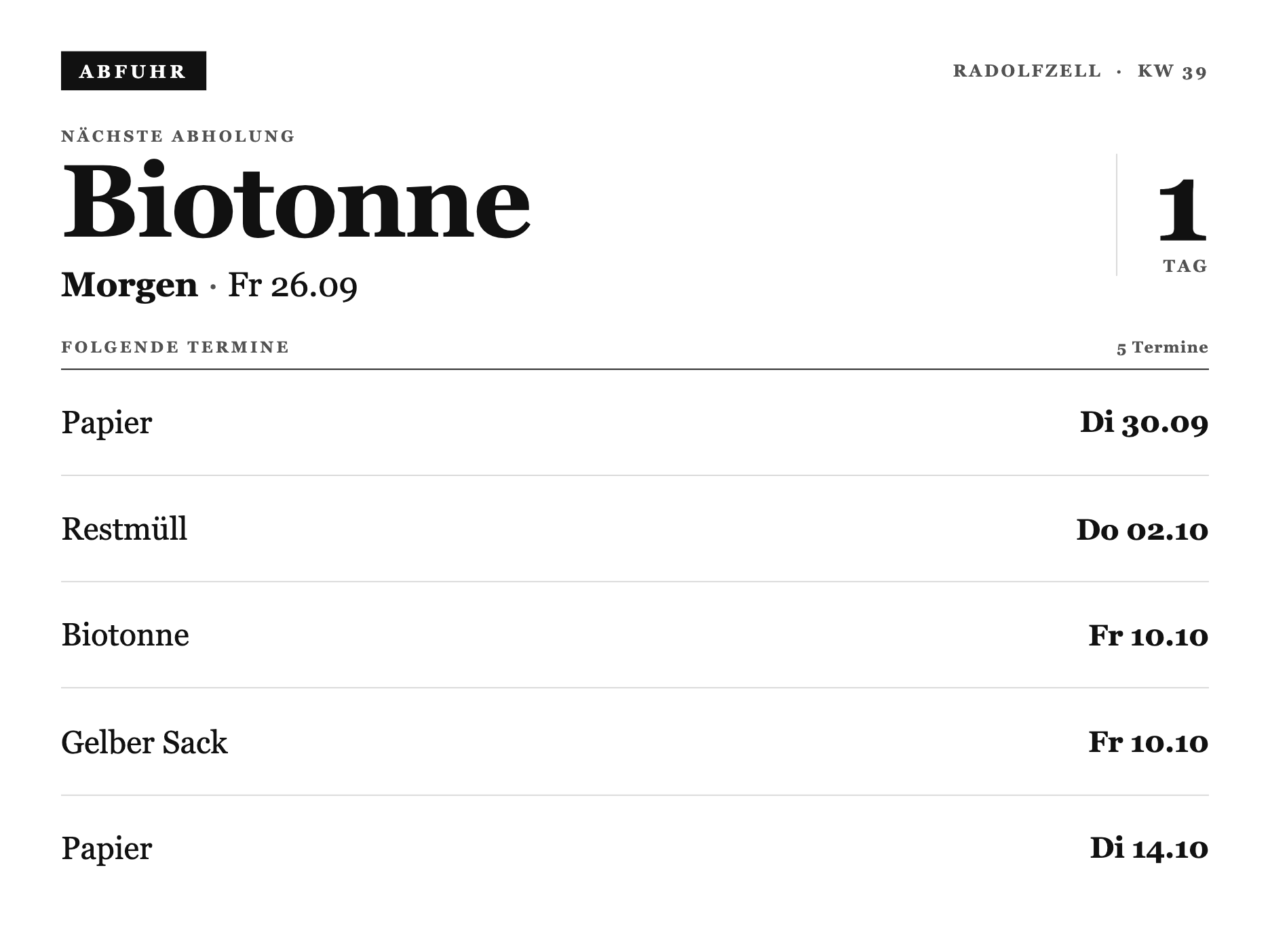
Zeigt, welche Tonne als Nächstes rauskommt, plus die kommenden Termine. Du fütterst die Liste einmal, danach steht der Screen. Zum Aktualisieren schickst du den Befehl mit neuen Werten einfach nochmal.
So baust du sie:
- Private Plugin anlegen, Strategy Webhook, speichern.
- Den kompletten Code unten ins Feld Full einfügen.
- Die Webhook-URL kopieren und die Termine einmal schicken (Befehl unten).
- In die Playlist ziehen.
Daten setzen (einmal):
curl -X POST "DEINE_WEBHOOK_URL" -H "Content-Type: application/json" -d '{"merge_variables": {"ort": "Radolfzell", "kw": "39", "naechste_tonne": "Biotonne", "naechste_wann": "morgen · Fr 26.09", "naechste_in": "1", "folgende": [{"tonne": "Papier", "datum": "Di 30.09"}, {"tonne": "Restmüll", "datum": "Do 02.10"}, {"tonne": "Biotonne", "datum": "Fr 10.10"}, {"tonne": "Gelber Sack", "datum": "Fr 10.10"}, {"tonne": "Papier", "datum": "Di 14.10"}]}}'Die Felder oben sind die nächste Abholung und die weiteren Termine. Wer das automatisch aus einem Abfuhr-Kalender füttern will, findet das Muster im Guide TRMNL mit Home Assistant verbinden.
Kompletter Code (ins Feld Full kopieren)
1{%- comment -%}
2 X-Design-Sprache v3 "Akte / Almanach" - shared for x-muell (Abfuhrkalender). One serifed
3 face throughout, kapitaelchen labels, the inverted stamp as the single accent (masthead
4 only - the next-collection date stays plain ink, never a second accent). Hero: a bespoke
5 line-drawn bin/sack glyph next to the huge tonne name and the days-to-go count. Below, a
6 ruled ledger of upcoming pickups with dates in a fixed right column, closed by a four-cell
7 legend of the bin family (echoes x-kalender's week footer). Auto-prepended; full.liquid is
8 markup only.
9{%- endcomment -%}
10<style>
11 :root {
12 --x-paper: #FFFFFF;
13 --x-ink: #111111;
14 --x-mute: #525252;
15 --x-line: #D6D6D6;
16 --x-fill: #111111;
17 }
18
19 .x-canvas {
20 box-sizing: border-box;
21 width: 100%; height: 100%;
22 display: flex; flex-direction: column;
23 padding: 32px 40px;
24 background: var(--x-paper);
25 color: var(--x-ink);
26 font-family: Georgia, "Times New Roman", "Iowan Old Style", serif;
27 font-feature-settings: "tnum" 1;
28 }
29
30 /* ---- v3 core primitives ---- */
31 .x-top { display: flex; align-items: center; justify-content: space-between; gap: 20px; }
32 .x-stamp {
33 display: inline-block; background: var(--x-fill); color: var(--x-paper);
34 font-size: 15px; font-weight: 700; letter-spacing: 0.2em; text-transform: uppercase;
35 padding: 8px 15px 7px;
36 }
37 .x-metacap { font-size: 14px; font-weight: 700; letter-spacing: 0.14em; text-transform: uppercase; color: var(--x-mute); }
38 .x-cap { display: block; font-size: 13px; font-weight: 700; letter-spacing: 0.18em; text-transform: uppercase; color: var(--x-mute); }
39 .x-display { margin: 20px 0 0; font-size: 62px; font-weight: 400; line-height: 0.98; letter-spacing: -0.015em; color: var(--x-ink); }
40 .x-display b { font-weight: 700; }
41 .x-rule { border-top: 2px solid var(--x-ink); }
42 .x-hairline { border-top: 1px solid var(--x-ink); }
43 .x-sec { display: flex; align-items: baseline; justify-content: space-between; gap: 12px; padding-bottom: 10px; border-bottom: 1px solid var(--x-ink); }
44 .x-sec__n { font-size: 13px; font-weight: 700; letter-spacing: 0.06em; color: var(--x-mute); font-variant-numeric: tabular-nums; }
45
46 /* ---- Hero: tonne name + when | days-to-go, type only ---- */
47 .m-hero { display: flex; align-items: center; justify-content: space-between; gap: 32px; padding: 30px 0 28px; }
48 .m-hero-body { flex: 1; min-width: 0; }
49 .m-hero-tonne { margin: 8px 0 0; font-size: 84px; font-weight: 700; line-height: 0.9; letter-spacing: -0.02em; }
50 .m-hero-when { margin-top: 14px; font-size: 28px; font-weight: 400; color: var(--x-ink); }
51 .m-hero-when b { font-weight: 700; }
52 .m-hero-when .m-sep { color: var(--x-mute); margin: 0 8px; }
53 .m-hero-count { flex: 0 0 auto; text-align: right; padding-left: 30px; border-left: 1px solid var(--x-line); }
54 .m-hero-count__n { display: block; font-size: 92px; font-weight: 700; line-height: 0.85; font-variant-numeric: tabular-nums; }
55 .m-hero-count__u { display: block; margin-top: 6px; font-size: 14px; font-weight: 700; letter-spacing: 0.14em; text-transform: uppercase; color: var(--x-mute); }
56
57 /* ---- Ledger: name left, date in a fixed right column; rows fill the sheet evenly ---- */
58 .m-list { flex: 1; display: flex; flex-direction: column; min-height: 0; }
59 .m-row { flex: 1; display: flex; align-items: center; justify-content: space-between; gap: 16px; border-bottom: 1px solid var(--x-line); }
60 .m-row:last-child { border-bottom: 0; }
61 .m-row__name { flex: 1; min-width: 0; font-size: 26px; font-weight: 400; overflow: hidden; text-overflow: ellipsis; white-space: nowrap; }
62 .m-row__date { flex: 0 0 auto; width: 140px; text-align: right; font-size: 24px; font-weight: 700; letter-spacing: -0.005em; font-variant-numeric: tabular-nums; }
63
64 /* ---- OG (800x480): hero compressed, list capped at 3 ---- */
65 .screen--og .x-canvas { padding: 20px 26px; }
66 .screen--og .m-hero { padding: 14px 0 16px; }
67 .screen--og .m-hero-tonne { font-size: 46px; }
68 .screen--og .m-hero-when { font-size: 18px; margin-top: 8px; }
69 .screen--og .m-hero-count { padding-left: 18px; }
70 .screen--og .m-hero-count__n { font-size: 50px; }
71 .screen--og .m-hero-count__u { font-size: 11px; margin-top: 3px; }
72 .screen--og .x-sec { padding-bottom: 6px; }
73 .screen--og .m-row__name { font-size: 19px; }
74 .screen--og .m-row__date { width: 104px; font-size: 17px; }
75 .screen--og .m-row:nth-child(n+4) { display: none; }
76
77 /* Views add their own .<v>-* classes below this block. */
78</style>
79
80{%- comment -%}
81 Abfuhrplan als Almanach-Blatt - v3 "Akte / Almanach", type-only. Editorial masthead with the
82 inverted stamp (the ONE accent), a hero that answers "which bin, when, in how many days" in
83 pure type (tonne name huge, the wann line, the days-to-go count in a fixed right column), then
84 a ruled ledger of the upcoming pickups that fills the sheet evenly (name left, date in a fixed
85 right column). No pictograms - the suite carries meaning through type. shared.liquid is
86 auto-prepended.
87{%- endcomment -%}
88{%- assign wann_parts = naechste_wann | split: " · " -%}
89{%- assign wann_wort = wann_parts[0] | capitalize -%}
90{%- assign wann_datum = wann_parts[1] | default: "" -%}
91{%- assign tag_wort = "Tage" -%}
92{%- if naechste_in == "1" -%}{%- assign tag_wort = "Tag" -%}{%- endif -%}
93
94 <div class="x-canvas">
95
96 <div class="x-top">
97 <span class="x-stamp">Abfuhr</span>
98 <span class="x-metacap">{{ ort }} · KW {{ kw }}</span>
99 </div>
100
101 {%- comment -%} ---- HERO: which bin, when, in how many days ---- {%- endcomment -%}
102 <div class="m-hero">
103 <div class="m-hero-body">
104 <span class="x-cap">Nächste Abholung</span>
105 <div class="m-hero-tonne">{{ naechste_tonne }}</div>
106 <div class="m-hero-when"><b>{{ wann_wort }}</b>{% if wann_datum != "" %}<span class="m-sep">·</span>{{ wann_datum }}{% endif %}</div>
107 </div>
108 <div class="m-hero-count">
109 <span class="m-hero-count__n">{{ naechste_in }}</span>
110 <span class="m-hero-count__u">{{ tag_wort }}</span>
111 </div>
112 </div>
113
114 {%- comment -%} ---- LEDGER: upcoming pickups, filling the sheet evenly ---- {%- endcomment -%}
115 <div class="x-sec">
116 <span class="x-cap">Folgende Termine</span>
117 <span class="x-sec__n">{{ folgende | size }} Termine</span>
118 </div>
119 <div class="m-list">
120 {%- for f in folgende -%}
121 <div class="m-row">
122 <span class="m-row__name">{{ f.tonne }}</span>
123 <span class="m-row__date">{{ f.datum }}</span>
124 </div>
125 {%- endfor -%}
126 </div>
127
128 </div>Hero Clock (Uhr mit Wetter)
Fortgeschritten, mit Home Assistant · Strategy Webhook
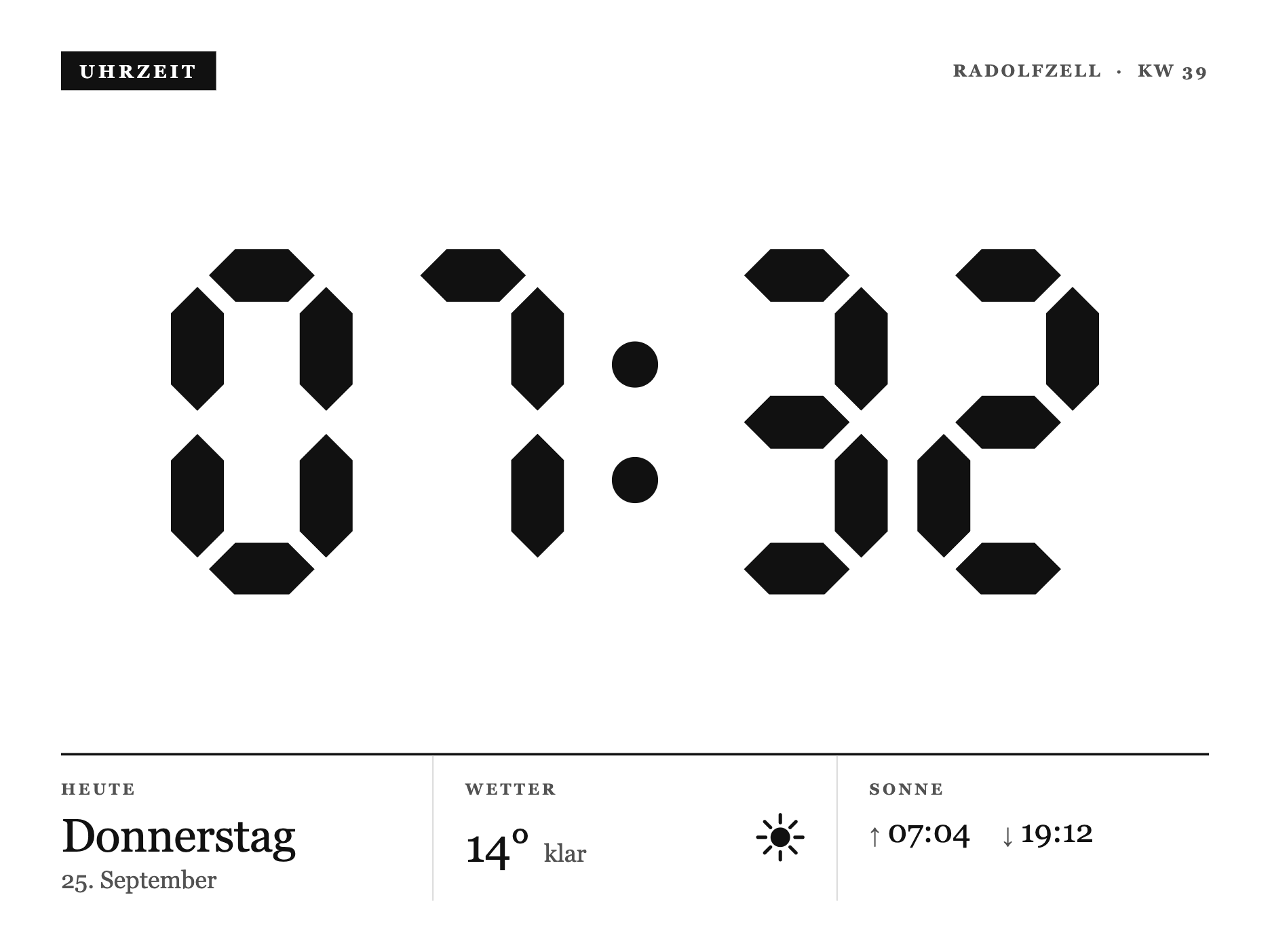
Eine große Segment-Uhr und darunter ein Info-Band mit Wochentag, Temperatur und Sonnenzeiten. Hier pusht Home Assistant die Werte, du brauchst also ein laufendes HA.
So baust du sie:
- Private Plugin anlegen, Strategy Webhook, speichern.
- Den kompletten Code unten ins Feld Full einfügen.
- In Home Assistant einen
rest_commandbauen, der Zeit und Wetter pusht (Beispiel unten). - Per Automation alle 15 Minuten triggern, in die Playlist ziehen.
Daten aus Home Assistant: Trag deine Webhook-URL ein und passe die Sensor-Namen an dein Setup an.
1rest_command:
2  trmnl_uhr:
3    url: "DEINE_WEBHOOK_URL"
4    method: POST
5    content_type: "application/json"
6    payload: >-
7      {"merge_variables": {"time": "{{ now().strftime('%H:%M') }}", "weekday": "{{ now().strftime('%A') }}", "datum": "{{ now().day }}.", "kw": "{{ now().isocalendar()[1] }}", "ort": "Zuhause", "temp": "{{ states('sensor.aussentemperatur') | float(0) | round(0) | int }}", "desc": "{{ states('weather.home') }}", "sunrise": "{{ as_timestamp(state_attr('sun.sun','next_rising')) | timestamp_custom('%H:%M') }}", "sunset": "{{ as_timestamp(state_attr('sun.sun','next_setting')) | timestamp_custom('%H:%M') }}"}}
Den kompletten Aufbau mit Automation und Rate-Limits findest du im Guide TRMNL mit Home Assistant verbinden.
Kompletter Code (ins Feld Full kopieren)
1{%- comment -%}
2 X-Design-Sprache v3 "Akte / Almanach" - shared for x-uhr. One serifed face throughout,
3 kapitaelchen labels, an inverted stamp as the single accent, hairline rules. The bespoke
4 7-segment clock is kept as the hero (drawn, not a font), framed by an editorial masthead
5 and a dense info band (Datum / Wetter / Sonne). Auto-prepended; full.liquid is markup only.
6{%- endcomment -%}
7<style>
8 :root {
9 --x-paper: #FFFFFF;
10 --x-ink: #111111;
11 --x-mute: #525252;
12 --x-line: #D6D6D6;
13 --x-fill: #111111;
14 }
15
16 .x-canvas {
17 box-sizing: border-box;
18 width: 100%; height: 100%;
19 display: flex; flex-direction: column;
20 padding: 32px 40px;
21 background: var(--x-paper);
22 color: var(--x-ink);
23 font-family: Georgia, "Times New Roman", "Iowan Old Style", serif;
24 font-feature-settings: "tnum" 1;
25 }
26
27 /* ---- v3 core primitives ---- */
28 .x-top { display: flex; align-items: center; justify-content: space-between; gap: 20px; }
29 .x-stamp {
30 display: inline-block; background: var(--x-fill); color: var(--x-paper);
31 font-size: 15px; font-weight: 700; letter-spacing: 0.2em; text-transform: uppercase;
32 padding: 8px 15px 7px;
33 }
34 .x-metacap { font-size: 14px; font-weight: 700; letter-spacing: 0.14em; text-transform: uppercase; color: var(--x-mute); }
35 .x-cap { display: block; font-size: 13px; font-weight: 700; letter-spacing: 0.18em; text-transform: uppercase; color: var(--x-mute); }
36 .x-rule { border-top: 2px solid var(--x-ink); }
37 .x-hairline { border-top: 1px solid var(--x-ink); }
38
39 /* ---- Clock hero: bespoke segment digits, centered in the upper band ---- */
40 .u-clock { flex: 1; display: flex; align-items: center; justify-content: center; min-height: 0; padding: 14px 0; }
41 .u-clock svg { display: block; width: 100%; max-width: 760px; height: auto; }
42
43 /* ---- Info band: three ruled cells under the rule ---- */
44 .u-band { display: flex; border-top: 2px solid var(--x-ink); }
45 .u-cell { flex: 1; padding: 20px 26px 6px; border-right: 1px solid var(--x-line); }
46 .u-cell:first-child { padding-left: 0; }
47 .u-cell:last-child { border-right: 0; padding-right: 0; }
48 .u-val { margin-top: 12px; display: flex; align-items: baseline; gap: 12px; }
49 .u-val__big { font-size: 38px; font-weight: 400; line-height: 1; letter-spacing: -0.01em; font-variant-numeric: tabular-nums; }
50 .u-val__sub { font-size: 20px; color: var(--x-mute); }
51 .u-sun { margin-top: 12px; font-size: 26px; font-weight: 400; font-variant-numeric: tabular-nums; display: flex; gap: 26px; }
52 .u-sun span { color: var(--x-mute); font-size: 18px; margin-right: 6px; }
53 .u-glyph { width: 40px; height: 40px; flex: 0 0 auto; }
54
55 /* ---- OG (800x480): smaller clock, tighter band ---- */
56 .screen--og .x-canvas { padding: 20px 26px; }
57 .screen--og .u-clock svg { max-width: 520px; }
58 .screen--og .u-cell { padding: 14px 18px 4px; }
59 .screen--og .u-val__big { font-size: 27px; }
60 .screen--og .u-val__sub { font-size: 15px; }
61 .screen--og .u-sun { font-size: 19px; }
62</style>
63
64{%- comment -%}
65 Uhr als Almanach-Blatt - v3 "Akte / Almanach". Editorial masthead with an inverted stamp,
66 the bespoke 7-segment clock (B2, no ghost - only lit segments) as the drawn hero, then a
67 dense three-cell info band: Heute (Wochentag + Datum), Wetter (Temp + Glyph), Sonne
68 (Auf/Unter). One serifed face, one stamp accent. shared.liquid is auto-prepended.
69
70 Segment map per digit (a=top, b=top-right, c=bottom-right, d=bottom, e=bottom-left,
71 f=top-left, g=middle). ON = ink fill, OFF = nothing.
72{%- endcomment -%}
73{%- assign segmaps = "abcdef,bc,abdeg,abcdg,bcfg,acdfg,acdefg,abc,abcdefg,abcdfg" | split: "," -%}
74{%- assign i1 = time | slice: 0, 1 | plus: 0 -%}
75{%- assign i2 = time | slice: 1, 1 | plus: 0 -%}
76{%- assign i3 = time | slice: 3, 1 | plus: 0 -%}
77{%- assign i4 = time | slice: 4, 1 | plus: 0 -%}
78{%- assign ons = segmaps[i1] | append: "|" | append: segmaps[i2] | append: "|" | append: segmaps[i3] | append: "|" | append: segmaps[i4] | split: "|" -%}
79{%- assign offs = "0,128,324,452" | split: "," -%}
80{%- comment -%} "1" belegt im 7-Segment nur die rechten Segmente (Bar bei x~94). Damit Zeiten
81 mit 1 nicht außermittig wirken, die 1 in ihrer Zelle zentrieren (Bar -> Zellmitte, dx -39). {%- endcomment -%}
82{%- assign digs = i1 | append: "," | append: i2 | append: "," | append: i3 | append: "," | append: i4 | split: "," -%}
83 <div class="x-canvas">
84
85 <div class="x-top">
86 <span class="x-stamp">Uhrzeit</span>
87 <span class="x-metacap">{{ ort }} · KW {{ kw }}</span>
88 </div>
89
90 <div class="u-clock">
91 <svg viewBox="0 0 562 210" role="img" aria-label="{{ time }} Uhr">
92 {%- for on in ons -%}
93 {%- assign tx = offs[forloop.index0] -%}
94 {%- if digs[forloop.index0] == "1" -%}{%- assign tx = tx | minus: 39 -%}{%- endif -%}
95 <g transform="translate({{ tx }},0)">
96 <polygon points="23,16 39,0 71,0 87,16 71,32 39,32" style="fill:{% if on contains 'a' %}var(--x-ink){% else %}none{% endif %};"/>
97 <polygon points="94,23 110,39 110,82 94,98 78,82 78,39" style="fill:{% if on contains 'b' %}var(--x-ink){% else %}none{% endif %};"/>
98 <polygon points="94,112 110,128 110,171 94,187 78,171 78,128" style="fill:{% if on contains 'c' %}var(--x-ink){% else %}none{% endif %};"/>
99 <polygon points="23,194 39,178 71,178 87,194 71,210 39,210" style="fill:{% if on contains 'd' %}var(--x-ink){% else %}none{% endif %};"/>
100 <polygon points="16,112 32,128 32,171 16,187 0,171 0,128" style="fill:{% if on contains 'e' %}var(--x-ink){% else %}none{% endif %};"/>
101 <polygon points="16,23 32,39 32,82 16,98 0,82 0,39" style="fill:{% if on contains 'f' %}var(--x-ink){% else %}none{% endif %};"/>
102 <polygon points="23,105 39,89 71,89 87,105 71,121 39,121" style="fill:{% if on contains 'g' %}var(--x-ink){% else %}none{% endif %};"/>
103 </g>
104 {%- endfor -%}
105 <circle cx="281" cy="70" r="14" style="fill:var(--x-ink);"/>
106 <circle cx="281" cy="140" r="14" style="fill:var(--x-ink);"/>
107 </svg>
108 </div>
109
110 <div class="u-band">
111 <div class="u-cell">
112 <span class="x-cap">Heute</span>
113 <div class="u-val">
114 <span class="u-val__big">{{ weekday }}</span>
115 </div>
116 <div class="u-val__sub" style="margin-top:6px;">{{ datum }}</div>
117 </div>
118 <div class="u-cell">
119 <span class="x-cap">Wetter</span>
120 <div class="u-val">
121 <span class="u-val__big">{{ temp }}°</span>
122 <span class="u-val__sub">{{ desc }}</span>
123 <svg class="u-glyph" viewBox="0 0 100 100" role="img" aria-label="{{ desc }}" style="margin-left:auto;">
124 <circle cx="50" cy="50" r="20" style="fill:var(--x-ink);"/>
125 {%- assign rays = "50,4,50,20|50,80,50,96|4,50,20,50|80,50,96,50|18,18,30,30|70,70,82,82|18,82,30,70|70,30,82,18" | split: "|" -%}
126 {%- for r in rays -%}{%- assign p = r | split: "," -%}<line x1="{{p[0]}}" y1="{{p[1]}}" x2="{{p[2]}}" y2="{{p[3]}}" style="stroke:var(--x-ink);stroke-width:7;stroke-linecap:round;"/>{%- endfor -%}
127 </svg>
128 </div>
129 </div>
130 <div class="u-cell">
131 <span class="x-cap">Sonne</span>
132 <div class="u-sun">
133 <div><span>↑</span>{{ sunrise }}</div>
134 <div><span>↓</span>{{ sunset }}</div>
135 </div>
136 </div>
137 </div>
138
139 </div>Sky Report (Wetter)
Fortgeschritten, mit Home Assistant · Strategy Webhook
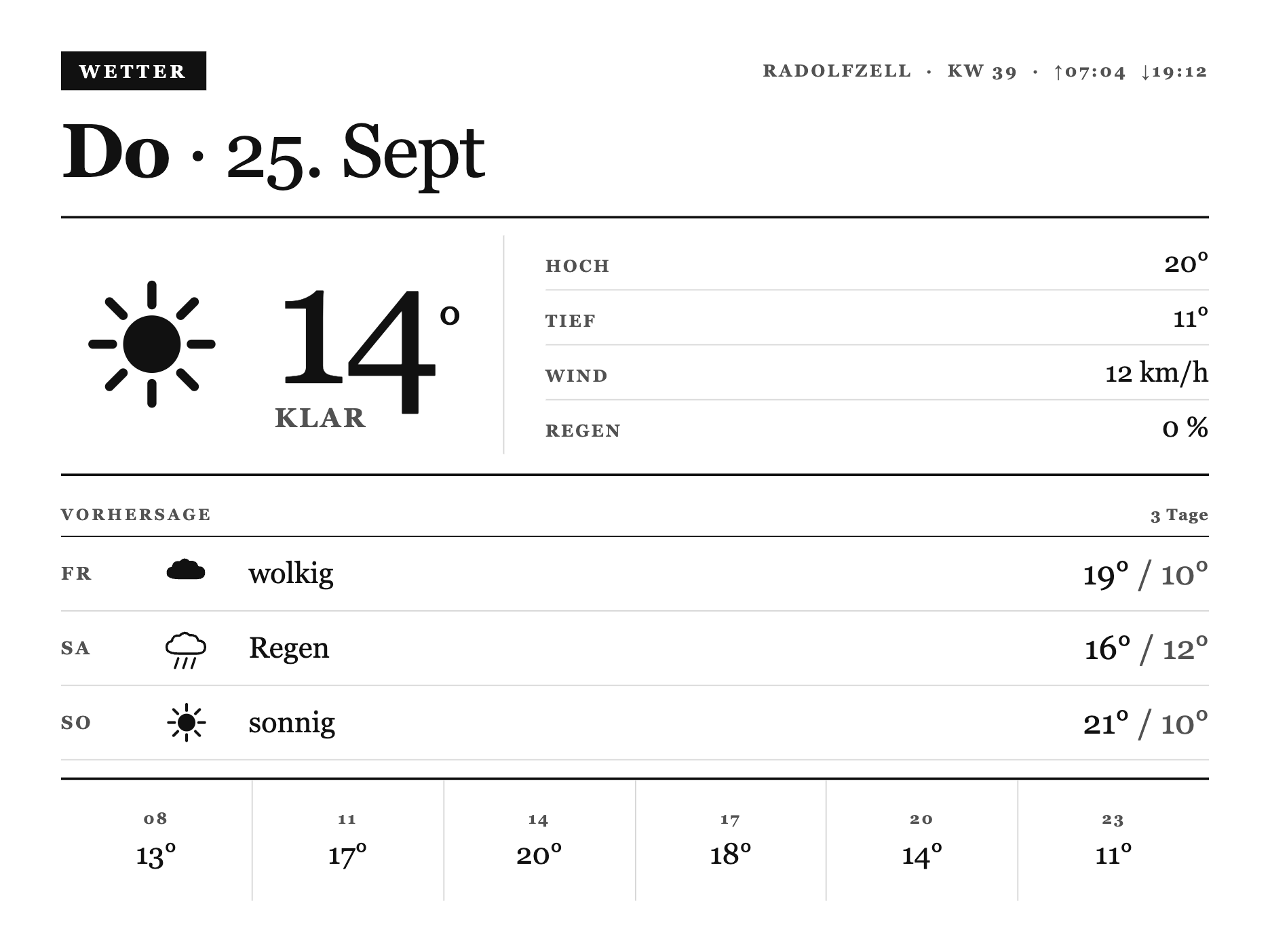
Aktuelle Temperatur mit Symbol, ein Fakten-Ledger, die 3-Tage-Vorschau und ein Stundenstreifen. Die Daten kommen von Open-Meteo über Home Assistant, ein API-Key ist nicht nötig.
So baust du sie:
- Private Plugin anlegen, Strategy Webhook, speichern.
- Den kompletten Code unten ins Feld Full einfügen.
- In Home Assistant drei Open-Meteo-Sensoren anlegen (aktuell, täglich, stündlich) und per
rest_commandpushen. - Per Automation alle 30 Minuten triggern, in die Playlist ziehen.
Daten aus Home Assistant: Das Wetter kommt von Open-Meteo, kostenlos und ohne Anmeldung. Der Screen erwartet aktuelle Werte plus eine 3-Tage-Liste und einen Stundenstreifen. So sieht die Form aus:
{"merge_variables": {"ort": "Radolfzell", "kw": "39", "tag": "Do · 25. Sept", "temp": "14", "desc": "klar", "hoch": "20", "tief": "11", "wind": "12 km/h", "regen": "0 %", "sonne_auf": "07:04", "sonne_ab": "19:12", "tage": [{"tag": "Fr", "glyph": "cloud", "desc": "wolkig", "hoch": "19", "tief": "10"}], "stunden": [{"h": "08", "t": "13"}, {"h": "11", "t": "17"}]}}Der rest_command in Home Assistant sieht so aus (die Webhook-URL durch deine eigene ersetzen):
1rest_command:
2  trmnl_wetter:
3    url: "DEINE_WEBHOOK_URL"
4    method: POST
5    content_type: "application/json"
6    payload: >-
7      {"merge_variables": {"ort": "{{ state_attr('zone.home', 'friendly_name') or 'Zuhause' }}", "kw": "{{ now().isocalendar()[1] }}", "tag": "{{ now().strftime('%a') }} · {{ now().strftime('%-d. %b') }}", "temp": "{{ states('sensor.openmeteo_temperature') | float(0) | round(0) }}", "desc": "{{ states('weather.openmeteo') }}", "hoch": "{{ state_attr('weather.openmeteo','temperature') | float(0) | round(0) }}", "tief": "{{ state_attr('weather.openmeteo','templow') | float(0) | round(0) }}", "wind": "{{ state_attr('weather.openmeteo','wind_speed') | float(0) | round(0) }} km/h", "regen": "{{ state_attr('weather.openmeteo','humidity') }} %"}}
Hinweis: Passe die Entity-IDs an dein Setup an. Das komplette Package mit Tagesvorschau und Stundenstreifen steht im Guide TRMNL mit Home Assistant verbinden.
Kompletter Code (ins Feld Full kopieren)
1{%- comment -%}
2 X-Design-Sprache v3 "Akte / Almanach" - shared for x-wetter. Master core primitives
3 (copied verbatim from x-shared/shared.liquid, see that file's header) plus .w-* Wetter-
4 bericht additions: a ruled hero band (bespoke inline-SVG glyph + huge temp, beside a fact
5 stack that reuses the core .x-row), a ruled 3-day forecast list, and a closing hourly-
6 temperature strip (same footer grammar as x-kalender's .k-week). One serifed face
7 throughout, one inverted stamp accent. OG (800x480) overrides live in full.liquid's own
8 <style> (drops the hourly strip + two facts, shrinks the rest). Auto-prepended; full.liquid
9 is markup only.
10{%- endcomment -%}
11<style>
12 :root {
13 --x-paper: #FFFFFF;
14 --x-ink: #111111;
15 --x-mute: #525252;
16 --x-line: #D6D6D6;
17 --x-fill: #111111;
18 }
19
20 .x-canvas {
21 box-sizing: border-box;
22 width: 100%; height: 100%;
23 display: flex; flex-direction: column;
24 padding: 32px 40px;
25 background: var(--x-paper);
26 color: var(--x-ink);
27 font-family: Georgia, "Times New Roman", "Iowan Old Style", serif;
28 font-feature-settings: "tnum" 1;
29 }
30
31 /* ---- v3 core primitives (masthead, kapitaelchen, display line, rules, section, row) ---- */
32 .x-top { display: flex; align-items: center; justify-content: space-between; gap: 20px; }
33 .x-stamp {
34 display: inline-block; background: var(--x-fill); color: var(--x-paper);
35 font-size: 15px; font-weight: 700; letter-spacing: 0.2em; text-transform: uppercase;
36 padding: 8px 15px 7px;
37 }
38 .x-metacap { font-size: 14px; font-weight: 700; letter-spacing: 0.14em; text-transform: uppercase; color: var(--x-mute); }
39 .x-cap { display: block; font-size: 13px; font-weight: 700; letter-spacing: 0.18em; text-transform: uppercase; color: var(--x-mute); }
40 .x-display { margin: 20px 0 0; font-size: 62px; font-weight: 400; line-height: 0.98; letter-spacing: -0.015em; color: var(--x-ink); }
41 .x-display b { font-weight: 700; }
42 .x-rule { border-top: 2px solid var(--x-ink); }
43 .x-hairline { border-top: 1px solid var(--x-ink); }
44 .x-sec { display: flex; align-items: baseline; justify-content: space-between; gap: 12px; padding-bottom: 10px; border-bottom: 1px solid var(--x-ink); }
45 .x-sec__n { font-size: 13px; font-weight: 700; letter-spacing: 0.06em; color: var(--x-mute); font-variant-numeric: tabular-nums; }
46 .x-row { display: flex; align-items: baseline; justify-content: space-between; gap: 18px; padding: 14px 0; border-bottom: 1px solid var(--x-line); }
47 .x-row:last-child { border-bottom: 0; }
48 .x-row__k { flex: 0 0 auto; font-size: 14px; font-weight: 700; letter-spacing: 0.12em; text-transform: uppercase; color: var(--x-mute); }
49 .x-row__v { flex: 0 0 auto; text-align: right; font-size: 27px; font-weight: 400; color: var(--x-ink); font-variant-numeric: tabular-nums; }
50
51 /* ---- w-* Wetterbericht additions ---- */
52
53 /* Hero band: drawn glyph + huge temp/desc on the left, a ruled fact stack on the right. */
54 .w-hero { display: flex; align-items: center; justify-content: space-between; gap: 36px; padding: 14px 0 16px; border-bottom: 2px solid var(--x-ink); }
55 .w-hero__left { display: flex; align-items: center; gap: 26px; min-width: 0; }
56 .w-hero__glyph { flex: 0 0 auto; height: 124px; width: auto; display: block; }
57 .w-hero__temp { display: block; font-size: 140px; font-weight: 400; line-height: 0.82; letter-spacing: -0.02em; font-variant-numeric: tabular-nums; }
58 .w-hero__temp sup { display: inline-block; font-size: 0.34em; font-weight: 400; vertical-align: 0.62em; }
59 .w-hero__desc { display: block; margin-top: 6px; font-size: 22px; font-weight: 700; letter-spacing: 0.1em; text-transform: uppercase; color: var(--x-mute); }
60 .w-hero__facts { flex: 1 1 auto; border-left: 1px solid var(--x-line); padding-left: 34px; }
61 .w-hero__facts .x-row { padding: 9px 0; }
62 .w-hero__facts .x-row__v { font-size: 23px; }
63
64 /* 3-day forecast: kapitaelchen day / small glyph / high-low, ruled like the core .x-row. */
65 .w-fc { display: flex; align-items: center; gap: 22px; padding: 11px 0; border-bottom: 1px solid var(--x-line); }
66 .w-fc:last-child { border-bottom: 0; }
67 .w-fc__day { flex: 0 0 58px; font-size: 15px; font-weight: 700; letter-spacing: 0.14em; text-transform: uppercase; color: var(--x-mute); }
68 .w-fc__glyph { flex: 0 0 auto; height: 38px; width: auto; display: block; }
69 .w-fc__desc { flex: 1; font-size: 24px; font-weight: 400; color: var(--x-ink); padding-left: 6px; }
70 .w-fc__val { flex: 0 0 auto; text-align: right; font-size: 27px; font-weight: 400; font-variant-numeric: tabular-nums; }
71 .w-fc__val span { color: var(--x-mute); }
72
73 /* Hourly strip: closes the sheet, same grammar as x-kalender's .k-week footer. */
74 .w-hours { display: flex; gap: 0; flex: 1; min-height: 0; margin-top: 14px; border-top: 2px solid var(--x-ink); }
75 .w-hours__c { flex: 1; display: flex; flex-direction: column; align-items: center; justify-content: center; gap: 8px; min-height: 60px; border-right: 1px solid var(--x-line); }
76 .w-hours__c:last-child { border-right: 0; }
77 .w-hours__h { font-size: 13px; font-weight: 700; letter-spacing: 0.12em; color: var(--x-mute); font-variant-numeric: tabular-nums; }
78 .w-hours__t { font-size: 24px; font-weight: 400; font-variant-numeric: tabular-nums; }
79</style>
80
81{%- comment -%}
82 Wetterbericht als Akte - v3 "Akte / Almanach". Masthead (stamp WETTER, Ort/KW/Sonnenzeiten
83 meta, a big bold-weekday date line), a ruled hero band (bespoke inline-SVG glyph + huge
84 temp + description, beside a fact stack of Hoch/Tief/Wind/Regen reusing the core .x-row),
85 a ruled 3-day forecast ("VORHERSAGE"), and a closing hourly-temperature strip that fills
86 the rest of the sheet. One serifed face, one stamp accent. shared.liquid (v3 tokens +
87 .w-* classes) is auto-prepended, so this is markup only.
88
89 Glyph pipeline: the fixture gives glyph NAMES directly for the 3-day forecast (tage[].glyph:
90 sun/cloud/rain/...), but the current condition only arrives as free text (`desc`, e.g.
91 "klar"). The hero glyph is therefore derived from `desc` via a small keyword case, landing
92 on the same sun/cloud/rain/fog/snow/storm/cloud-sun vocabulary as the forecast, then all
93 four glyphs reuse ONE drawing block (viewBox 0 0 120 100) so hero and forecast stay
94 visually identical at any size. Unknown text falls back to a plain cloud.
95{%- endcomment -%}
96
97{%- comment -%} ---- reusable cloud silhouette (viewBox units) ---- {%- endcomment -%}
98{%- assign cloud_d = "M44 62 H82 Q100 62 100 48 Q100 34 85 34 Q83 21 66 22 Q56 12 45 23 Q31 21 28 35 Q16 37 17 50 Q18 62 44 62 Z" -%}
99
100{%- comment -%} ---- hero glyph key, derived from the free-text `desc` ---- {%- endcomment -%}
101{%- assign d = desc | downcase -%}
102{%- if d contains "klar" or d contains "sonnig" -%}
103 {%- assign hero_glyph = "sun" -%}
104{%- elsif d contains "heiter" -%}
105 {%- assign hero_glyph = "cloud-sun" -%}
106{%- elsif d contains "gewitter" -%}
107 {%- assign hero_glyph = "storm" -%}
108{%- elsif d contains "schnee" -%}
109 {%- assign hero_glyph = "snow" -%}
110{%- elsif d contains "regen" or d contains "schauer" or d contains "niesel" -%}
111 {%- assign hero_glyph = "rain" -%}
112{%- elsif d contains "nebel" -%}
113 {%- assign hero_glyph = "fog" -%}
114{%- else -%}
115 {%- assign hero_glyph = "cloud" -%}
116{%- endif -%}
117
118{%- comment -%} ---- 1. hero glyph + the 3 forecast glyphs, in one list ---- {%- endcomment -%}
119{%- assign glyphnames = hero_glyph | append: "|" | append: tage[0].glyph | append: "|" | append: tage[1].glyph | append: "|" | append: tage[2].glyph | split: "|" -%}
120
121{%- comment -%} ---- 2. glyph name -> inner SVG shapes (the ONE drawing block) ---- {%- endcomment -%}
122{%- assign inners = "" -%}
123{%- for g in glyphnames -%}
124 {%- capture piece -%}
125 {%- case g -%}
126 {%- when "sun" -%}
127 <circle cx="60" cy="50" r="19" fill="var(--x-ink)"/>
128 <g stroke="var(--x-ink)" stroke-width="6" stroke-linecap="round">
129 <line x1="60" y1="11" x2="60" y2="24"/><line x1="60" y1="76" x2="60" y2="89"/>
130 <line x1="21" y1="50" x2="34" y2="50"/><line x1="86" y1="50" x2="99" y2="50"/>
131 <line x1="32" y1="22" x2="41" y2="31"/><line x1="79" y1="69" x2="88" y2="78"/>
132 <line x1="32" y1="78" x2="41" y2="69"/><line x1="79" y1="31" x2="88" y2="22"/>
133 </g>
134 {%- when "cloud-sun" -%}
135 <g stroke="var(--x-ink)" stroke-width="5" stroke-linecap="round">
136 <line x1="40" y1="6" x2="40" y2="16"/><line x1="16" y1="30" x2="26" y2="30"/>
137 <line x1="20" y1="11" x2="27" y2="18"/><line x1="60" y1="12" x2="53" y2="19"/>
138 </g>
139 <circle cx="40" cy="30" r="14" fill="var(--x-ink)"/>
140 <path d="{{ cloud_d }}" fill="var(--x-paper)" stroke="var(--x-ink)" stroke-width="5" stroke-linejoin="round" transform="translate(11,17) scale(0.84)"/>
141 {%- when "cloud" -%}
142 <path d="{{ cloud_d }}" fill="var(--x-ink)"/>
143 {%- when "fog" -%}
144 <path d="{{ cloud_d }}" fill="none" stroke="var(--x-ink)" stroke-width="5" stroke-linejoin="round"/>
145 <g stroke="var(--x-ink)" stroke-width="5" stroke-linecap="round">
146 <line x1="30" y1="74" x2="88" y2="74"/><line x1="22" y1="86" x2="76" y2="86"/>
147 <line x1="38" y1="97" x2="84" y2="97"/>
148 </g>
149 {%- when "rain" -%}
150 <path d="{{ cloud_d }}" fill="none" stroke="var(--x-ink)" stroke-width="5" stroke-linejoin="round"/>
151 <g stroke="var(--x-ink)" stroke-width="5" stroke-linecap="round">
152 <line x1="42" y1="72" x2="35" y2="93"/><line x1="60" y1="72" x2="53" y2="93"/>
153 <line x1="78" y1="72" x2="71" y2="93"/>
154 </g>
155 {%- when "snow" -%}
156 <path d="{{ cloud_d }}" fill="none" stroke="var(--x-ink)" stroke-width="5" stroke-linejoin="round"/>
157 <g stroke="var(--x-ink)" stroke-width="4" stroke-linecap="round">
158 <line x1="40" y1="72" x2="40" y2="86"/><line x1="34" y1="75" x2="46" y2="83"/><line x1="46" y1="75" x2="34" y2="83"/>
159 <line x1="60" y1="82" x2="60" y2="96"/><line x1="54" y1="85" x2="66" y2="93"/><line x1="66" y1="85" x2="54" y2="93"/>
160 <line x1="78" y1="72" x2="78" y2="86"/><line x1="72" y1="75" x2="84" y2="83"/><line x1="84" y1="75" x2="72" y2="83"/>
161 </g>
162 {%- when "storm" -%}
163 <path d="{{ cloud_d }}" fill="none" stroke="var(--x-ink)" stroke-width="5" stroke-linejoin="round"/>
164 <polygon points="60,66 45,89 57,89 50,99 76,76 63,76 71,66" fill="var(--x-ink)"/>
165 {%- else -%}
166 <path d="{{ cloud_d }}" fill="var(--x-ink)"/>
167 {%- endcase -%}
168 {%- endcapture -%}
169 {%- assign inners = inners | append: piece | append: "@@SEP@@" -%}
170{%- endfor -%}
171{%- assign inners = inners | split: "@@SEP@@" -%}
172
173{%- comment -%} ---- masthead date line: bold weekday, then the rest of `tag` ---- {%- endcomment -%}
174{%- assign tag_parts = tag | split: " · " -%}
175
176{%- comment -%}
177 OG (800x480, 1-bit): drop the hourly strip and two facts (Wind/Regen), shrink everything
178 else so the sheet closes cleanly at a flat 420px budget. Scoped to .screen--og only (never
179 @media), touches nothing on X.
180{%- endcomment -%}
181<style>
182 .screen--og .w-og-hide { display: none; }
183 .screen--og .x-canvas { padding: 20px 26px; }
184 .screen--og .x-display { font-size: 38px; margin-top: 10px; }
185 .screen--og .w-hero { padding: 12px 0 14px; gap: 20px; }
186 .screen--og .w-hero__glyph { height: 76px; }
187 .screen--og .w-hero__temp { font-size: 86px; }
188 .screen--og .w-hero__desc { font-size: 15px; margin-top: 3px; }
189 .screen--og .w-hero__facts { flex: 0 0 190px; }
190 .screen--og .x-row { padding: 8px 0; }
191 .screen--og .x-row__k { font-size: 11px; }
192 .screen--og .x-row__v { font-size: 19px; }
193 .screen--og .x-sec { padding-bottom: 6px; }
194 .screen--og .w-fc { padding: 8px 0; gap: 14px; }
195 .screen--og .w-fc__day { flex-basis: 40px; font-size: 12px; }
196 .screen--og .w-fc__glyph { height: 24px; }
197 .screen--og .w-fc__val { font-size: 18px; }
198 .screen--og .w-fc__desc { display: none; }
199</style>
200
201 <div class="x-canvas">
202
203 <div class="x-top">
204 <span class="x-stamp">Wetter</span>
205 <span class="x-metacap">{{ ort }} · KW {{ kw }} · ↑{{ sonne_auf }} ↓{{ sonne_ab }}</span>
206 </div>
207 <h1 class="x-display"><b>{{ tag_parts[0] }}</b>{% if tag_parts[1] %} · {{ tag_parts[1] }}{% endif %}</h1>
208
209 <div class="x-rule" style="margin-top:22px;"></div>
210
211 <div class="w-hero">
212 <div class="w-hero__left">
213 <svg viewBox="0 0 120 100" role="img" aria-label="{{ desc }}" class="w-hero__glyph">{{ inners[0] }}</svg>
214 <div>
215 <span class="w-hero__temp">{{ temp }}<sup>°</sup></span>
216 <span class="w-hero__desc">{{ desc }}</span>
217 </div>
218 </div>
219 <div class="w-hero__facts">
220 <div class="x-row"><span class="x-row__k">Hoch</span><span class="x-row__v">{{ hoch }}°</span></div>
221 <div class="x-row"><span class="x-row__k">Tief</span><span class="x-row__v">{{ tief }}°</span></div>
222 <div class="x-row w-og-hide"><span class="x-row__k">Wind</span><span class="x-row__v">{{ wind }}</span></div>
223 <div class="x-row w-og-hide"><span class="x-row__k">Regen</span><span class="x-row__v">{{ regen }}</span></div>
224 </div>
225 </div>
226
227 <div class="x-sec" style="margin-top:24px;">
228 <span class="x-cap">Vorhersage</span>
229 <span class="x-sec__n">{{ tage | size }} Tage</span>
230 </div>
231 {%- for t in tage -%}
232 {%- assign gi = forloop.index -%}
233 <div class="w-fc">
234 <span class="w-fc__day">{{ t.tag }}</span>
235 <svg viewBox="0 0 120 100" role="img" aria-hidden="true" class="w-fc__glyph">{{ inners[gi] }}</svg>
236 <span class="w-fc__desc">{{ t.desc }}</span>
237 <span class="w-fc__val">{{ t.hoch }}° <span>/ {{ t.tief }}°</span></span>
238 </div>
239 {%- endfor -%}
240
241 <div class="w-hours w-og-hide">
242 {%- for s in stunden -%}
243 <div class="w-hours__c">
244 <span class="w-hours__h">{{ s.h }}</span>
245 <span class="w-hours__t">{{ s.t }}°</span>
246 </div>
247 {%- endfor -%}
248 </div>
249
250 </div>Family Ledger (Tagesplan)
Fortgeschritten, mit Home Assistant · Strategy Webhook
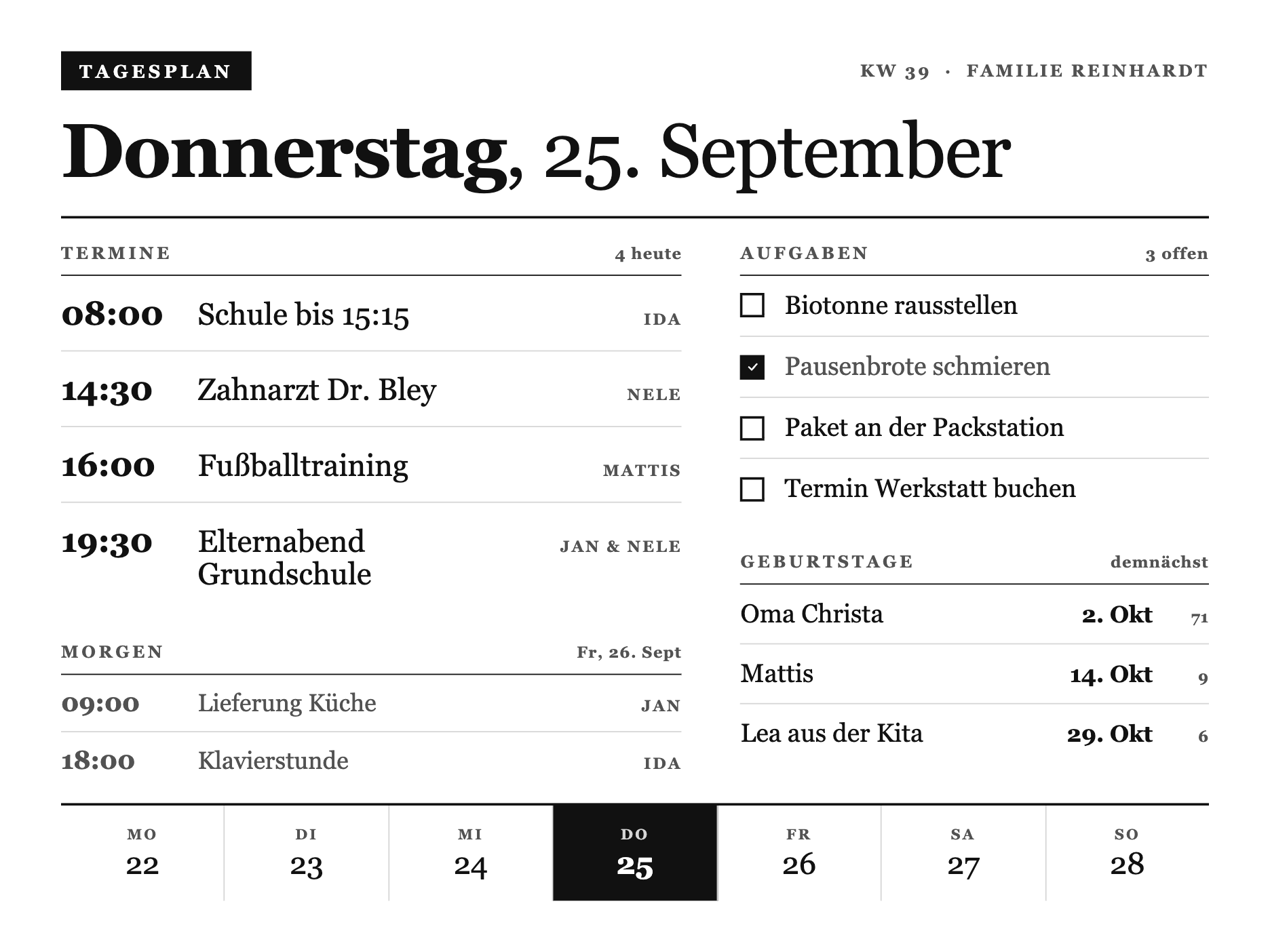
Ein Tagesplan wie eine Akte: Termine heute und morgen, offene Aufgaben, kommende Geburtstage und ein Wochenstreifen. Ideal als Familien-Board an der Wand. Die Daten kommen aus deinen HA-Kalendern.
So baust du sie:
- Private Plugin anlegen, Strategy Webhook, speichern.
- Den kompletten Code unten ins Feld Full einfügen.
- In Home Assistant die Termine per
calendar.get_eventsholen und als Webhook pushen (Form unten). - Per Automation alle paar Stunden triggern, in die Playlist ziehen.
Daten aus Home Assistant: Der Screen zeigt die Termine von heute und morgen, offene Aufgaben, kommende Geburtstage und einen Wochenstreifen. Die Daten baust du in HA aus deinen Kalendern und einer To-do-Liste zusammen. So sieht die erwartete Form aus (gekürzt):
{"merge_variables": {"kw": "35", "wochentag": "Dienstag", "datum": "26. August", "ort": "Familie", "morgen_datum": "Mi, 27. Aug", "termine": [{"zeit": "08:45", "titel": "Zahnarzt", "wer": "Nele"}], "morgen": [{"zeit": "09:00", "titel": "Lieferung", "wer": "Jan"}], "aufgaben": [{"text": "Biotonne raus", "erledigt": false}], "geburtstage": [{"name": "Oma", "datum": "2. Okt", "alter": "71"}], "woche": [{"tag": "Mo", "num": "25"}, {"tag": "Di", "num": "26", "aktiv": true}]}}Der rest_command in Home Assistant:
1rest_command:
2  trmnl_kalender:
3    url: "DEINE_WEBHOOK_URL"
4    method: POST
5    content_type: "application/json"
6    payload: >-
7      {"merge_variables": {"kw": "{{ now().isocalendar()[1] }}", "wochentag": "{{ ['Montag','Dienstag','Mittwoch','Donnerstag','Freitag','Samstag','Sonntag'][now().weekday()] }}", "datum": "{{ now().strftime('%-d. %B') }}", "ort": "Familie"}}
Hinweis: Termine, Aufgaben und Geburtstage fütterst du über eine Automation, die
calendar.get_eventsnutzt und das JSON zusammenbaut. Wie das mit HA-Kalendern (auch Apple Reminders) funktioniert, steht im Guide TRMNL mit Home Assistant verbinden.
Kompletter Code (ins Feld Full kopieren)
1{%- comment -%}
2 X-Design-Sprache v3 - "Akte / Almanach". Editorial dossier language for the TRMNL X
3 (10.3" e-ink, 1040x780 @ 1.8x = 1872x1404, 16 grays). Pure CSS, AUTO-PREPENDED to the view.
4
5 Derived from the Ortsakte (x-lostplace) look Daniel likes: ONE serifed typeface (the
6 document default, never overridden with Inter), hierarchy from size + case + tracking +
7 hairline rules, an inverted ink stamp as the single accent, dense asymmetric columns.
8 No sans, no minimal-poster emptiness. A printed record, set with care.
9{%- endcomment -%}
10<style>
11 :root {
12 --x-paper: #FFFFFF;
13 --x-ink: #111111;
14 --x-mute: #525252;
15 --x-line: #D6D6D6;
16 --x-fill: #111111;
17 }
18
19 /* The document face: a serif, deliberately NOT set to Inter - the whole almanac
20 character lives here. Kapitaelchen labels are the same face, uppercased + tracked. */
21 .x-canvas {
22 box-sizing: border-box;
23 width: 100%; height: 100%;
24 display: flex; flex-direction: column;
25 padding: 32px 40px;
26 background: var(--x-paper);
27 color: var(--x-ink);
28 font-family: Georgia, "Times New Roman", "Iowan Old Style", serif;
29 font-feature-settings: "tnum" 1;
30 }
31
32 /* ---- Kapitaelchen label ---- */
33 .k-label {
34 display: block;
35 font-size: 14px; font-weight: 700;
36 letter-spacing: 0.18em; text-transform: uppercase;
37 color: var(--x-mute);
38 }
39
40 /* ---- Masthead: stamp left, meta right, then the date set large ---- */
41 .k-top { display: flex; align-items: center; justify-content: space-between; gap: 20px; }
42 .k-stamp {
43 display: inline-block;
44 background: var(--x-fill); color: var(--x-paper);
45 font-size: 15px; font-weight: 700; letter-spacing: 0.2em; text-transform: uppercase;
46 padding: 8px 15px 7px;
47 }
48 .k-meta { font-size: 14px; font-weight: 700; letter-spacing: 0.14em; text-transform: uppercase; color: var(--x-mute); }
49 .k-date {
50 margin: 20px 0 0;
51 font-size: 62px; font-weight: 400; line-height: 0.98; letter-spacing: -0.015em;
52 color: var(--x-ink);
53 }
54 .k-date b { font-weight: 700; }
55 .k-rule { margin: 22px 0 0; border-top: 2px solid var(--x-ink); }
56
57 /* ---- Body: dense asymmetric two-column dossier ---- */
58 .k-body { flex: 1; display: flex; flex-direction: row; gap: 48px; min-height: 0; padding-top: 20px; }
59 .k-main { flex: 1 1 57%; display: flex; flex-direction: column; min-width: 0; }
60 .k-side { flex: 1 1 43%; display: flex; flex-direction: column; min-width: 0; }
61
62 /* Morgen: the day-ahead preview, quieter than today */
63 .k-ahead { margin-top: 30px; }
64 .k-ahead .k-ev { padding: 11px 0; }
65 .k-ahead .k-ev__t { font-size: 21px; color: var(--x-mute); }
66 .k-ahead .k-ev__b { font-size: 20px; color: var(--x-mute); }
67
68 /* ---- Section header: kapitaelchen + count, underlined by a hairline ---- */
69 .k-sec { display: flex; align-items: baseline; justify-content: space-between; gap: 12px; padding-bottom: 10px; border-bottom: 1px solid var(--x-ink); }
70 .k-sec__n { font-size: 13px; font-weight: 700; letter-spacing: 0.06em; color: var(--x-mute); font-variant-numeric: tabular-nums; }
71 .k-block + .k-block { margin-top: 26px; }
72 .k-block--fill { flex: 1; min-height: 0; }
73
74 /* ---- Agenda: time / entry / person, ruled rows ---- */
75 .k-ev { display: flex; align-items: baseline; gap: 20px; padding: 15px 0; border-bottom: 1px solid var(--x-line); }
76 .k-ev:last-child { border-bottom: 0; }
77 .k-ev__t { flex: 0 0 auto; width: 92px; font-size: 27px; font-weight: 700; letter-spacing: -0.01em; font-variant-numeric: tabular-nums; }
78 .k-ev__b { flex: 1; min-width: 0; font-size: 25px; font-weight: 400; line-height: 1.1; }
79 .k-ev__w { flex: 0 0 auto; font-size: 13px; font-weight: 700; letter-spacing: 0.12em; text-transform: uppercase; color: var(--x-mute); white-space: nowrap; }
80
81 /* ---- Tasks: a checkbox and the line; done = filled box + quiet text ---- */
82 .k-task { display: flex; align-items: center; gap: 16px; padding: 12px 0; border-bottom: 1px solid var(--x-line); }
83 .k-task:last-child { border-bottom: 0; }
84 .k-box { flex: 0 0 auto; width: 20px; height: 20px; border: 2px solid var(--x-ink); box-sizing: border-box; display: inline-flex; align-items: center; justify-content: center; }
85 .k-task--done .k-box { background: var(--x-ink); }
86 .k-check { display: block; width: 11px; height: 11px; }
87 .k-check path { fill: none; stroke: var(--x-paper); stroke-width: 3; stroke-linecap: round; stroke-linejoin: round; }
88 .k-task__t { flex: 1; font-size: 21px; font-weight: 400; line-height: 1.2; }
89 .k-task--done .k-task__t { color: var(--x-mute); }
90
91 /* ---- Birthdays: name, then date + age in fixed right-aligned columns ---- */
92 .k-bd { display: flex; align-items: baseline; gap: 12px; padding: 12px 0; border-bottom: 1px solid var(--x-line); }
93 .k-bd:last-child { border-bottom: 0; }
94 .k-bd__n { flex: 1; min-width: 0; font-size: 21px; font-weight: 400; overflow: hidden; text-overflow: ellipsis; white-space: nowrap; }
95 .k-bd__d { flex: 0 0 auto; width: 92px; text-align: right; font-size: 19px; font-weight: 700; font-variant-numeric: tabular-nums; }
96 .k-bd__a { flex: 0 0 auto; width: 34px; text-align: right; font-size: 13px; font-weight: 700; letter-spacing: 0.04em; color: var(--x-mute); font-variant-numeric: tabular-nums; }
97
98 /* ---- Week footer: seven cells, today stamped, closes the sheet ---- */
99 .k-week { display: flex; gap: 0; margin-top: 22px; border-top: 2px solid var(--x-ink); }
100 .k-week__c { flex: 1; display: flex; flex-direction: column; align-items: center; justify-content: center; gap: 5px; min-height: 78px; border-right: 1px solid var(--x-line); }
101 .k-week__c:last-child { border-right: 0; }
102 .k-week__t { font-size: 12px; font-weight: 700; letter-spacing: 0.14em; text-transform: uppercase; color: var(--x-mute); line-height: 1; }
103 .k-week__n { font-size: 25px; font-weight: 400; font-variant-numeric: tabular-nums; line-height: 1; }
104 .k-week__c--on { background: var(--x-fill); }
105 .k-week__c--on .k-week__t { color: var(--x-line); }
106 .k-week__c--on .k-week__n { color: var(--x-paper); font-weight: 700; }
107
108 /* ---- OG (800x480, 1-bit): reduced sheet - today + tasks only ---- */
109 .screen--og .k-og-hide { display: none; }
110 .screen--og .x-canvas { padding: 20px 26px; }
111 .screen--og .k-date { font-size: 40px; margin-top: 12px; }
112 .screen--og .k-body { gap: 30px; padding-top: 12px; }
113 .screen--og .k-ev { padding: 9px 0; }
114 .screen--og .k-ev__t { width: 66px; font-size: 20px; }
115 .screen--og .k-ev__b { font-size: 18px; }
116 .screen--og .k-task { padding: 7px 0; }
117 .screen--og .k-task__t { font-size: 16px; }
118 .screen--og .k-bd { padding: 7px 0; }
119 .screen--og .k-bd__n { font-size: 16px; }
120</style>
121
122{%- comment -%}
123 Familienkalender als Tagesakte - v3 "Akte / Almanach". A dense editorial day sheet for
124 the household: masthead with stamped date, then an asymmetric split. LEFT the agenda
125 (time / entry / person, ruled like a ledger), RIGHT a task checklist and the upcoming
126 birthdays. One serifed face throughout, one inverted stamp as the accent. shared.liquid
127 (v3 tokens + .k-* dossier classes) is auto-prepended, so this is markup only.
128{%- endcomment -%}
129 <div class="x-canvas">
130
131 <div class="k-top">
132 <span class="k-stamp">Tagesplan</span>
133 <span class="k-meta">KW {{ kw }} · {{ ort }}</span>
134 </div>
135 <h1 class="k-date"><b>{{ wochentag }}</b>, {{ datum }}</h1>
136 <div class="k-rule"></div>
137
138 <div class="k-body">
139
140 <div class="k-main">
141 <div class="k-sec">
142 <span class="k-label">Termine</span>
143 <span class="k-sec__n">{{ termine | size }} heute</span>
144 </div>
145 <div class="k-block">
146 {%- for t in termine -%}
147 <div class="k-ev">
148 <span class="k-ev__t">{{ t.zeit }}</span>
149 <span class="k-ev__b">{{ t.titel }}</span>
150 <span class="k-ev__w">{{ t.wer }}</span>
151 </div>
152 {%- endfor -%}
153 </div>
154
155 {%- if morgen and morgen.size > 0 -%}
156 <div class="k-block k-ahead k-og-hide">
157 <div class="k-sec">
158 <span class="k-label">Morgen</span>
159 <span class="k-sec__n">{{ morgen_datum }}</span>
160 </div>
161 {%- for t in morgen -%}
162 <div class="k-ev">
163 <span class="k-ev__t">{{ t.zeit }}</span>
164 <span class="k-ev__b">{{ t.titel }}</span>
165 <span class="k-ev__w">{{ t.wer }}</span>
166 </div>
167 {%- endfor -%}
168 </div>
169 {%- endif -%}
170 </div>
171
172 <div class="k-side">
173 <div class="k-block">
174 <div class="k-sec">
175 <span class="k-label">Aufgaben</span>
176 <span class="k-sec__n">{{ aufgaben | where: "erledigt", false | size }} offen</span>
177 </div>
178 {%- if aufgaben and aufgaben.size > 0 -%}
179 {%- for a in aufgaben -%}
180 <div class="k-task{% if a.erledigt %} k-task--done{% endif %}">
181 <span class="k-box">{% if a.erledigt %}<svg class="k-check" viewBox="0 0 24 24" role="img" aria-label="erledigt"><path d="M5 12.5 L10 17.5 L19 7"/></svg>{% endif %}</span>
182 <span class="k-task__t">{{ a.text }}</span>
183 </div>
184 {%- endfor -%}
185 {%- else -%}
186 <div class="k-task k-task--done">
187 <span class="k-box"><svg class="k-check" viewBox="0 0 24 24" role="img" aria-label="erledigt"><path d="M5 12.5 L10 17.5 L19 7"/></svg></span>
188 <span class="k-task__t">Alles erledigt</span>
189 </div>
190 {%- endif -%}
191 </div>
192
193 <div class="k-block k-og-hide">
194 <div class="k-sec">
195 <span class="k-label">Geburtstage</span>
196 <span class="k-sec__n">demnächst</span>
197 </div>
198 {%- for g in geburtstage -%}
199 <div class="k-bd">
200 <span class="k-bd__n">{{ g.name }}</span>
201 <span class="k-bd__d">{{ g.datum }}</span>
202 <span class="k-bd__a">{{ g.alter }}</span>
203 </div>
204 {%- endfor -%}
205 </div>
206 </div>
207
208 </div>
209
210 <div class="k-week k-og-hide">
211 {%- for d in woche -%}
212 <div class="k-week__c{% if d.aktiv %} k-week__c--on{% endif %}">
213 <span class="k-week__t">{{ d.tag }}</span>
214 <span class="k-week__n">{{ d.num }}</span>
215 </div>
216 {%- endfor -%}
217 </div>
218
219 </div>Solar Arc (PV-Tageskurve)
Fortgeschritten, mit Home Assistant · Strategy Webhook
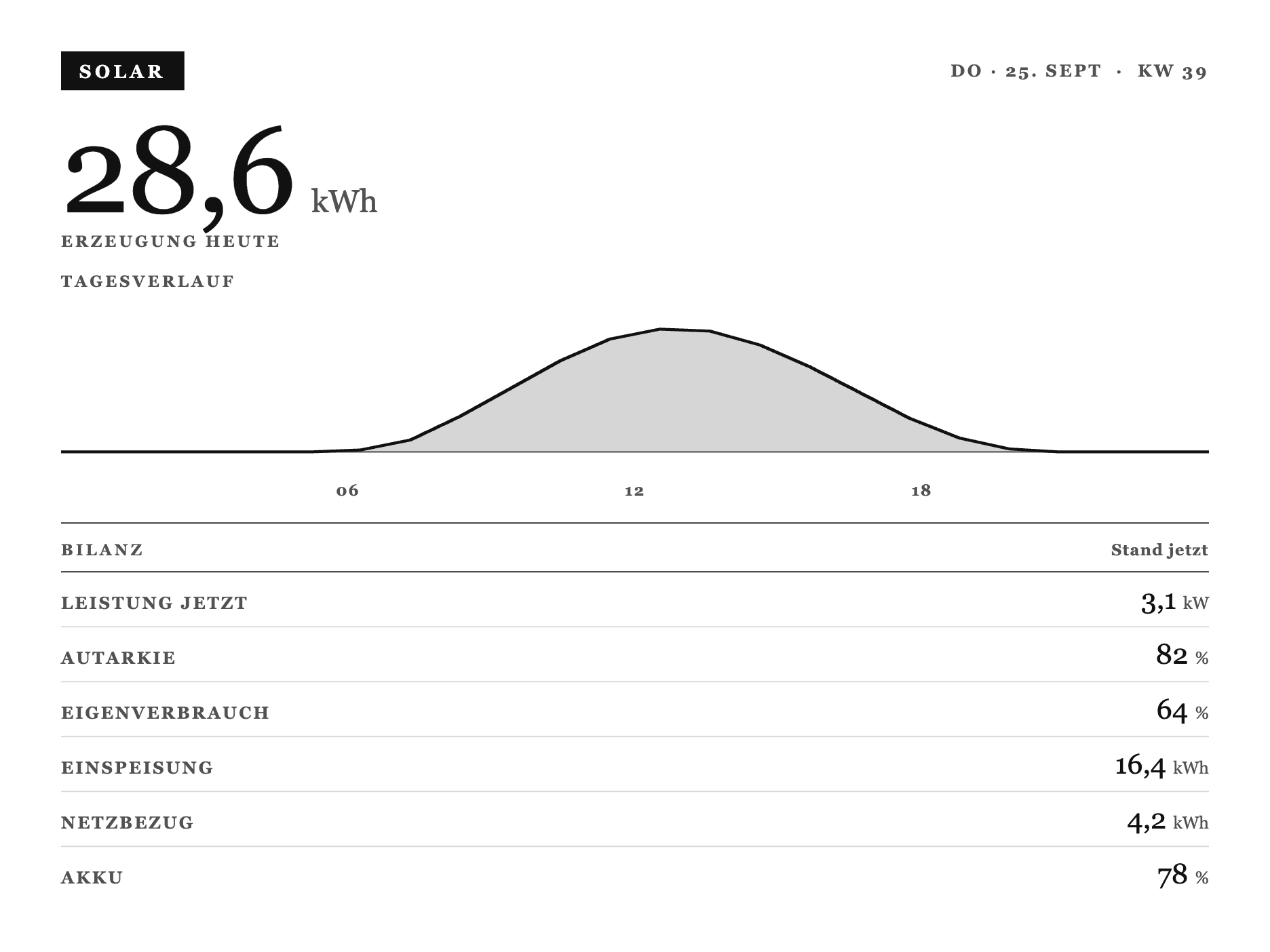
Die Solar-Erzeugung des Tages als Kurve, darunter eine Bilanz aus Autarkie, Eigenverbrauch, Ein- und Ausspeisung und Akkustand. Für alle mit PV-Anlage und Home Assistant.
So baust du sie:
- Private Plugin anlegen, Strategy Webhook, speichern.
- Den kompletten Code unten ins Feld Full einfügen.
- In Home Assistant die Tagesreihe sammeln und die Bilanz per
rest_commandpushen (Form unten). - Per Automation alle 15 Minuten triggern, in die Playlist ziehen.
Daten aus Home Assistant: Der Screen zeichnet eine Tageskurve aus Stundenwerten und darunter eine Bilanz. Du fütterst Erzeugung, aktuelle Leistung, Autarkie, Ein- und Ausspeisung, Akkustand und die Kurve als Punktliste:
{"merge_variables": {"kw": "39", "tag": "Do · 25. Sept", "erzeugung": "28,6", "leistung": "3,1", "autarkie": "82", "eigenverbrauch": "64", "einspeisung": "16,4", "netzbezug": "4,2", "akku": "78", "kurve": [0, 0, 0.1, 0.6, 1.8, 3.2, 4.6, 5.7, 6.2, 6.1, 5.4, 4.3, 3.0, 1.7, 0.7, 0.15, 0, 0]}}Der rest_command in Home Assistant:
1rest_command:
2  trmnl_solar:
3    url: "DEINE_WEBHOOK_URL"
4    method: POST
5    content_type: "application/json"
6    payload: >-
7      {"merge_variables": {"kw": "{{ now().isocalendar()[1] }}", "tag": "{{ now().strftime('%a') }} · {{ now().strftime('%-d. %b') }}", "erzeugung": "{{ states('sensor.solar_energy_today') | float(0) | round(1) }}", "leistung": "{{ states('sensor.solar_power') | float(0) | round(1) }}", "autarkie": "{{ states('sensor.autarkie') | float(0) | round(0) }}", "eigenverbrauch": "{{ states('sensor.eigenverbrauch') | float(0) | round(0) }}", "einspeisung": "{{ states('sensor.grid_export_today') | float(0) | round(1) }}", "netzbezug": "{{ states('sensor.grid_import_today') | float(0) | round(1) }}", "akku": "{{ states('sensor.battery_soc') | float(0) | round(0) }}"}}
Hinweis: Die Entity-IDs hängen von deinem PV-System ab (SolarEdge, Hoymiles, Shelly, EVCC, etc.). Die Kurve sind stündliche kW-Werte, die du in HA über den Tag in einem
input_textsammelst. Das Muster steht im HA-Guide. Der Screen fängt eine leere Kurve sauber ab, morgens gibt es also keinen Fehler.
Kompletter Code (ins Feld Full kopieren)
1{%- comment -%}
2 Solarbericht als Almanach-Blatt - v3 "Akte / Almanach". Masthead with an inverted SOLAR
3 stamp, a giant serif hero for the day's generation, a filled day-curve silhouette (SVG,
4 scaled purely via viewBox - no fixed px, so it survives OG untouched) with a hairline
5 baseline and faint hour ticks, then a ruled BILANZ ledger of the remaining KPIs. One
6 serifed face throughout, the stamp is the only inverted accent. shared.liquid (this file)
7 is auto-prepended; full.liquid is markup only.
8{%- endcomment -%}
9<style>
10 :root {
11 --x-paper: #FFFFFF;
12 --x-ink: #111111;
13 --x-mute: #525252;
14 --x-line: #D6D6D6;
15 --x-fill: #111111;
16 }
17
18 .x-canvas {
19 box-sizing: border-box;
20 width: 100%; height: 100%;
21 display: flex; flex-direction: column;
22 padding: 32px 40px;
23 background: var(--x-paper);
24 color: var(--x-ink);
25 font-family: Georgia, "Times New Roman", "Iowan Old Style", serif;
26 font-feature-settings: "tnum" 1;
27 }
28
29 /* ---- v3 core primitives ---- */
30 .x-top { display: flex; align-items: center; justify-content: space-between; gap: 20px; }
31 .x-stamp {
32 display: inline-block; background: var(--x-fill); color: var(--x-paper);
33 font-size: 15px; font-weight: 700; letter-spacing: 0.2em; text-transform: uppercase;
34 padding: 8px 15px 7px;
35 }
36 .x-metacap { font-size: 14px; font-weight: 700; letter-spacing: 0.14em; text-transform: uppercase; color: var(--x-mute); }
37 .x-cap { display: block; font-size: 13px; font-weight: 700; letter-spacing: 0.18em; text-transform: uppercase; color: var(--x-mute); }
38 .x-rule { border-top: 2px solid var(--x-ink); }
39 .x-hairline { border-top: 1px solid var(--x-ink); }
40 .x-sec { display: flex; align-items: baseline; justify-content: space-between; gap: 12px; padding-bottom: 10px; border-bottom: 1px solid var(--x-ink); }
41 .x-sec__n { font-size: 13px; font-weight: 700; letter-spacing: 0.06em; color: var(--x-mute); font-variant-numeric: tabular-nums; }
42 .x-row { display: flex; align-items: baseline; justify-content: space-between; gap: 18px; padding: 14px 0; border-bottom: 1px solid var(--x-line); }
43 .x-row:last-child { border-bottom: 0; }
44 .x-row__k { flex: 0 0 auto; font-size: 14px; font-weight: 700; letter-spacing: 0.12em; text-transform: uppercase; color: var(--x-mute); }
45 .x-row__v { flex: 0 0 auto; text-align: right; font-size: 27px; font-weight: 400; color: var(--x-ink); font-variant-numeric: tabular-nums; }
46
47 /* ---- Hero: the day's total generation, set huge ---- */
48 .pv-hero { margin-top: 20px; flex: 0 0 auto; }
49 .pv-hero__num { display: flex; align-items: baseline; gap: 14px; }
50 .pv-hero__val { font-size: 100px; font-weight: 400; line-height: 0.9; letter-spacing: -0.02em; font-variant-numeric: tabular-nums; }
51 .pv-hero__unit { font-size: 26px; font-weight: 400; color: var(--x-mute); }
52 .pv-hero .x-cap { margin-top: 6px; }
53
54 /* ---- Day curve: filled silhouette, baseline, faint hour ticks - fills remaining space ---- */
55 .pv-curve { flex: 1 1 auto; min-height: 0; display: flex; flex-direction: column; margin-top: 18px; }
56 .pv-curve__head { flex: 0 0 auto; }
57 .pv-curve__chart { flex: 1 1 auto; min-height: 40px; position: relative; margin-top: 8px; }
58 .pv-curve__chart svg { position: absolute; left: 0; top: 0; width: 100%; height: 100%; display: block; }
59 .pv-curve__fill { fill: var(--x-line); stroke: none; }
60 .pv-curve__base { stroke: var(--x-mute); stroke-width: 2; }
61 .pv-curve__line { fill: none; stroke: var(--x-ink); stroke-width: 4; stroke-linejoin: round; stroke-linecap: round; }
62 .pv-curve__ticks { flex: 0 0 auto; position: relative; height: 18px; margin-top: 6px; }
63 .pv-curve__ticks span { position: absolute; transform: translateX(-50%); font-size: 13px; font-weight: 700; letter-spacing: 0.08em; color: var(--x-mute); }
64
65 /* ---- Bilanz: ruled KPI ledger, values right-aligned in a fixed column ---- */
66 .pv-hairline { margin-top: 16px; }
67 .pv-bilanz { margin-top: 14px; flex: 0 0 auto; }
68 .pv-bilanz .x-row { padding: 9px 0; }
69 .pv-bilanz .x-row__v { font-size: 23px; }
70 .pv-row__unit { font-size: 14px; font-weight: 400; color: var(--x-mute); }
71
72 /* ---- OG (800x480, 1-bit): hero + curve + top 3 KPIs only ---- */
73 .screen--og .x-canvas { padding: 20px 26px; }
74 .screen--og .pv-hero { margin-top: 10px; }
75 .screen--og .pv-hero__val { font-size: 62px; }
76 .screen--og .pv-hero__unit { font-size: 18px; }
77 .screen--og .pv-curve { margin-top: 10px; }
78 .screen--og .pv-curve__ticks span { font-size: 11px; }
79 .screen--og .pv-hairline { margin-top: 10px; }
80 .screen--og .pv-bilanz { margin-top: 8px; }
81 .screen--og .pv-bilanz .x-row { padding: 6px 0; }
82 .screen--og .pv-bilanz .x-row__k { font-size: 12px; }
83 .screen--og .pv-bilanz .x-row__v { font-size: 18px; }
84 .screen--og .pv-og-hide { display: none; }
85</style>
86
87{%- comment -%}
88 Solarbericht - v3 "Akte / Almanach". Masthead (SOLAR stamp + Tag/KW), a giant serif hero
89 for the day's total generation, the 24h curve as a filled silhouette below it (hairline
90 baseline, faint 06/12/18 ticks), a rule, then a ruled BILANZ ledger of the remaining
91 figures. shared.liquid (tokens + .pv-* classes) is auto-prepended, this file is markup
92 only.
93
94 `kurve` arrives as a real JSON array of 24 hourly kW values (sample.json), iterated
95 directly.
96
97 Divide-by-zero / empty guard: curve_max scans the array for its largest value, starting
98 at 0.0. An empty or all-zero array leaves curve_max at 0.0, so every point's rise
99 collapses to 0 and the curve flattens to the baseline - never a NaN coordinate. lastIdx
100 (size - 1) guards the OTHER division: with 0 or 1 points, dividing x by lastIdx=0 would
101 also produce NaN, so that case renders a flat two-point line at the single value's height
102 (or the baseline if empty) instead of looping. Both guards compose independently.
103{%- endcomment -%}
104{%- assign n = kurve | size -%}
105{%- assign lastIdx = n | minus: 1 -%}
106{%- assign curve_max = 0.0 -%}
107{%- for v in kurve -%}
108 {%- assign vf = v | plus: 0.0 -%}
109 {%- if vf > curve_max -%}{%- assign curve_max = vf -%}{%- endif -%}
110{%- endfor -%}
111{%- assign W = 1000 -%}
112{%- assign baseY = 210 -%}
113{%- assign usable = 170 -%}
114{%- assign line = "" -%}
115{%- if lastIdx > 0 -%}
116 {%- for v in kurve -%}
117 {%- assign x = forloop.index0 | times: W | divided_by: lastIdx -%}
118 {%- if curve_max > 0 -%}
119 {%- assign vf = v | plus: 0.0 -%}
120 {%- assign rise = vf | divided_by: curve_max | times: usable -%}
121 {%- assign y = baseY | minus: rise | round: 1 -%}
122 {%- else -%}
123 {%- assign y = baseY -%}
124 {%- endif -%}
125 {%- capture pt -%}{{ x }},{{ y }}{%- endcapture -%}
126 {%- assign line = line | append: pt | append: " " -%}
127 {%- endfor -%}
128{%- else -%}
129 {%- comment -%} 0 or 1 curve points: flat baseline, no division by lastIdx=0 {%- endcomment -%}
130 {%- assign v = kurve | first | default: 0 -%}
131 {%- if curve_max > 0 -%}
132 {%- assign vf = v | plus: 0.0 -%}
133 {%- assign rise = vf | divided_by: curve_max | times: usable -%}
134 {%- assign y = baseY | minus: rise | round: 1 -%}
135 {%- else -%}
136 {%- assign y = baseY -%}
137 {%- endif -%}
138 {%- capture line -%}0,{{ y }} {{ W }},{{ y }}{%- endcapture -%}
139{%- endif -%}
140{%- capture area -%}0,{{ baseY }} {{ line }} {{ W }},{{ baseY }}{%- endcapture -%}
141
142 <div class="x-canvas">
143
144 <div class="x-top">
145 <span class="x-stamp">Solar</span>
146 <span class="x-metacap">{{ tag }} · KW {{ kw }}</span>
147 </div>
148
149 <div class="pv-hero">
150 <div class="pv-hero__num">
151 <span class="pv-hero__val">{{ erzeugung }}</span>
152 <span class="pv-hero__unit">kWh</span>
153 </div>
154 <span class="x-cap">Erzeugung heute</span>
155 </div>
156
157 <div class="pv-curve">
158 <div class="pv-curve__head">
159 <span class="x-cap">Tagesverlauf</span>
160 </div>
161 <div class="pv-curve__chart">
162 <svg viewBox="0 0 {{ W }} 240" preserveAspectRatio="none" role="img" aria-label="Solarkurve, Erzeugung {{ erzeugung }} Kilowattstunden">
163 <polygon points="{{ area }}" class="pv-curve__fill"/>
164 <line x1="0" y1="{{ baseY }}" x2="{{ W }}" y2="{{ baseY }}" class="pv-curve__base"/>
165 <polyline points="{{ line }}" class="pv-curve__line"/>
166 </svg>
167 </div>
168 <div class="pv-curve__ticks">
169 <span style="left:25%;">06</span>
170 <span style="left:50%;">12</span>
171 <span style="left:75%;">18</span>
172 </div>
173 </div>
174
175 <div class="x-hairline pv-hairline"></div>
176
177 <div class="pv-bilanz">
178 <div class="x-sec">
179 <span class="x-cap">Bilanz</span>
180 <span class="x-sec__n">Stand jetzt</span>
181 </div>
182 <div class="x-row">
183 <span class="x-row__k">Leistung jetzt</span>
184 <span class="x-row__v">{{ leistung }} <span class="pv-row__unit">kW</span></span>
185 </div>
186 <div class="x-row">
187 <span class="x-row__k">Autarkie</span>
188 <span class="x-row__v">{{ autarkie }} <span class="pv-row__unit">%</span></span>
189 </div>
190 <div class="x-row">
191 <span class="x-row__k">Eigenverbrauch</span>
192 <span class="x-row__v">{{ eigenverbrauch }} <span class="pv-row__unit">%</span></span>
193 </div>
194 <div class="x-row pv-og-hide">
195 <span class="x-row__k">Einspeisung</span>
196 <span class="x-row__v">{{ einspeisung }} <span class="pv-row__unit">kWh</span></span>
197 </div>
198 <div class="x-row pv-og-hide">
199 <span class="x-row__k">Netzbezug</span>
200 <span class="x-row__v">{{ netzbezug }} <span class="pv-row__unit">kWh</span></span>
201 </div>
202 <div class="x-row pv-og-hide">
203 <span class="x-row__k">Akku</span>
204 <span class="x-row__v">{{ akku }} <span class="pv-row__unit">%</span></span>
205 </div>
206 </div>
207
208 </div>House Watch (Statusblatt)
Fortgeschritten, Vorlage zum Anpassen · Strategy Webhook
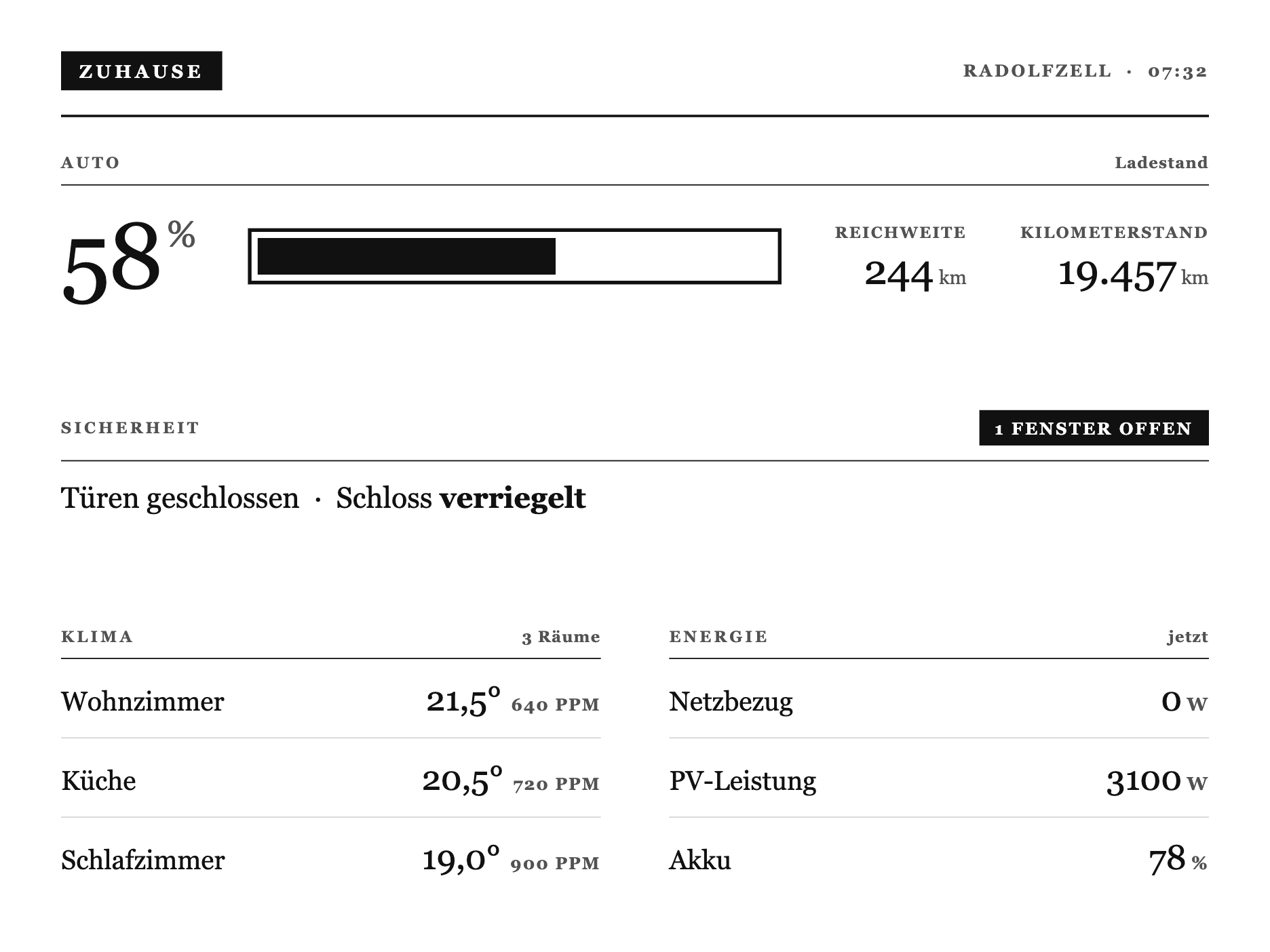
Ein Statusblatt fürs ganze Haus: ein Band fürs Auto (Akku, Reichweite, Kilometerstand), eine Sicherheitszeile, Raumtemperaturen und die aktuelle Energiebilanz. Das ist die flexibelste Vorlage, du passt die Felder an deine eigenen Geräte an.
So baust du sie:
- Private Plugin anlegen, Strategy Webhook, speichern.
- Den kompletten Code unten ins Feld Full einfügen.
- In Home Assistant die Werte deiner Geräte sammeln und als Webhook pushen (Form unten).
- Per Automation alle 15 Minuten triggern, in die Playlist ziehen.
Daten aus Home Assistant, Vorlage zum Anpassen: Ein Statusblatt aus Auto, Sicherheit, Klima und Energie. Das Auto-Band erwartet Werte wie von einem E-Auto (Akku, Reichweite, Kilometerstand), die anderen Blöcke Fensterkontakte, ein Schloss, Raumtemperaturen und PV. Tausch die Felder gegen deine eigenen Geräte:
{"merge_variables": {"ort": "Zuhause", "zeit": "07:32", "auto_akku": "58", "auto_reichweite": "244", "auto_km": "19.457", "auto_laedt": "aus", "auto_ziel": "80", "fenster_offen": "1", "tueren_offen": "0", "schloss": "verriegelt", "klima": [{"raum": "Wohnzimmer", "temp": "21,5", "co2": "640"}], "netzbezug": "0", "pv": "3100", "akku": "78"}}Kein Auto? Dann lässt du das Auto-Band weg und zeigst nur Klima und Energie. Das Muster fürs Füttern aus HA steht im HA-Guide.
Kompletter Code (ins Feld Full kopieren)
1{%- comment -%}
2 Zuhause - Statusblatt v3.1 "Akte / Almanach". Editorial, no heavy inverted block. A person
3 band across the top (who is home), a security line whose single inverted chip is the one
4 accent (it appears only when something is open), and a two-column Klima/Energie ledger at the
5 foot. One serifed face, hairline rules. shared.liquid is auto-prepended.
6{%- endcomment -%}
7<style>
8 :root {
9 --x-paper: #FFFFFF; --x-ink: #111111; --x-mute: #525252; --x-line: #D6D6D6; --x-fill: #111111;
10 }
11 .x-canvas {
12 box-sizing: border-box; width: 100%; height: 100%;
13 display: flex; flex-direction: column; padding: 32px 40px;
14 background: var(--x-paper); color: var(--x-ink);
15 font-family: Georgia, "Times New Roman", "Iowan Old Style", serif;
16 font-feature-settings: "tnum" 1;
17 }
18 .x-top { display: flex; align-items: center; justify-content: space-between; gap: 20px; }
19 .x-stamp { display: inline-block; background: var(--x-fill); color: var(--x-paper); font-size: 15px; font-weight: 700; letter-spacing: 0.2em; text-transform: uppercase; padding: 8px 15px 7px; }
20 .x-metacap { font-size: 14px; font-weight: 700; letter-spacing: 0.14em; text-transform: uppercase; color: var(--x-mute); }
21 .x-cap { display: block; font-size: 13px; font-weight: 700; letter-spacing: 0.18em; text-transform: uppercase; color: var(--x-mute); }
22 .x-rule { border-top: 2px solid var(--x-ink); }
23 .x-sec { display: flex; align-items: baseline; justify-content: space-between; gap: 12px; padding-bottom: 10px; border-bottom: 1px solid var(--x-ink); }
24 .x-sec__n { font-size: 13px; font-weight: 700; letter-spacing: 0.06em; color: var(--x-mute); font-variant-numeric: tabular-nums; }
25 .x-row { display: flex; align-items: baseline; justify-content: space-between; gap: 18px; padding: 16px 0; border-bottom: 1px solid var(--x-line); }
26 .x-row:last-child { border-bottom: 0; }
27 .x-row__k { flex: 0 0 auto; font-size: 22px; font-weight: 400; color: var(--x-ink); }
28 .x-row__v { flex: 0 0 auto; text-align: right; font-size: 28px; font-weight: 400; color: var(--x-ink); font-variant-numeric: tabular-nums; }
29 .x-row__v small { font-size: 15px; font-weight: 700; letter-spacing: 0.08em; text-transform: uppercase; color: var(--x-mute); margin-left: 4px; }
30
31 /* ---- Auto band: SoC hero + battery bar + range/odometer stats ---- */
32 .h-auto { display: flex; align-items: center; gap: 44px; margin: 26px 0 0; }
33 .h-auto__pct { flex: 0 0 auto; font-size: 76px; font-weight: 400; line-height: 0.85; letter-spacing: -0.02em; font-variant-numeric: tabular-nums; }
34 .h-auto__pct sup { font-size: 30px; vertical-align: baseline; position: relative; top: -34px; margin-left: 4px; color: var(--x-mute); }
35 .h-auto__bar { flex: 1; height: 46px; border: 3px solid var(--x-ink); padding: 5px; }
36 .h-auto__fill { background: var(--x-fill); height: 100%; min-width: 3px; }
37 .h-auto__stat { flex: 0 0 auto; text-align: right; }
38 .h-auto__stat + .h-auto__stat { min-width: 0; }
39 .h-auto__k { display: block; font-size: 13px; font-weight: 700; letter-spacing: 0.1em; text-transform: uppercase; color: var(--x-mute); margin-bottom: 6px; }
40 .h-auto__v { display: block; font-size: 34px; font-weight: 400; line-height: 1; font-variant-numeric: tabular-nums; }
41 .h-auto__v small { font-size: 16px; color: var(--x-mute); margin-left: 4px; }
42
43 /* ---- Security line: the one accent is a small inverted chip, only when open ---- */
44 .h-sec-row { display: flex; align-items: center; justify-content: space-between; gap: 16px; padding-bottom: 12px; border-bottom: 1px solid var(--x-ink); }
45 .h-chip { display: inline-block; background: var(--x-fill); color: var(--x-paper); font-size: 14px; font-weight: 700; letter-spacing: 0.12em; text-transform: uppercase; padding: 7px 13px 6px; }
46 .h-chip--calm { background: none; color: var(--x-mute); border: 1px solid var(--x-line); }
47 .h-secline { margin-top: 16px; font-size: 24px; font-weight: 400; color: var(--x-ink); }
48 .h-secline b { font-weight: 700; }
49
50 /* ---- Klima / Energie: two-column ledger ---- */
51 .h-cols { display: flex; gap: 56px; }
52 .h-col { flex: 1; min-width: 0; }
53 .h-col .x-row__k { font-size: 22px; }
54 .h-temp { font-variant-numeric: tabular-nums; }
55 .h-co2 { font-size: 14px; font-weight: 700; letter-spacing: 0.08em; text-transform: uppercase; color: var(--x-mute); margin-left: 8px; }
56
57 /* vertical rhythm: three bands spread evenly across the sheet, no single void */
58 .h-body { flex: 1; display: flex; flex-direction: column; justify-content: space-between; padding: 30px 0 4px; min-height: 0; }
59
60 /* ---- OG (800x480): drop the person band to status counts, tighten ---- */
61 .screen--og .x-canvas { padding: 20px 26px; }
62 .screen--og .h-auto { gap: 24px; margin-top: 14px; }
63 .screen--og .h-auto__pct { font-size: 48px; }
64 .screen--og .h-auto__pct sup { font-size: 20px; top: -20px; }
65 .screen--og .h-auto__bar { height: 30px; border-width: 2px; }
66 .screen--og .h-auto__v { font-size: 22px; }
67 .screen--og .h-auto__k { font-size: 10px; }
68 .screen--og .h-band { margin-top: 18px; }
69 .screen--og .x-row { padding: 9px 0; }
70 .screen--og .x-row__k { font-size: 16px; }
71 .screen--og .x-row__v { font-size: 19px; }
72 .screen--og .h-secline { font-size: 17px; margin-top: 10px; }
73</style>
74
75{%- comment -%}
76 Zuhause - Statusblatt v3.1. Masthead, a person band (who is home), a security line whose
77 inverted chip is the single accent (only when something is open), and a Klima/Energie ledger
78 pinned to the foot. shared.liquid is auto-prepended, so this is markup only.
79{%- endcomment -%}
80{%- assign fn = fenster_offen | plus: 0 -%}
81{%- assign tn = tueren_offen | plus: 0 -%}
82 <div class="x-canvas">
83
84 <div class="x-top">
85 <span class="x-stamp">Zuhause</span>
86 <span class="x-metacap">{{ ort }} · {{ zeit }}</span>
87 </div>
88 <div class="x-rule" style="margin-top:20px;"></div>
89
90 <div class="h-body">
91
92 {%- comment -%} ---- Auto band (SoC + battery bar + range + odometer) ---- {%- endcomment -%}
93 <div class="h-band">
94 <div class="x-sec">
95 <span class="x-cap">Auto</span>
96 <span class="x-sec__n">{% if auto_laedt == "an" %}lädt · Ziel {{ auto_ziel }} %{% else %}Ladestand{% endif %}</span>
97 </div>
98 <div class="h-auto">
99 <span class="h-auto__pct">{{ auto_akku }}<sup>%</sup></span>
100 <div class="h-auto__bar"><div class="h-auto__fill" style="width:{{ auto_akku }}%"></div></div>
101 <div class="h-auto__stat">
102 <span class="h-auto__k">Reichweite</span>
103 <span class="h-auto__v">{{ auto_reichweite }}<small>km</small></span>
104 </div>
105 <div class="h-auto__stat">
106 <span class="h-auto__k">Kilometerstand</span>
107 <span class="h-auto__v">{{ auto_km }}<small>km</small></span>
108 </div>
109 </div>
110 </div>
111
112 {%- comment -%} ---- Security, the one accent ---- {%- endcomment -%}
113 <div class="h-band">
114 <div class="h-sec-row">
115 <span class="x-cap">Sicherheit</span>
116 {%- if fn > 0 and tn > 0 -%}
117 <span class="h-chip">{{ fn | plus: tn }} offen</span>
118 {%- elsif fn > 0 -%}
119 <span class="h-chip">{{ fn }} Fenster offen</span>
120 {%- elsif tn > 0 -%}
121 <span class="h-chip">{{ tn }} Tür offen</span>
122 {%- else -%}
123 <span class="h-chip h-chip--calm">Alles sicher</span>
124 {%- endif -%}
125 </div>
126 <div class="h-secline">
127 {% if tn > 0 %}{{ tn }} Tür offen{% else %}Türen geschlossen{% endif %} · Schloss <b>{{ schloss }}</b>
128 </div>
129 </div>
130
131 {%- comment -%} ---- Klima / Energie ledger ---- {%- endcomment -%}
132 <div class="h-band">
133 <div class="h-cols">
134 <div class="h-col">
135 <div class="x-sec">
136 <span class="x-cap">Klima</span>
137 <span class="x-sec__n">{{ klima | size }} Räume</span>
138 </div>
139 {%- for k in klima -%}
140 <div class="x-row">
141 <span class="x-row__k">{{ k.raum }}</span>
142 <span class="x-row__v h-temp">{{ k.temp }}°{% if k.co2 and k.co2 != "" %}<span class="h-co2">{{ k.co2 }} ppm</span>{% endif %}</span>
143 </div>
144 {%- endfor -%}
145 </div>
146 <div class="h-col">
147 <div class="x-sec">
148 <span class="x-cap">Energie</span>
149 <span class="x-sec__n">jetzt</span>
150 </div>
151 <div class="x-row"><span class="x-row__k">Netzbezug</span><span class="x-row__v">{{ netzbezug }}<small>W</small></span></div>
152 <div class="x-row"><span class="x-row__k">PV-Leistung</span><span class="x-row__v">{{ pv }}<small>W</small></span></div>
153 <div class="x-row"><span class="x-row__k">Akku</span><span class="x-row__v">{{ akku }}<small>%</small></span></div>
154 </div>
155 </div>
156 </div>
157
158 </div>
159
160 </div>YouTube (Abo-Zähler)
Fortgeschritten, braucht API-Key · Strategy Webhook
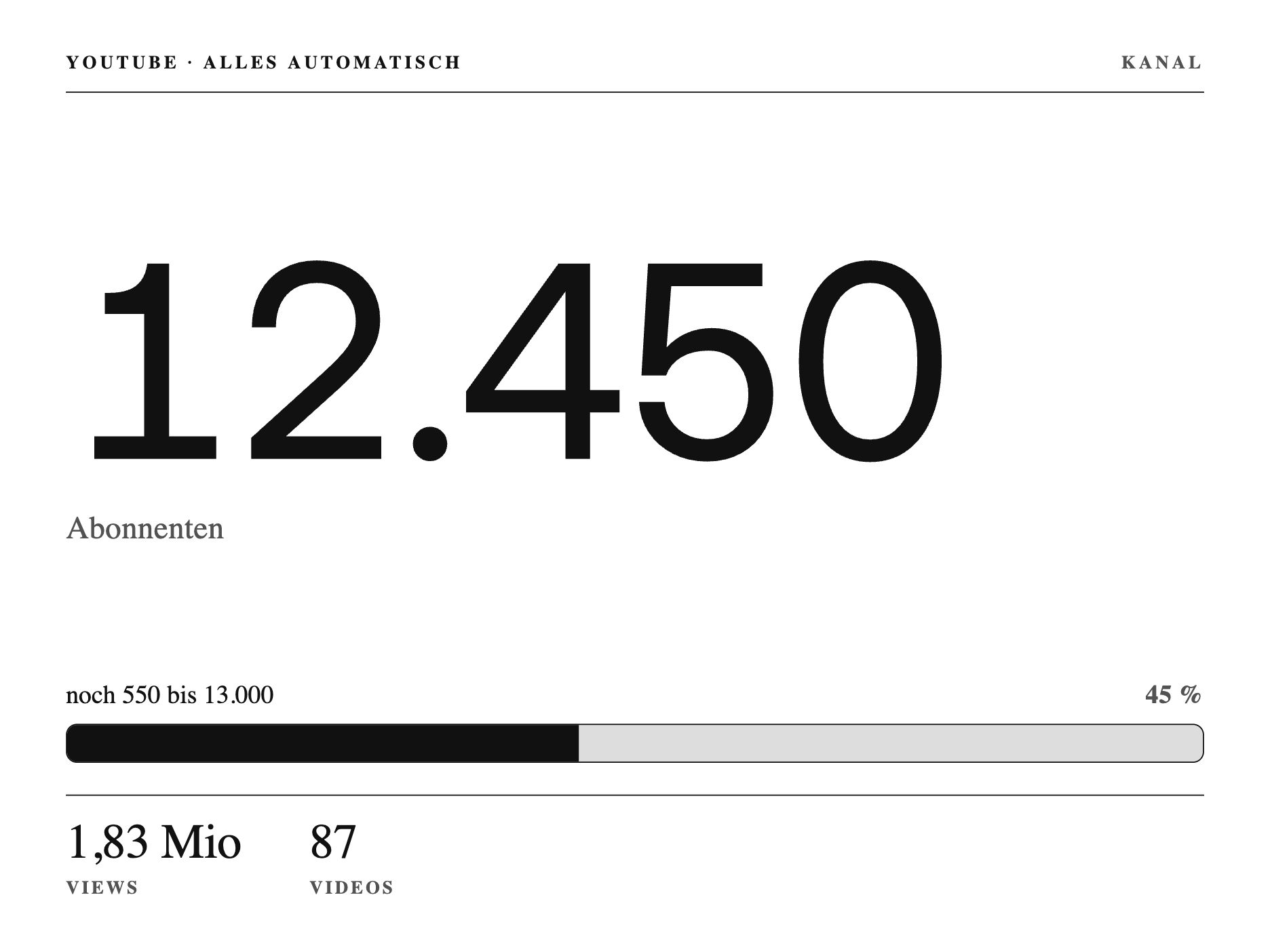
Die Abonnenten deines Kanals, ein Fortschrittsbalken zum nächsten runden Meilenstein und die Gesamt-Views. Für Creator, die ihre Zahlen im Blick behalten wollen, ohne die App zu öffnen.
So baust du sie:
- Private Plugin anlegen, Strategy Webhook, speichern.
- Den kompletten Code unten ins Feld Full einfügen.
- Einen YouTube-API-Key holen und die Zahlen pushen (Form unten).
- Per Automation stündlich triggern, in die Playlist ziehen.
Daten, braucht einen YouTube-API-Key: Der Screen zeigt die Abonnenten, den Fortschritt zum nächsten Meilenstein und die Views. Die Zahlen holst du über die YouTube Data API und pushst sie per Webhook (oder lässt TRMNL eine URL pollen, die sie liefert). Erwartete Form:
{"merge_variables": {"subs_display": "12.450", "next_milestone": "13.000", "to_next": "550", "progress_pct": "45", "views_display": "1,83 Mio", "videos": "87"}}Einen kostenlosen API-Key bekommst du in der Google Cloud Console. In Home Assistant liest du die Zahlen mit einem REST-Sensor und pushst sie im Takt.
Kompletter Code (ins Feld Full kopieren)
1{%- comment -%}
2 X-Design-Sprache - shared design language for the TRMNL X (10.3" e-ink, 1040x780 @ 1.8x =
3 1872x1404 physical, 16 grays). Pure CSS, mirroring the real TRMNL model: this file is
4 AUTO-PREPENDED to every view (no {% include %} / {% render %} needed in screen templates).
5 Screens style with framework classes (value--giga, label, progress-bar--large) plus the
6 thin .x-* components below.
7
8 Near-black ink on white paper. Hierarchy from type + hairlines, not decoration. Only
9 widely-separated grays (paper #FFF / line #DDD / mute #777 / ink #111); none of the motion,
10 depth, or transparency effects e-ink breaks on. Exactly ONE accent per screen - here the
11 milestone progress bar carries it, filled solid ink so the climb to the next 1000 reads
12 as the single confident moment on the page.
13{%- endcomment -%}
14<style>
15 /* ---- X design tokens: only widely-separated e-ink grays ---- */
16 :root {
17 --x-paper: #FFFFFF; /* page + card surface (white paper) */
18 --x-ink: #111111; /* gray-10 - near-black text, rules, the one accent */
19 --x-mute: #525252; /* gray-40 - secondary labels, quiet captions */
20 --x-line: #DDDDDD; /* gray-70 - light separator, progress track */
21 }
22
23 /* ---- Canvas: the editorial frame inside view--full ---- */
24 .x-canvas {
25 box-sizing: border-box;
26 width: 100%;
27 height: 100%;
28 display: flex;
29 flex-direction: column;
30 padding: 34px 44px;
31 background: var(--x-paper);
32 color: var(--x-ink);
33 font-feature-settings: "tnum" 1, "cv01" 1;
34 }
35
36 /* ---- Masthead: the channel eyebrow balanced across a hairline ---- */
37 .x-masthead {
38 display: flex;
39 align-items: baseline;
40 justify-content: space-between;
41 gap: 24px;
42 padding-bottom: 16px;
43 }
44
45 /* ---- Eyebrow: small, quiet, tracked label cap ---- */
46 .x-eyebrow {
47 display: block;
48 font-size: 15px;
49 font-weight: 600;
50 line-height: 1;
51 letter-spacing: 0.18em;
52 text-transform: uppercase;
53 color: var(--x-mute);
54 }
55 .x-eyebrow--ink { color: var(--x-ink); }
56
57 /* ---- Hairline: a single crisp structural rule ---- */
58 .x-hairline {
59 display: block;
60 width: 100%;
61 height: 0;
62 border: 0;
63 border-top: 1px solid var(--x-ink);
64 }
65
66 /* ---- Hero: the milestone figure. value--giga ships thin (250) and light-gray-prone on
67 e-ink; we pin it to solid ink and a heavier cut so 12.450 lands bold and unmistakable. ---- */
68 .x-hero {
69 display: flex;
70 flex: 1;
71 flex-direction: column;
72 justify-content: center;
73 min-height: 0;
74 }
75 .x-subs {
76 color: var(--x-ink);
77 font-weight: 440;
78 letter-spacing: -0.035em;
79 font-variant-numeric: tabular-nums;
80 white-space: nowrap;
81 }
82 .x-sublabel {
83 margin-top: 6px;
84 font-size: 26px;
85 font-weight: 450;
86 letter-spacing: 0.01em;
87 color: var(--x-mute);
88 }
89
90 /* ---- Milestone bar: the ONE accent. Head line above, then a large bar whose fill is
91 solid ink on a light track (unlike the calm mute fills elsewhere in the system). ---- */
92 .x-goal { margin-top: 4px; }
93 .x-goal__head {
94 display: flex;
95 align-items: baseline;
96 justify-content: space-between;
97 gap: 20px;
98 margin-bottom: 12px;
99 }
100 .x-goal__k { font-size: 21px; font-weight: 450; color: var(--x-ink); }
101 .x-goal__k .x-goal__num { font-variant-numeric: tabular-nums; }
102 .x-goal__v {
103 font-size: 21px;
104 font-weight: 600;
105 letter-spacing: 0.02em;
106 color: var(--x-mute);
107 font-variant-numeric: tabular-nums;
108 }
109 .x-goal .progress-bar .track {
110 background: var(--x-line);
111 background-image: none;
112 border: 1px solid var(--x-ink);
113 border-radius: 9px;
114 }
115 .x-goal .progress-bar .fill {
116 background: var(--x-ink);
117 background-image: none;
118 }
119
120 /* ---- Footer band: two quiet secondary figures, label under value, split by a hairline ---- */
121 .x-foot {
122 display: flex;
123 gap: 56px;
124 padding-top: 18px;
125 }
126 .x-foot__item { display: flex; flex-direction: column; }
127 .x-foot__v {
128 font-size: 40px;
129 font-weight: 400;
130 line-height: 1;
131 letter-spacing: -0.01em;
132 color: var(--x-ink);
133 font-variant-numeric: tabular-nums;
134 }
135 .x-foot__k {
136 margin-top: 9px;
137 font-size: 15px;
138 font-weight: 600;
139 letter-spacing: 0.14em;
140 text-transform: uppercase;
141 color: var(--x-mute);
142 }
143</style>
144
145{%- comment -%}
146 YouTube-Meilenstein - Screen 6 of the TRMNL X design language. A single celebratory figure:
147 the current subscriber count of "Alles Automatisch" set giant in value--giga ink, captioned
148 "Abonnenten". Below it the one accent on the page - a large milestone bar climbing toward the
149 next round 1000 ("noch {{ to_next }} bis {{ next_milestone }}"), filled solid ink. A quiet
150 footer band carries the secondary lifetime figures (Views, Videos).
151 shared.liquid (CSS tokens + .x-* components + milestone-bar theming) is auto-prepended.
152
153 Data is pushed from Home Assistant (YouTube REST sensors) via webhook - no API key on TRMNL.
154 progress_pct is the raw 0..100 climb through the current thousand (subs mod 1000, /10).
155{%- endcomment -%}
156 <div class="x-canvas">
157
158 <div class="x-masthead">
159 <span class="x-eyebrow x-eyebrow--ink">YouTube · Alles Automatisch</span>
160 <span class="x-eyebrow">Kanal</span>
161 </div>
162 <div class="x-hairline"></div>
163
164 <div class="x-hero">
165 <span class="value--giga x-subs">{{ subs_display }}</span>
166 <span class="x-sublabel">Abonnenten</span>
167 </div>
168
169 <div class="x-goal">
170 <div class="x-goal__head">
171 <span class="x-goal__k">noch <span class="x-goal__num">{{ to_next }}</span> bis <span class="x-goal__num">{{ next_milestone }}</span></span>
172 <span class="x-goal__v">{{ progress_pct }} %</span>
173 </div>
174 <div class="progress-bar progress-bar--large">
175 <div class="track"><div class="fill" style="width:{{ progress_pct }}%;"></div></div>
176 </div>
177 </div>
178
179 <div class="x-hairline" style="margin-top:26px;"></div>
180 <div class="x-foot">
181 <div class="x-foot__item">
182 <span class="x-foot__v">{{ views_display }}</span>
183 <span class="x-foot__k">Views</span>
184 </div>
185 <div class="x-foot__item">
186 <span class="x-foot__v">{{ videos }}</span>
187 <span class="x-foot__k">Videos</span>
188 </div>
189 </div>
190
191 </div>Meine weiteren Screens
Einen Screen hänge ich hier nicht rein, weil du ihn nicht für dich nachbauen kannst: die Lost-Place-Ortsakte kommt aus meinem eigenen Projekt und zieht ihre Orte, Fotos und QR-Codes von einer festen Adresse. Das Muster dahinter ist aber dasselbe wie bei der Chronik, ein Polling gegen eine öffentliche JSON.
Ansonsten hast du oben alles beisammen. Egal ob Wortweiser ohne alles oder Solar-Kurve mit Home Assistant, es ist immer der gleiche Dreischritt: ein Private Plugin, der Code ins Full-Feld, und Daten per Webhook oder Polling. Wenn du eigene Sensoren hast, baust du dir damit genau dein Board.
Viel Spaß beim Nachbauen. Wenn du magst, zeig mir dein Ergebnis in den Kommentaren unter dem Video.
Häufige Fragen
Kann man eigene TRMNL-Plugins bauen?
Ja, das ist der Kern von TRMNL. Es gibt einen einfachen visuellen Editor und die Private Plugins mit Liquid-Templates und Datenwegen (Webhook, Polling, Formular). Genau solche Plugins baust du oben in diesem Guide nach.
Braucht man Programmierkenntnisse?
Für die fertigen Beispiele hier nicht. Du kopierst den Code ins Full-Feld und schickst einmal Daten, das war es. Wer eigene Screens von Grund auf gestaltet, sollte HTML und die Liquid-Template-Sprache grob kennen, tief programmieren muss man aber nicht.
Welche Sprache nutzt TRMNL für die Templates?
Liquid, dieselbe Template-Sprache, die auch Shopify nutzt. Damit setzt du Platzhalter, Schleifen und Bedingungen ins HTML, das TRMNL dann zum Bild rendert. Dazu kommt ein e-ink-optimiertes CSS-Framework.
Kann ich Plugins lokal entwickeln und testen?
Ja. Mit dem Tool trmnlp baust und testest du deine Plugins lokal auf dem Rechner, bevor sie aufs Gerät gehen. Das spart die vielen Zwischenschritte über die Weboberfläche.
Mehr Datenwege: wie du die Screens mit Home Assistant fütterst, steht im Guide TRMNL mit Home Assistant verbinden.